Clearing Stored File System SDD Match Data
Related Queries
- "Delete SDD matches"
- "Clear sensitive data from SA_FSDLP_MatchHits"
- "Remove stored match data Access Analyzer"
- "SDD matches still showing after scan"
Overview
This article explains how to clear stored File System SDD match data from the database. This approach removes the sensitive data captured in match results while keeping the scan results themselves, such as match counts and criteria.
Instructions
Excluding Sensitive Data from the Next Collection
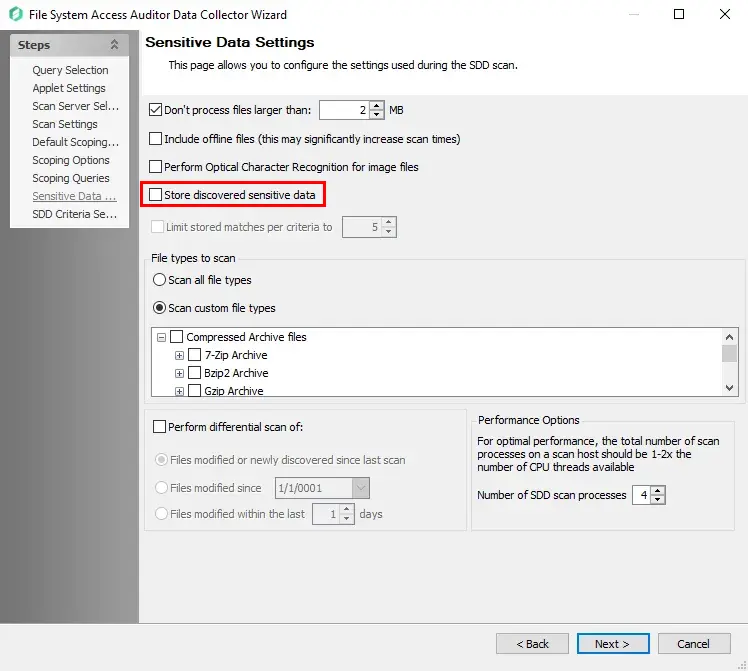
- Open the SEEK System Scan query configuration.
- On the Sensitive Data Settings tab, uncheck the option Store discovered sensitive data to prevent new match data from being stored.
Clearing Previously-Stored Match Hits
In the Netwrix Access Analyzer SQL database, run the following SQL statement:
UPDATE SA_FSDLP_MatchHits
SET MatchData = NULL,
    MatchPrefix = NULL,
    MatchSuffix = NULL
Removing All SDD Matches
Use the FS_SDD_DELETE instant job to remove SDD matches entirely:
- Access Analyzer 12.0: FS_SDD_DELETE Job
- Access Analyzer 11.6: FS_SDD_DELETE Job