Sensitive Data Criteria Editor
Access the Sensitive Data Criteria Editor from the Criteria tab in the Settings > Sensitive Data node. Use it to view pre-defined criteria and to customize or create user-defined criteria. You can configure Sensitive Data Criteria in individual data collectors that use the Sensitive Data Discovery Add-On, or configure them to inherit Sensitive Data Criteria settings from the Settings > Sensitive Data node. See the Sensitive Data topic for additional information.
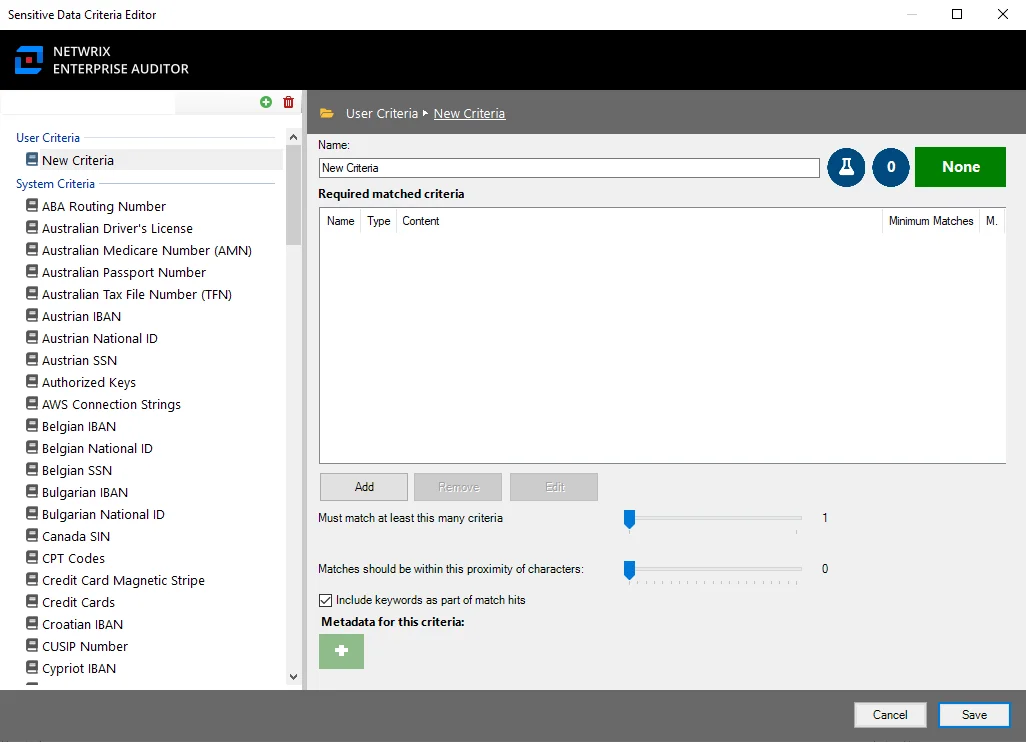
The Sensitive Data Criteria Editor contains two sections:
- Navigation pane – Add or remove user-configured criteria using the Add or Remove options. See the Navigation Pane topic for additional information.
- Configuration pane – Displays configured settings for the selected criteria in the navigation pane. See the Configuration Pane topic for additional information.
Navigation Pane
The navigation pane lists all user-created and pre-configured Sensitive Data criteria.
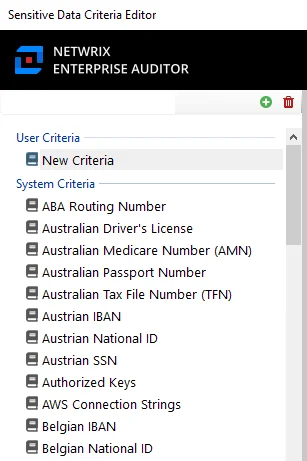
The options in the Navigation Pane are:
-
Add Criteria – Adds a new criteria under the User Criteria list
-
Remove Criteria – Removes a user-created criteria from the User Criteria list
-
User Criteria – Lists all user-created criteria
-
System Criteria – Lists all pre-configured criteria. For a list of pre-configured System Criteria, see the Sensitive Data System Criteria topic for additional information.
- System Criteria can't be modified or removed. To use existing System Criteria configurations in a User Criteria, right-click a System Criteria and select Duplicate from the right-click menu. A configurable copy of the System Criteria appears under User Criteria.