3-FSAA Exceptions Job
The 3-FSAA Exceptions job doesn't use the FSAA Data Collector. Instead it runs analysis on the data returned by the Access Auditing collection jobs to identify potential security concerns.
Parameter Configuration
Use the Configuration section on a Job's overview page to modify any customizable parameters used by analysis tasks in the job. See the Parameter Configuration topic for instructions on how to edit parameters on a job overview page.
The 3-FSAA Exceptions job has the following customizable parameter:
- Well Known high risk SIDS – Add any additional custom SIDS, but don't remove the default SIDS.
See the Analysis Tasks for the 3-FSAA Exceptions Job topic for additional information.
Analysis Tasks for the 3-FSAA Exceptions Job
View the analysis tasks by navigating to the FileSystem > 0.Collection > 3-FSAA Exceptions > Configure node and select Analysis.
Most of these analysis tasks are preconfigured and shouldn't be modified and/or deselected. You can deselect particular tasks as specified, but doing so isn't recommended.
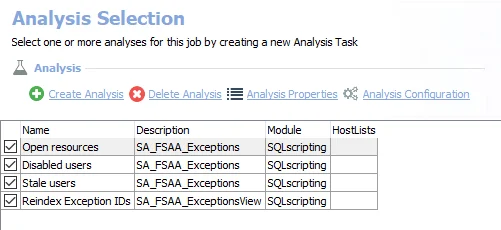
The following analysis tasks are selected by default:
-
Open resources – Any folders that are openly accessible through file shares. Deselect this task if you don't need open resource information.
- The
#SIDSparameter includes well-known, high-risk SIDS by default. Don't remove these, but you can add custom SIDS. See the Configure the Customizable Parameters in an Analysis Task topic for additional information.
- The
-
Disabled users – Any folders where disabled users have access
- Deselect this task if you don't need disabled user information
-
Stale users – Any folders where stale users have access. Stale users are users who haven't logged in for more than 120 days.
- Deselect this task if you don't need stale user information
-
Reindex Exception IDs – Displays views within the Results node of the Enterprise Auditor Console