SP_StaleFiles Job
The SP_StaleFiles Job identifies files that have not been modified in at least a year across SharePoint farms. This aids administrators and users in cleaning up or archiving old and unchanged files to help maintain a clean and healthy SharePoint environment. Report includes files, their last modified time, total file size, versions, and version size, along with file owner and file editor information.
Parameter Configuration
Use the Configuration section on a job's overview page to modify any customizable parameters used by analysis tasks in the job. See the Parameter Configuration topic for instructions on how to edit parameters on a job overview page.
The SP_StaleFiles page has the following configurable parameters:
- Days since last modification to be considered stale
See the Customizable Analysis Tasks for the SP_StaleFiles Job for additional information.
Analysis Tasks for the SP_StaleFiles Job
Navigate to the Jobs > SharePoint > 4.Content > SP_StaleFiles > Configure node and select Analysis to view the analysis tasks.
Don't modify or deselect the selected analysis task. The analysis task is
preconfigured for this job. Only the @stale parameter can be configured for the analysis task.
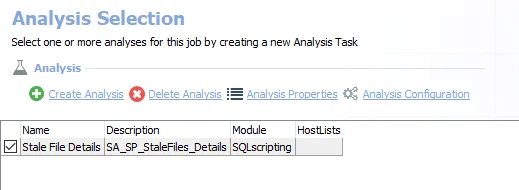
The default analysis task is:
-
Stale File Details – Creates the SA_SP_StaleFiles_Details table accessible under the job’s Results node
- This analysis task contains a configurable parameter:
@stale. See the Customizable Analysis Tasks for the SP_StaleFiles Job topic for additional information.
- This analysis task contains a configurable parameter:
In addition to the table created by the analysis task which displays the stale file resources, the SP_StaleFiles Job produces the following pre-configured report:
| Report | Description | Default Tags | Report Elements |
|---|---|---|---|
| Stale Files | This report identifies the files which have not been modified in the longest amount of time. | Stale Data | This report is comprised of three elements:
|
Customizable Analysis Tasks for the SP_StaleFiles Job
The default values for customizable parameters are:
| Analysis Task | Customizable Parameter Name | Default Value | Instruction |
|---|---|---|---|
| Stale File Details | @stale | 365 | Determines days since last modification that files are considered stale. |