500 Internal Server Error When Using Okta SSO for Published Reports
Related Queries
- "Receiving 500 error after login using Okta."
- "Published Reports site fails with Okta."
- "NAA SAML SSO broken."
Symptom
When attempting to connect to the Netwrix Access Analyzer (formerly Enterprise Auditor) Published Reports site using Okta Single Sign-On (SSO), users encounter the following error message:
500 Internal Server Error
Cause
The Okta application is configured to use the SHA1 algorithm for signing SAML assertions.
The modern .NET Framework (4.6.2 and later) and OWIN-based security libraries reject SHA1, as it is deprecated. These platforms require a more secure algorithm, such as SHA256, for WS-Federation and SAML tokens.
Resolution
To resolve this issue, update the signature and digest algorithms in the Okta application settings. These changes ensure compatibility with the security expectations of modern .NET/OWIN libraries used by the Published Reports site.
- In Okta, navigate to the Application used for Published Reports.
- Open the General Settings tab.
- Scroll to the Signature Algorithm section.
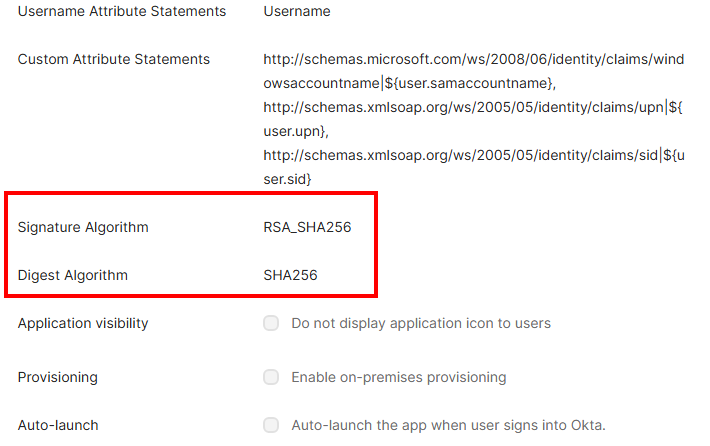
- Set the following:
- Signature Algorithm:
RSA_SHA256 - Digest Algorithm:
SHA256
- Signature Algorithm:
- Save the changes.
NOTE: After saving, users may need to sign out and back in for the new settings to take effect.