Box_FailedLogins Job
The Box_FailedLogins Job identifies failed logon events that have occurred over the last 30 days. A failed logon can be an indication of security issues such as an attempt to access unauthorized content, or operational issues such as a misconfigured service account.
Analysis Tasks for the Box_FailedLogins Job
Navigate to Box > 1.Activity > Suspicious Activity > Box_FailedLogins > Configure node and select Analysis.
warning
Don't modify or deselect the selected analysis tasks. The analysis tasks are preconfigured for this job.
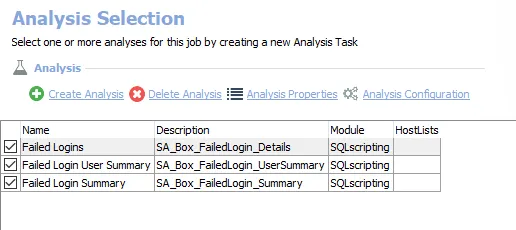
The following analysis tasks are selected by default:
- Failed Logins – Creates the Box_FailedLogin_Details table accessible under the job’s Results node
- Failed Login User Summary – Creates an interim processing table in the database for use by downstream analysis and report generation
- Failed Login Summary – Creates an interim processing table in the database for use by downstream analysis and report generation
In addition to the tables created by the analysis tasks, the Box_FailedLogins Job produces the following pre-configured report:
| Report | Description | Default Tags | Report Elements |
|---|---|---|---|
| Failed Logins | This report highlights the failed login activity occurring in the target Box environment over the last 30 days. | None | This report is comprised of two elements:
|