Migrating Job Configurations to Scan Parameters
Overview
Scans in AA26 replace the legacy job/data collector model. Each source has one scan per scan type, and scan parameters are configured directly on the scan rather than in a job wizard. The tables and procedures below map each legacy data collector setting to its AA26 equivalent by connector type.
Before starting this procedure, complete Migrating Target Servers and Host Lists to Source Groups. Scans exist within source groups and are associated with specific sources.
Data collector to scan type mapping
Each legacy data collector maps to a specific AA26 scan type:
| Legacy Data Collector | AA26 Scan Type | Notes |
|---|---|---|
| FSAA — File System Access/Permission Auditing | File Server — Access Scan | Scans permissions and file metadata |
| FSAA — Sensitive Data Discovery | File Server — Sensitive Data Scan | Requires Access Scan to have run first |
| ADInventory | Active Directory — Identity Sync | Collects users, groups, and membership |
| AzureAD Inventory | Entra ID — Identity Sync | Collects users, groups, and roles |
| SPAA — SharePoint Access Auditing | SharePoint Online — Access Scan | Scans permissions and content metadata |
| FSAA — File System Activity | Not applicable | Activity data is surfaced through Netwrix Activity Monitor (NAM) integration. See Historical Audit Data. |
Key differences from legacy jobs
One scan per source, not per job. In the legacy product, multiple jobs could target the same host with different data collector settings. In AA26, each source has one Access Scan and one Sensitive Data Scan. If you had multiple FSAA jobs targeting the same file server with different scope or depth settings, consolidate those settings into a single scan configuration per source.
Scan type is fixed per scan. Unlike a legacy FSAA job that could include both permission auditing and sensitive data queries, AA26 uses separate scans for each type. The Access Scan runs first; the Sensitive Data Scan uses the discovered share list from the Access Scan as its scope.
Proxy assignment is replaced by scanner labels. Legacy jobs had a Scan Server Selection step where you assigned a specific proxy server or proxy host list. In AA26, scanner assignment is configured at the source group level using scanner labels — not per scan. See Migrating Proxy Servers to Scanners.
Managing scans
Navigate to Configuration > Scans to view and configure all scans across your sources.
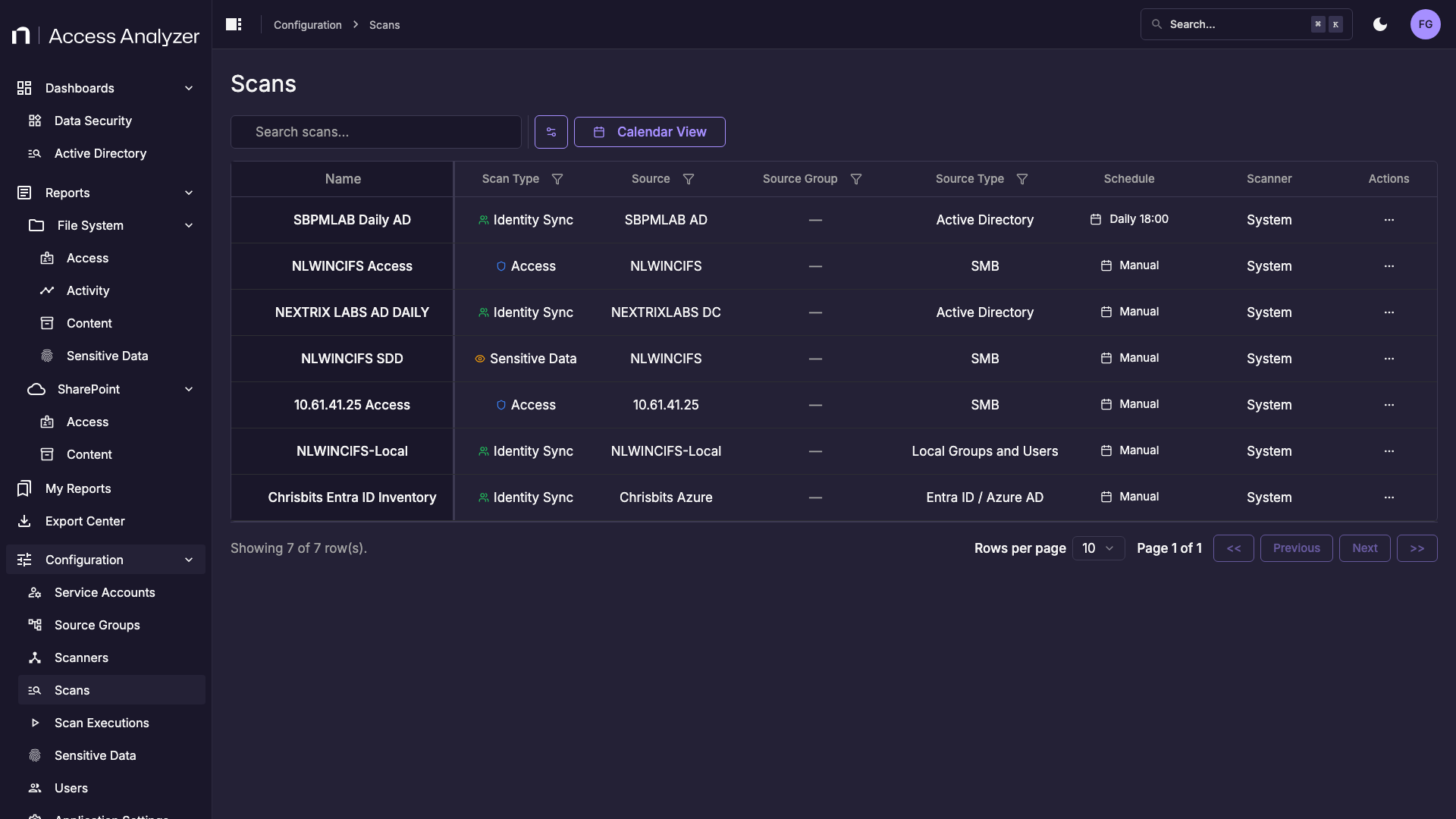
Each row shows a scan's type, source, schedule, and assigned scanner. Click the scan name to open the edit panel for that scan.
File Server — Access Scan parameters
The Access Scan collects file permissions, share structure, and file metadata from file servers.
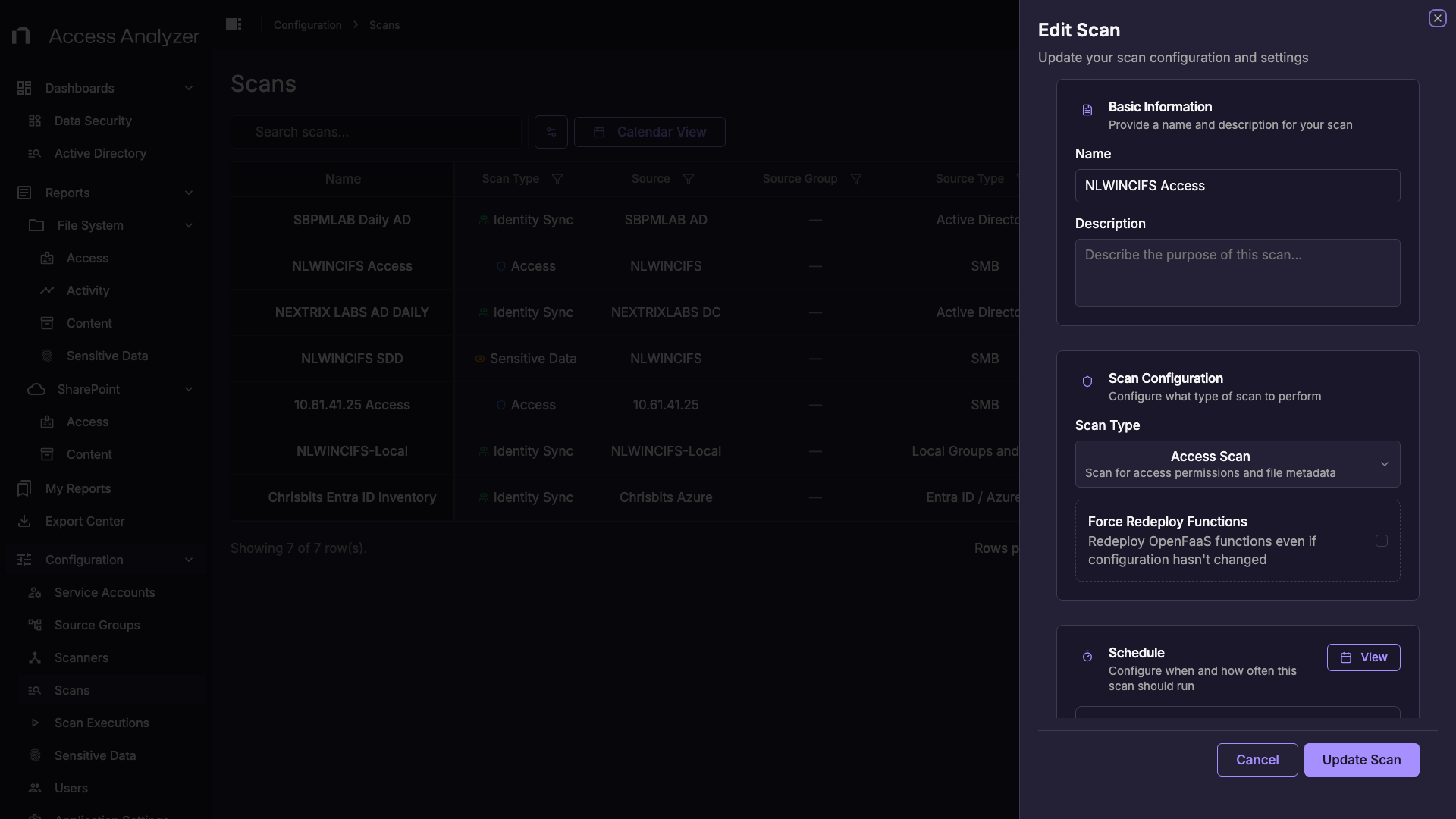
| AA26 Parameter | Description | Legacy Equivalent |
|---|---|---|
| Name | Display name for this scan. | Job name |
| Description | Optional notes. | Job description |
| Scan Type | Set to Access Scan. | FSAA — Access/Permission Auditing query |
| Schedule | Enable and configure a recurring schedule. | Windows Task Scheduler trigger on the job |
The Access Scan has no additional scoping parameters. It scans all accessible shares on the source server. Use the Sensitive Data Scan's Share Selection parameter to scope sensitive data collection to specific shares.
File Server — Sensitive Data Scan parameters
The Sensitive Data Scan classifies file contents against configured data type patterns. It must be run after the Access Scan — the scan uses the share list discovered by the Access Scan to determine scope.
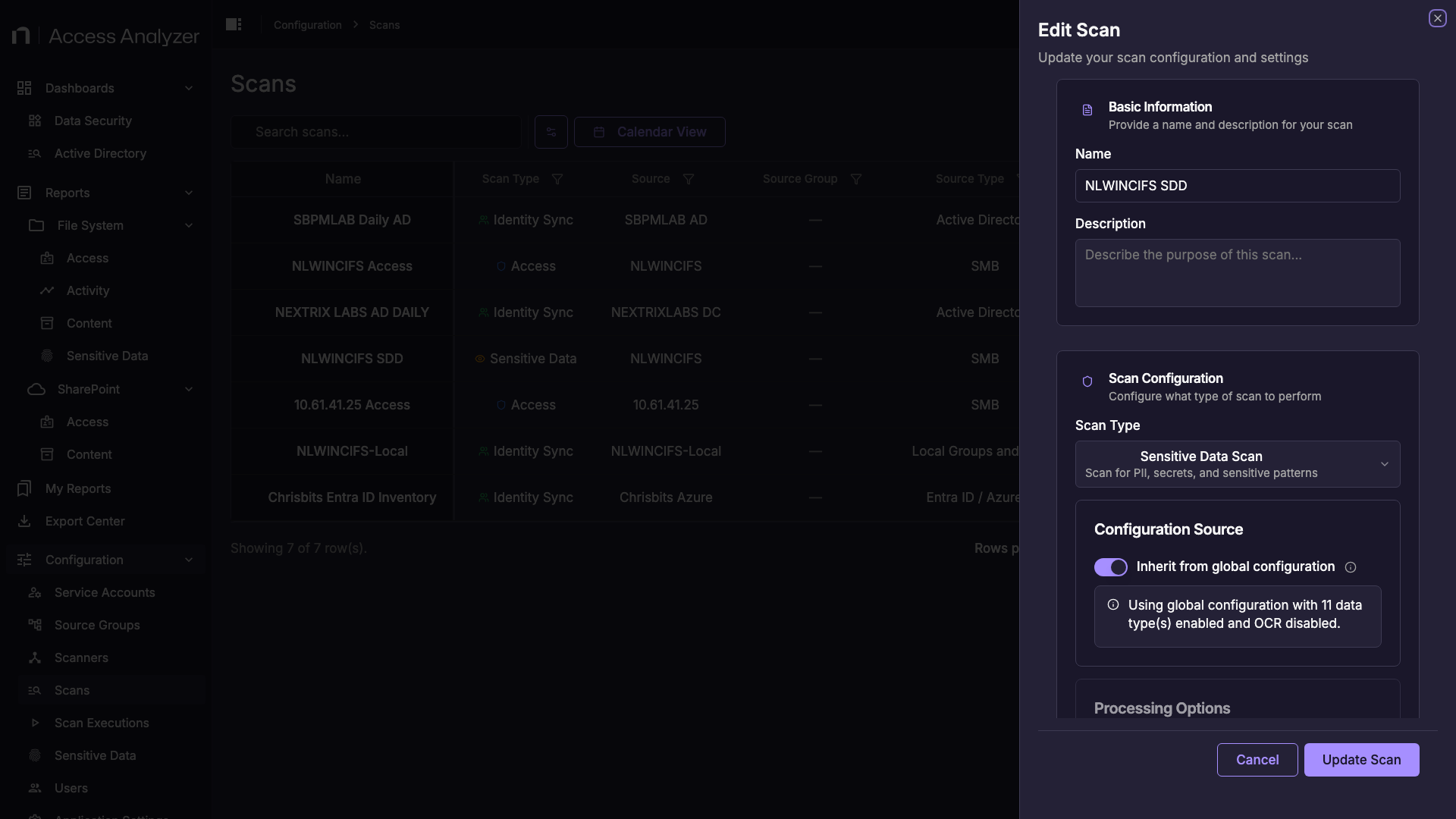
| AA26 Parameter | Description | Legacy Equivalent |
|---|---|---|
| Scan Type | Set to Sensitive Data Scan. | FSAA — Sensitive Data Discovery query |
| Configuration Source | Inherit from global configuration uses the globally configured sensitive data types. Select a custom configuration to override for this scan. | Global sensitive data policy |
| Run OCR | Enable to extract text from image files during classification. | FSAA OCR option |
| Sensitive Data Types to Classify | Select which data type categories to classify against: CCPA, CMMC, Credentials, Financial Records, GDPR, GDPR Restricted, GLBA, HIPAA, PCI DSS, PHI, PII. | Sensitive data criteria selection in FSAA wizard |
| Batch Size | Number of files to process per batch. Default: 100. | No direct equivalent |
| Workers | Number of concurrent workers for scanning. Default: 3. | FSAA thread count or concurrent scan settings |
| Differential Scan | When enabled, only files modified since the last scan are classified. The first run scans all files. | FSAA incremental scan option |
| Share Selection | Restrict the scan to specific shares discovered by the Access Scan. If empty, all discovered shares are scanned. | FSAA include/exclude share lists |
| Maximum Scan Depth | Folder depth limit. Leave empty for unlimited depth. | FSAA scan depth setting |
| Schedule | Enable and configure a recurring schedule. | Windows Task Scheduler trigger |
The Share Selection list is populated from the results of the Access Scan. If no shares appear, run the Access Scan for that source first.
Active Directory — Identity Sync parameters
The Identity Sync collects users, groups, group membership, and custom attributes from Active Directory domain controllers.
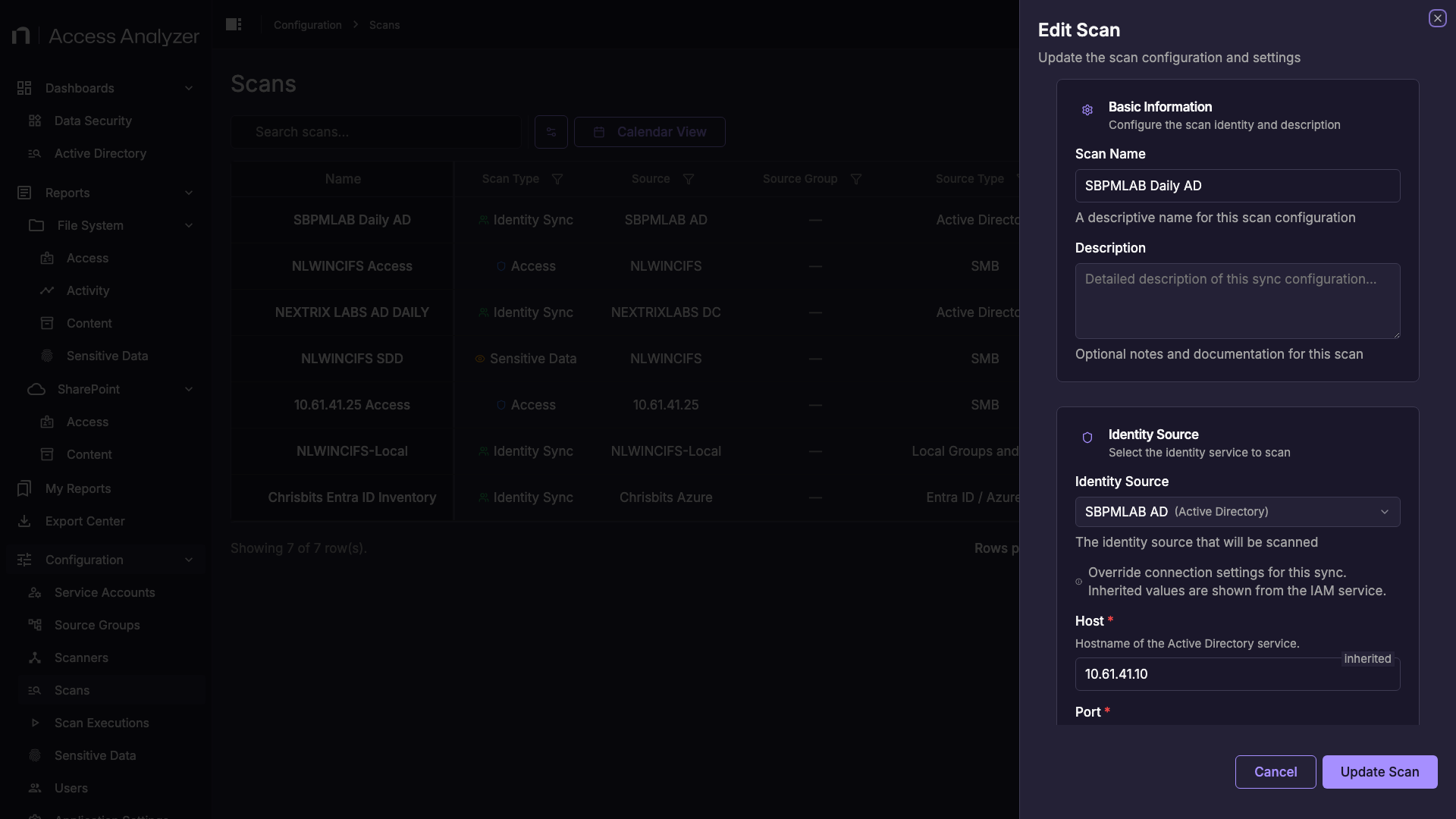
| AA26 Parameter | Description | Legacy Equivalent |
|---|---|---|
| Scan Name | Display name for this sync. | Job name |
| Identity Source | The Active Directory source to sync. Selects the domain controller configured on the source. | Job host target / connection profile |
| Host / Port / Domain | Override the connection settings inherited from the source. Leave as inherited unless you need to target a specific domain controller. | ADInventory domain and DC settings |
| Ignore SSL Errors | Ignore certificate errors on the LDAP/LDAPS connection. | ADInventory SSL options |
| Differential Scan | When enabled, only changes since the last sync are collected. | ADInventory incremental collection |
| Schedule | Frequency: One-time, Hourly, Daily, Weekly, or Monthly. Set a specific time and optional start/end date. | Windows Task Scheduler trigger |
AA26 collects standard Active Directory attributes: users, groups, group membership, and user custom attributes. Custom attribute collection beyond this set is not configurable in the current release.
Entra ID — Identity Sync parameters
The Identity Sync collects users, groups, and roles from Entra ID via the Microsoft Graph API.
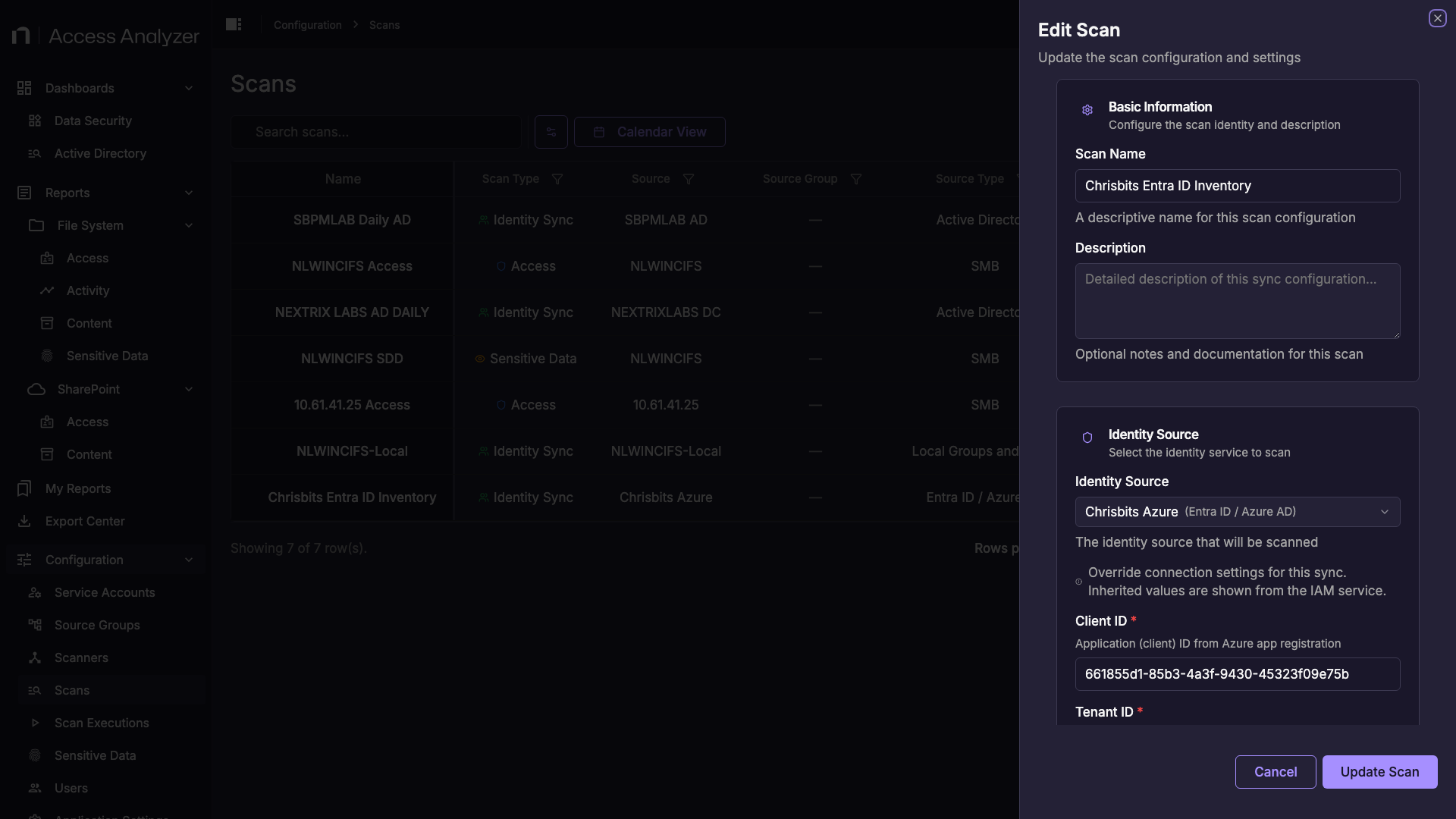
| AA26 Parameter | Description | Legacy Equivalent |
|---|---|---|
| Scan Name | Display name for this sync. | Job name |
| Identity Source | The Entra ID source to sync. | Job host target |
| Client ID / Tenant ID | Override the credentials inherited from the source's service account. Leave as inherited in most cases. | AzureAD Inventory connection profile |
| Schedule | Enable and configure a recurring schedule. | Windows Task Scheduler trigger |
SharePoint Online — Access Scan parameters
The SharePoint Online Access Scan collects site, library, and item permissions from SharePoint Online, OneDrive, and Teams.
When you create a SharePoint Online source group, the wizard includes a SharePoint Domain field. This is equivalent to the legacy SPAA site URL configuration. Within a source group, the scan targets all sites within that domain by default.
Settings that do not migrate
Some legacy job settings have no equivalent in AA26:
| Legacy Setting | Status in AA26 |
|---|---|
| Applet launch mechanism (MSTask / Windows Service / pre-installed service) | Not applicable — scanner deployment is automated via K3s |
| Per-proxy communication timeout | Not applicable — managed by Kubernetes infrastructure |
| Strong proxy affinity (pin host to specific proxy) | No direct equivalent — scanner labels route at source group level |
| Applet port and certificate exchange | Not applicable — managed by K3s infrastructure |
| Custom AD attribute collection beyond standard set | Not supported in current release |
| Multiple jobs targeting same host with different scoping | Consolidate to one scan configuration per source |
| FSAA File System Activity scanning | Not a scan type — route activity data through NAM integration |
| SQL Server, Exchange, Unix data collectors | No equivalent connector in current release |