Checksums
Many identifiers end in a check digit computed from the other digits: payment card numbers, International Bank Account Numbers (IBANs), United States bank routing numbers, and many national IDs. A checksum is the rule that recomputes that digit. A detector's passes a checksum filter keeps only the matches that pass, which removes most random digit strings that merely have the right shape. A checksum checks the whole match, unless the match captures exactly one named group, and then it checks only that group's text. See Build a classifier.
You need the Admin role to create, edit, or delete checksums.
The Checksums tab
Go to Classification > Classifiers and select the Checksums tab.
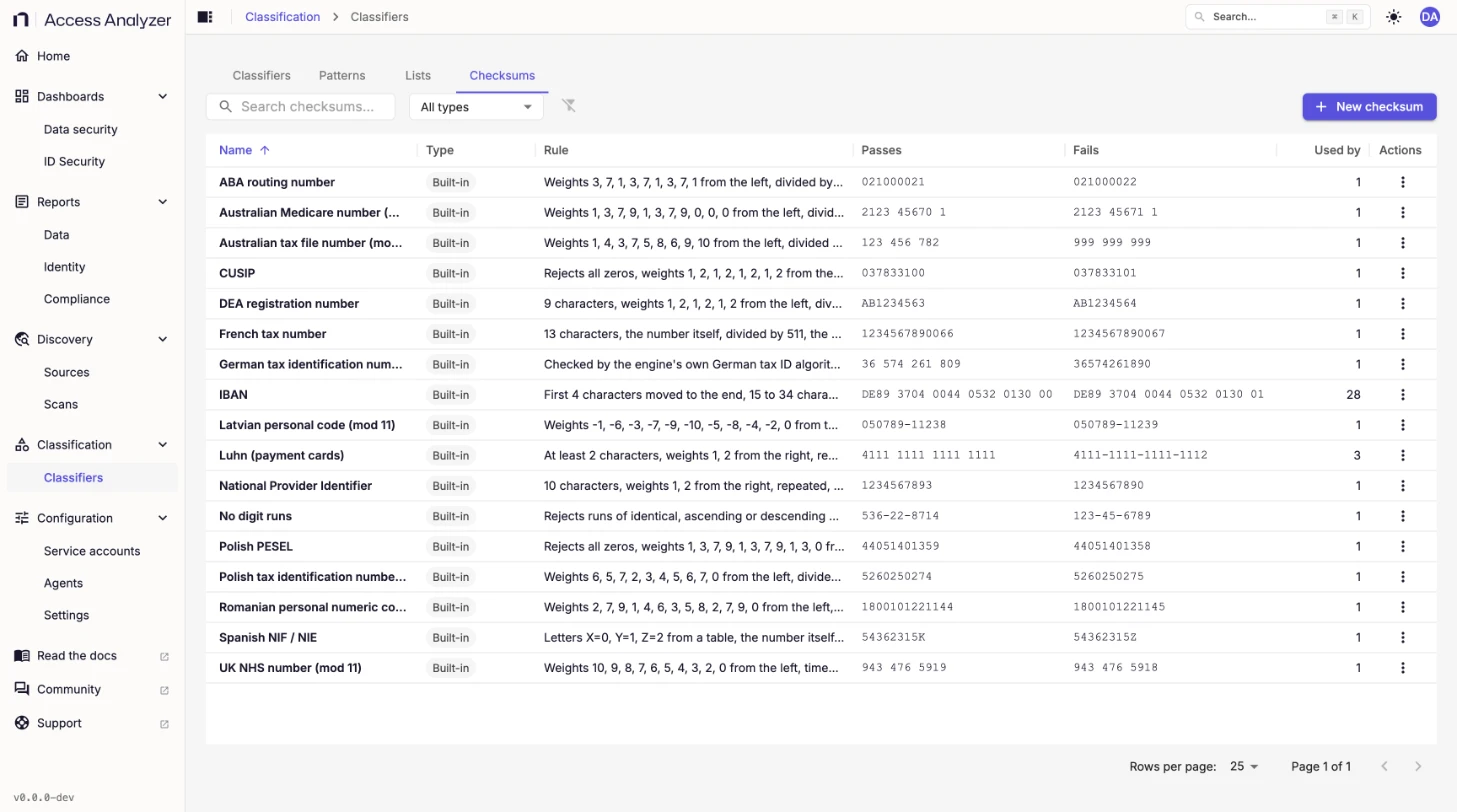
| Column | What it shows |
|---|---|
| Name | The checksum name. |
| Type | Built-in or Yours. |
| Rule | The rule in words, such as "Weights 3, 7, 1, 3, 7, 1, 3, 7, 1 from the left, divided by 10, nothing left over". |
| Passes | An example value that passes. |
| Fails | An example value that fails. |
| Used by | How many classifiers use the checksum. |
| Actions | View checksum and Duplicate for a built-in checksum; Edit, Duplicate, and Delete for yours. A duplicate is named <name> copy. You can't delete a checksum while a classifier uses it. |
Access Analyzer ships these checksums:
| Checksum | Checks |
|---|---|
| ABA routing number | United States bank routing numbers. |
| Australian Medicare number (mod 11) | Australian Medicare card numbers. |
| Australian tax file number (mod 11) | Australian tax file numbers (TFNs). |
| CUSIP | Committee on Uniform Securities Identification Procedures (CUSIP) security identifiers. |
| DEA registration number | United States Drug Enforcement Administration (DEA) registration numbers. |
| French tax number | French tax numbers. |
| German tax identification number | German tax IDs, with the product's own algorithm. You can't rebuild it in the visual builder. |
| IBAN | International Bank Account Numbers. |
| Latvian personal code (mod 11) | Latvian personal codes. |
| Luhn (payment cards) | Payment card numbers. |
| National Provider Identifier | United States National Provider Identifier (NPI) numbers. |
| No digit runs | Rejects runs of identical, ascending, or descending digits, such as 123-45-6789. |
| Polish PESEL | Polish national identification numbers. |
| Polish tax identification number (mod 11) | Polish tax IDs. |
| Romanian personal numeric code (mod 11) | Romanian personal numeric codes. |
| Spanish NIF / NIE | Spanish tax and foreigner identification numbers. |
| UK NHS number (mod 11) | UK National Health Service (NHS) numbers. |
Create a checksum
The checksum builder describes a rule in three steps: clean up the value, add up and divide, and decide. A Check it panel recomputes the rule on a number as you build it.
- On the Checksums tab, click New checksum.
- In Name, enter a name. Optionally, add a Description.
- To start from an existing rule, click Start from a built-in and pick one.
- Under Clean up, set Remove these characters, how Letters count (not allowed, ignored, counted as numbers, counted by alphabet position, or from a table), and Ignore letter case. More clean-up options adds characters in front, keeps only the first characters, moves characters to the end, and limits the length.
- Under Add up and divide, set how the Total is computed, the Weights, where to start (From), whether to Repeat the weights, what to do with each product (Then), and the Add to the total, Multiply by, Then add, and Divide by values.
- Under Decide, choose when It passes, and select any Also reject when options, such as All digits are the same.
- In Try a number, enter a value to see whether it passes and how the rule reads it.
- Under Valid examples and Invalid examples, click Add an example and enter values the rule must accept and reject. Add at least one of each, and up to 30 of each.
- Click Create checksum.
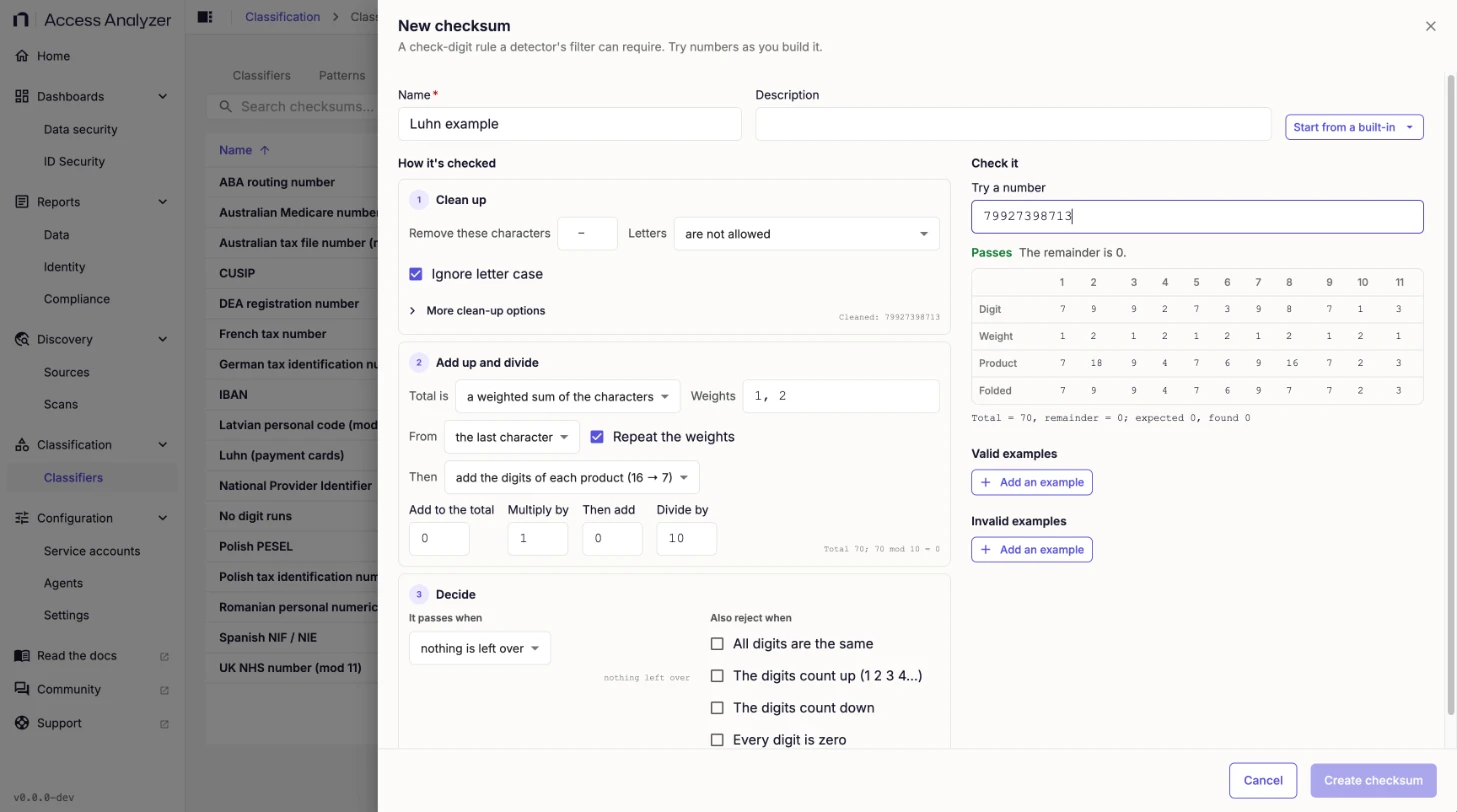
The Check it panel shows Passes or the reason a value fails, with a table of each digit, its weight, the product, and the folded value, and the total and remainder underneath. For example, with weights 1, 2 from the last character, repeated, and the digits of each product added, 79927398713 totals 70, and 70 divided by 10 leaves nothing over, so it passes.
Create checksum stays unavailable until the rule agrees with every example; until then, the builder reports how many examples disagree. When you save, the scan engine checks every example again and refuses the save if any disagrees, so a rule can't reach a scan until it behaves the way its examples say. A message confirms the save: Checksum "<name>" created.
To change a built-in checksum, click Duplicate and edit the copy.