Build an MRZ checksum
A machine-readable zone (MRZ) is the block of letters, digits, and < characters at the bottom of a passport's photo page. A classifier can find MRZs in scanned passports and ID images as well as in text. In an MRZ, the document number and each date are followed by a check digit that the characters before it determine. In this tutorial, you build a custom checksum that recomputes a check digit, so a classifier can keep only the values with a correct one. You also learn how to count letters as numbers, remove filler characters, and read the check digit from the end of a value.
Before you start
Sign in to Access Analyzer with the Admin role. You don't need a source or a scan, because the builder tests the values you enter. For every builder setting, see Checksums.
How the MRZ check digit works
The MRZ of a passport has two lines of 44 characters. The following sample is for Utopia (UTO), the fictional state that the International Civil Aviation Organization (ICAO) uses in its Doc 9303 specification:
P<UTOERIKSSON<<ANNA<MARIA<<<<<<<<<<<<<<<<<<<
L898902C36UTO7408122F1204159ZE184226B<<<<<10
Line 1 holds the document code, the issuing state, and the holder's name. Line 2 holds the fields in the following table. On a passport, the document number is the passport number. The filler < pads a field to its full length.
| Characters | Field | In the sample |
|---|---|---|
| 1 to 9 | Document number | L898902C3 |
| 10 | Document number check digit | 6 |
| 11 to 13 | Nationality | UTO |
| 14 to 19 | Date of birth (YYMMDD) | 740812 |
| 20 | Date of birth check digit | 2 |
| 21 | Sex | F |
| 22 to 27 | Expiry date (YYMMDD) | 120415 |
| 28 | Expiry date check digit | 9 |
| 29 to 42 | Optional data | ZE184226B<<<<< |
| 43 | Optional data check digit | 1 |
| 44 | Composite check digit | 0 |
The check digit rule comes from ICAO Doc 9303, Part 3, section 4.9. It works in four steps:
- Replace each character with a value. A digit keeps its own value, the letters
AtoZcount as 10 to 35, and the filler<counts as 0. - Multiply each value by a weight. The weights 7, 3, and 1 repeat from the first character.
- Add the products.
- Divide the total by 10. The remainder is the check digit.
For the document number L898902C3, the letter L is 21 and the letter C is 12, so the products add up as follows:
21×7 + 8×3 + 9×1 + 8×7 + 9×3 + 0×1 + 2×7 + 12×3 + 3×1 = 316
Dividing 316 by 10 leaves 6, and the character after the document number is 6, so the check digit is correct.
The same rule checks the date fields. With the same weights, the date of birth 740812 totals 122, so its check digit is 2.
Character 44, the last character of line 2, is a composite check digit. It covers characters 1 to 10, 14 to 20, and 22 to 43, which aren't next to each other. A checksum checks one unbroken run of characters, so it can't check the composite check digit.
This tutorial uses the passport layout. Other types of travel document, such as ID cards, have MRZs with other layouts. Their check digits use the same rule, but their fields sit at other positions.
Open the builder and name the checksum
- Go to Classification > Classifiers and select the Checksums tab.
- Click New checksum.
- In Name, enter
MRZ check digit. - Optionally, in Description, enter
Validates the check digit that follows a field in a passport MRZ.
Enter the name exactly as shown. The next tutorial selects this checksum by name, and checksum names must be unique.
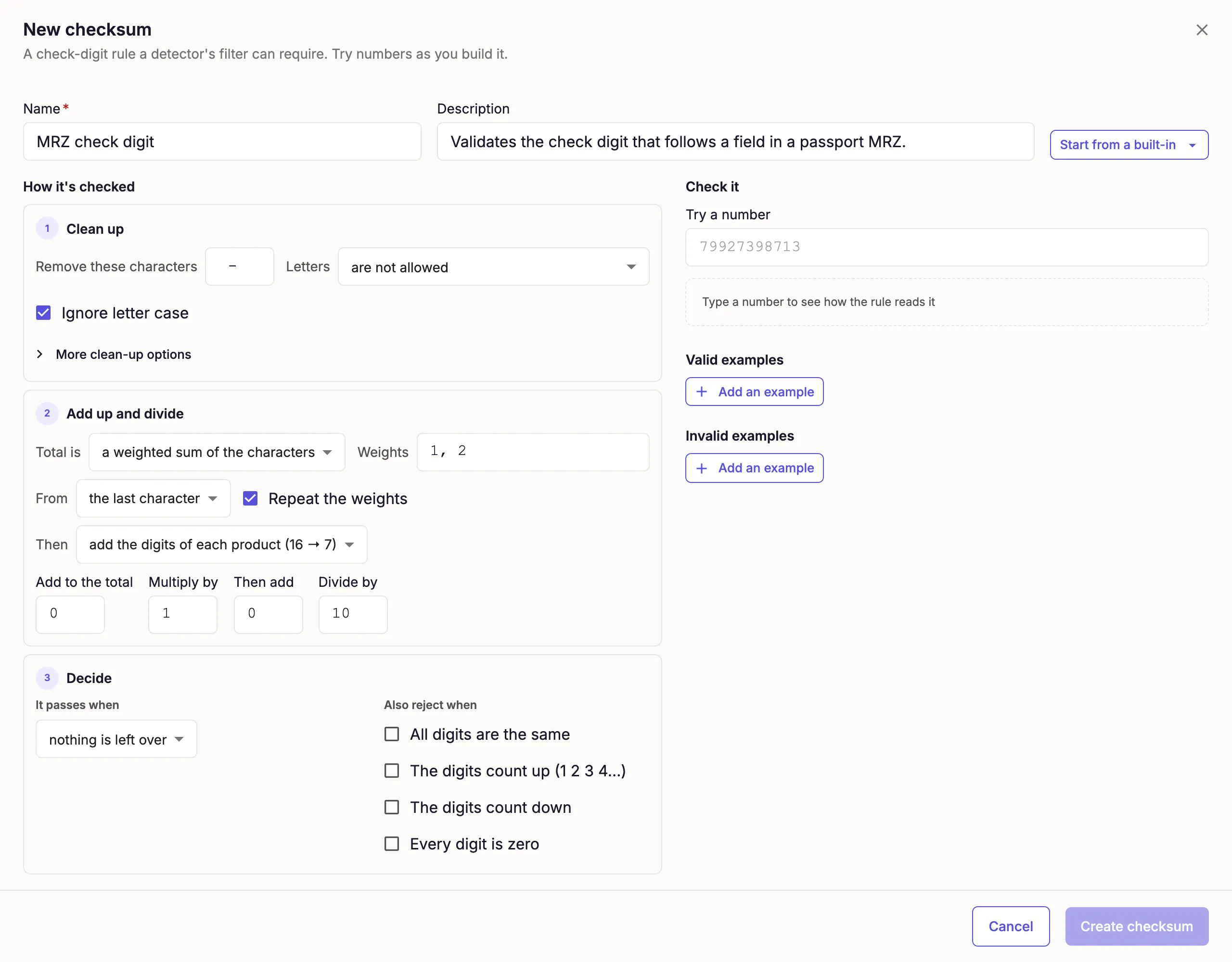
The builder opens with the rule for payment card numbers (Luhn) filled in. The next section changes each setting that doesn't suit an MRZ.
Set up the rule
The builder describes a rule in three steps. Clean up converts the characters to values, Add up and divide applies the weights, adds the products, and divides the total, and Decide compares the remainder with the check digit.
Clean up the value
The Clean up step turns the text into one value for each character.
- In Remove these characters, replace the contents with
<. - In Letters, select count as numbers (A=10 … Z=35).
- Leave Ignore letter case selected. An MRZ has capital letters only, so the setting changes nothing here.
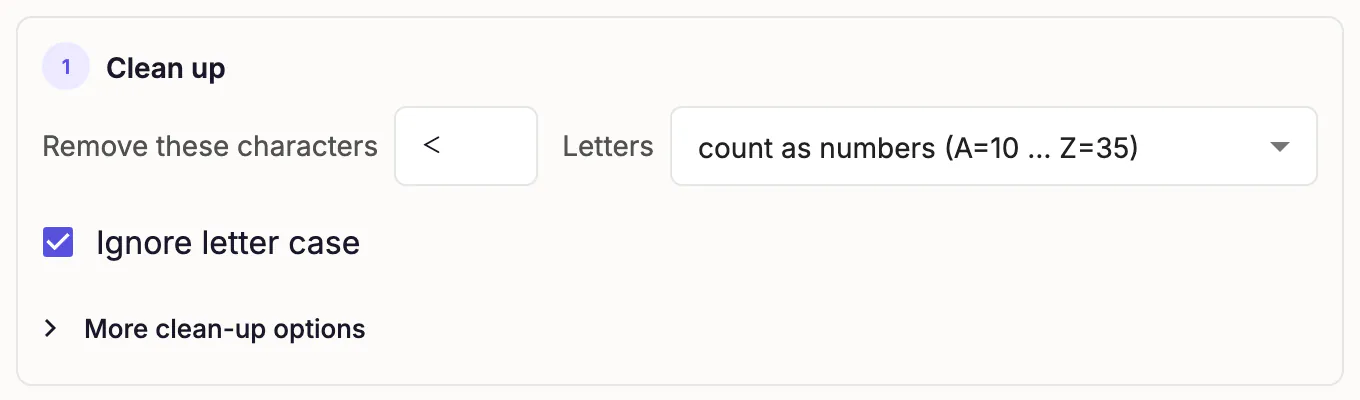
A filler counts as 0, and in a document number the fillers come only at the end of the field, so removing them gives the same total. The builder started with a space and a hyphen in Remove these characters. A value that contains either one now fails, because an MRZ has neither. Digits keep their own value and need no entries.
Add up and divide
The Add up and divide step multiplies each value by a weight, adds the products, and divides the total.
- Leave Total is set to a weighted sum of the characters.
- In Weights, replace the contents with
7, 3, 1. - In From, select the first character.
- Leave Repeat the weights selected.
- In Then, select keep each product.
- Leave Add to the total at
0, Multiply by at1, Then add at0, and Divide by at10.
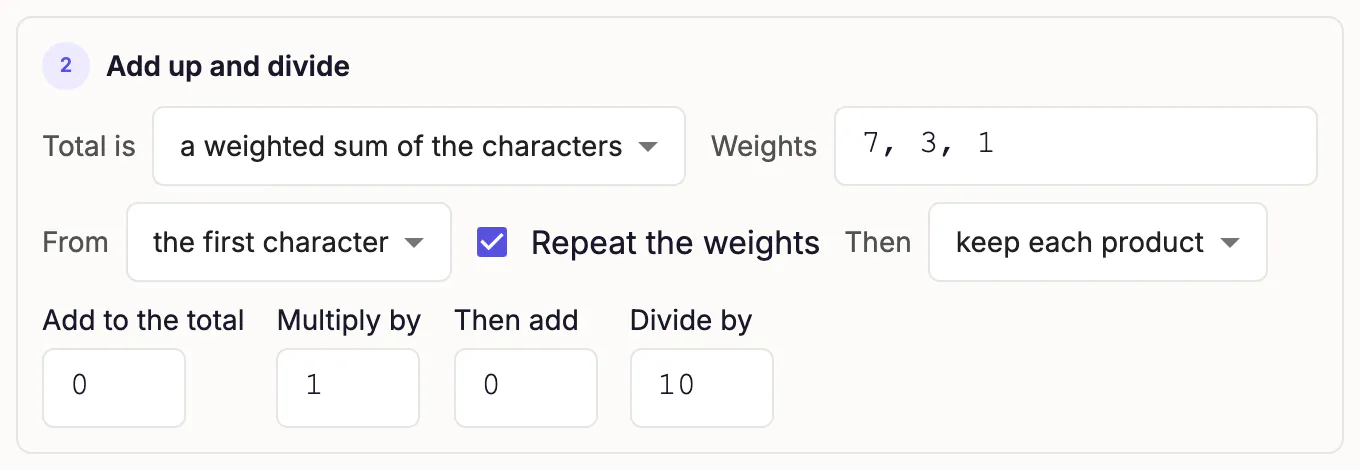
The three weights repeat across the whole value, so the same rule fits a nine-character document number and a six-character date. The rule leaves the check digit out of the total, because the next step compares that character with the remainder.
Decide when a value passes
The Decide step compares the remainder with the check digit in the value.
- In It passes when, select the check digit equals the remainder.
- Leave Check digit at set to the end and width at
1. - Leave Characters per remainder empty.
- Leave every option under Also reject when cleared.
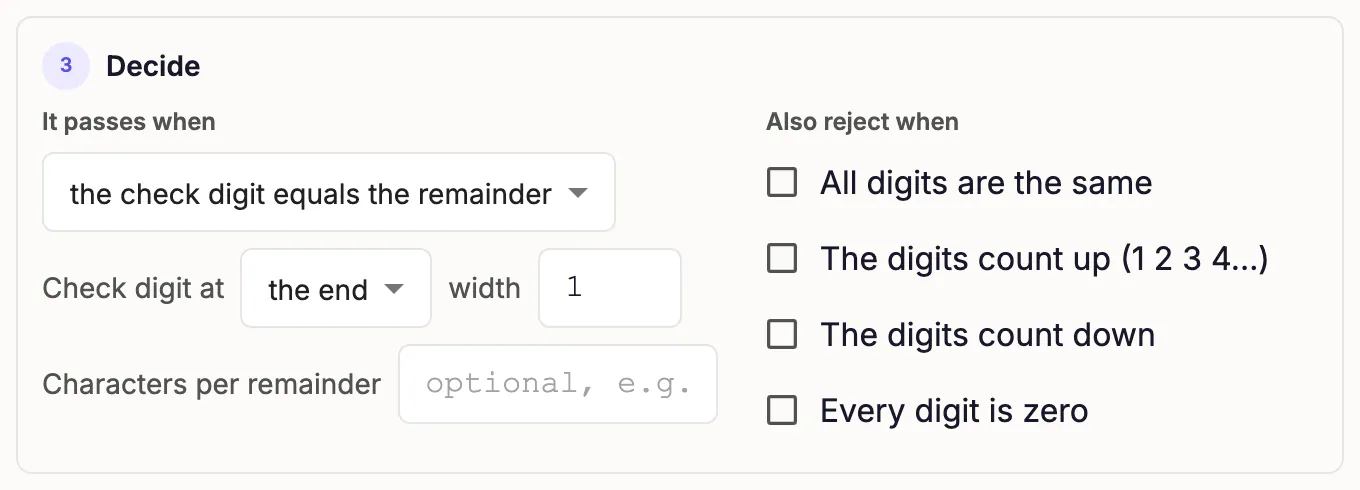
The check digit is the last character of the value. A remainder from 0 to 9 is the check digit itself, so the rule needs no list of characters per remainder.
Test the rule
The Check it panel recomputes the rule each time you change a setting or a value.
Try a document number
- In Try a number, enter
L898902C36. - Confirm that the panel reports Passes.
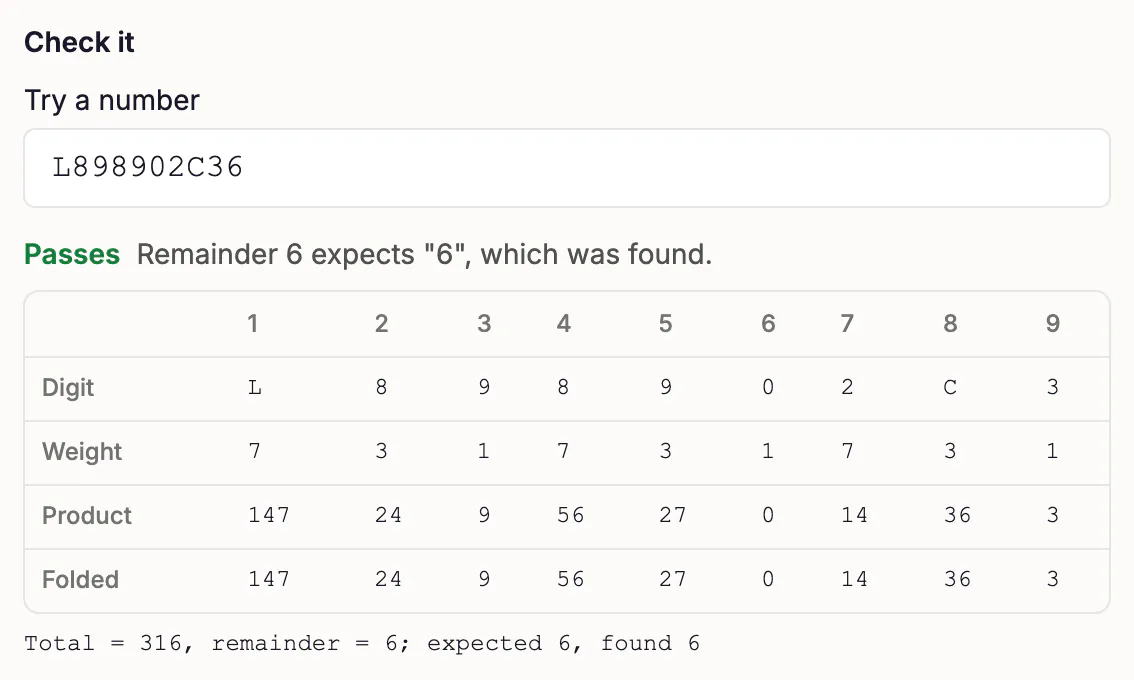
The panel shows a worksheet with one column for each weighted character. Each column lists the character, its weight, and its product. The worksheet has no column for the check digit, because the rule compares that character with the remainder instead of adding it. The line under the worksheet reads "Total = 316, remainder = 6; expected 6, found 6".
Each step also summarizes what it did with the number. Clean up reads "Cleaned: L898902C3", Add up and divide reads "Total 316; 316 mod 10 = 6", and Decide reads "expected 6, found 6". If your total isn't 316, compare your settings with the values in this tutorial.
Try a date
The same rule checks the date fields.
- In Try a number, enter
7408122, which is the date of birth740812followed by its check digit. - Confirm that the panel reports Passes, with a total of 122 and a remainder of 2.
- In Try a number, enter
1204159, which is the expiry date120415followed by its check digit. - Confirm that the panel reports Passes, with a total of 49 and a remainder of 9.
Add examples
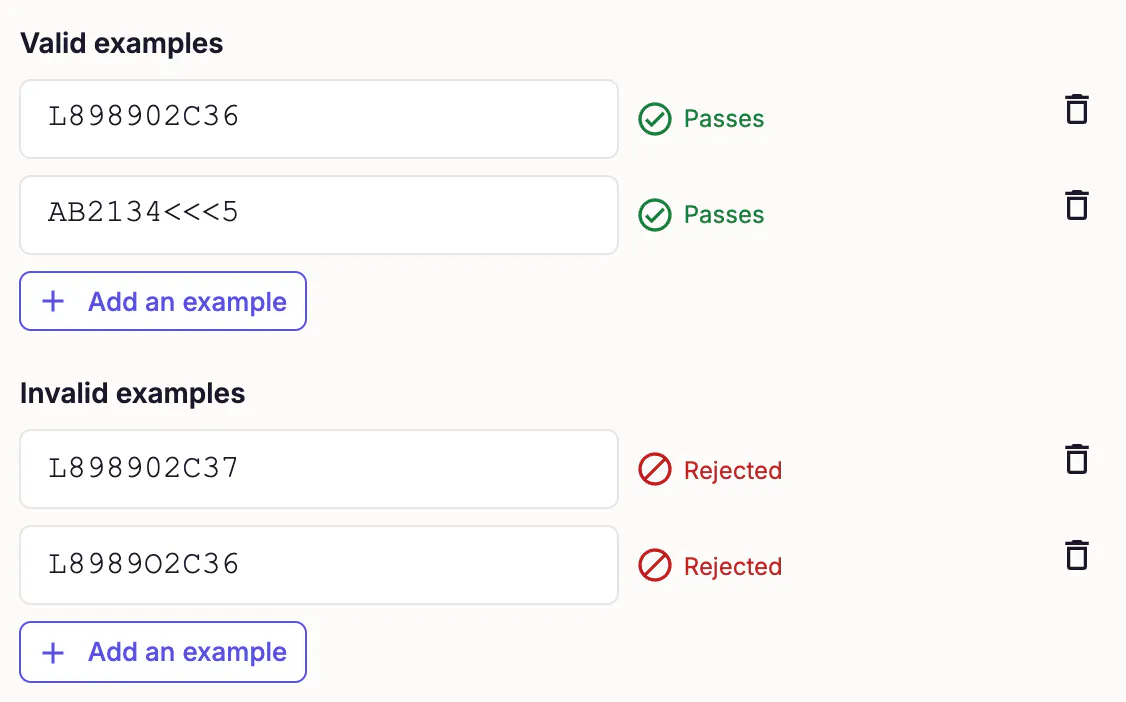
The builder saves a checksum only when it has at least one valid and one invalid example and the rule agrees with every example. Add two values that must pass and two that must fail. Both valid examples come from ICAO Doc 9303. One has no fillers, and the other has three. The invalid examples cover a wrong check digit and a letter O in place of a zero.
| Add under | Value | Why |
|---|---|---|
| Valid examples | L898902C36 | The total is 316, the remainder is 6, and the last character is 6. |
| Valid examples | AB2134<<<5 | The rule removes the three fillers. The total is 125, the remainder is 5, and the last character is 5. |
| Invalid examples | L898902C37 | The remainder is 6, but the last character is 7. |
| Invalid examples | L8989O2C36 | The sixth character is the letter O, not the digit 0. The total is 340, the remainder is 0, and the last character is 6. |
For each row, click Add an example under its heading and enter the value.
Each example shows its verdict as you enter it: Passes for a valid example and Rejected for an invalid one. When all four agree with the rule, the footer reads "The rule agrees with all 4 examples" and Create checksum becomes available.
Save the checksum
Click Create checksum.
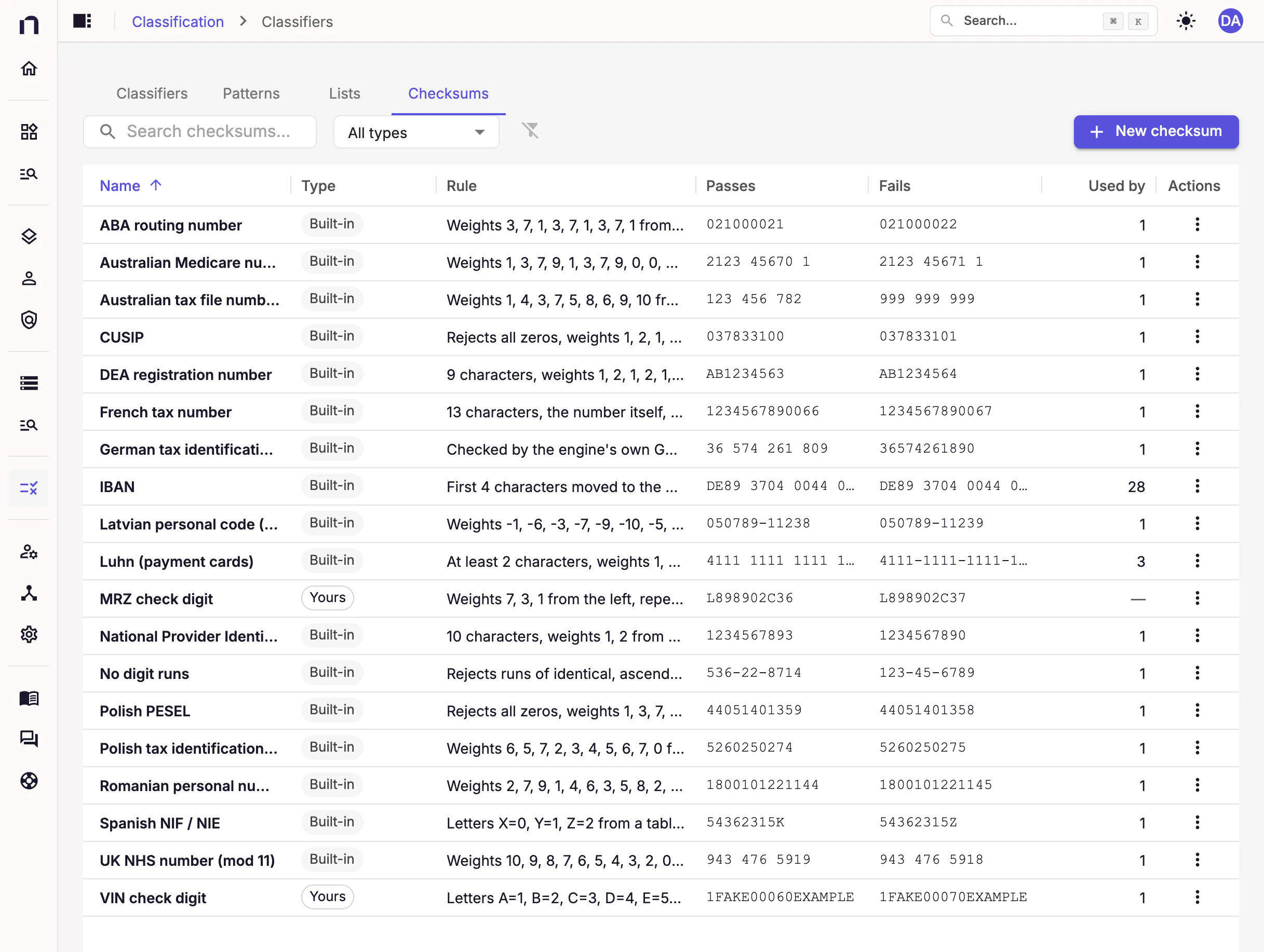
A message confirms the save: Checksum "MRZ check digit" created. The checksum appears on the Checksums tab with the type Yours. The Rule column describes the saved rule in words: "Weights 7, 3, 1 from the left, repeated, divided by 10, the remainder names the check digit at the end". The Passes and Fails columns show your first valid and invalid examples, and Used by shows a dash until a classifier uses the checksum.
Troubleshooting
| What you see | Cause | Fix |
|---|---|---|
| "letter 'L' is not allowed" | Letters is still are not allowed. | In Letters, select count as numbers (A=10 … Z=35). |
'<' is not a digit | Remove these characters doesn't contain <. | Enter < in Remove these characters. |
"The remainder is 8; it must be 0." for L898902C36 | It passes when is still nothing is left over. | Select the check digit equals the remainder. |
| "3 weights do not fit 9 characters" | Repeat the weights is cleared. | Select Repeat the weights. |
Add up and divide shows a total other than 316 for L898902C36, or the panel reports Does not pass | A setting from the payment card rule is still in place, or a weight is wrong. | Compare Weights, From, Then, and Divide by with the values in this tutorial. |
| Create checksum is unavailable | At least one example disagrees with the rule. The footer reports how many. | Find the example marked "Fails: the rule rejects this valid example" or "Passes: the rule accepts this invalid example", and fix the rule or the example. |
| "is already the name of another checksum" under Name | Another checksum has the same name, and that includes the built-in checksums. Names ignore letter case. | Enter a different name, or edit the other checksum if you created it. |
Next steps
A checksum checks a pattern's whole match, or only the text of the one named group when the pattern captures exactly one. This checksum expects text that ends with a check digit, so a pattern that finds line 2 captures the document number and its check digit in a named group. See Regular expression dialect.
To see how a detector applies a checksum, see Build a classifier.
Next, build an MRZ classifier that uses the MRZ check digit checksum.