Alias Server Host Name
Access the Access Information Center through a supported browser from a machine within your company's network. The URL is the hosting machine's name and the port, http://[HOSTNAME.DOMAIN.COM]:81. For example, if the application was installed on a server named NEWYORKSRV10.NWXTech.com with the default port of 81, the URL would be http://NEWYORKSRV10.NWXTech.com:81. Notification emails include this URL as hyperlinks in their body. You can customize it by supplying an alias server host name.
Modify the Response Server Host Name parameter in the
AccessInformationCenter.Service.exe.config file, which is located in the Access Information Center
installation directory:
…\STEALTHbits\Access Information Center
To supply an alias server host name for notification hyperlinks:
Step 1 – Open the AccessInformationCenter.Service.exe.config file in a text editor, for
example Notepad.
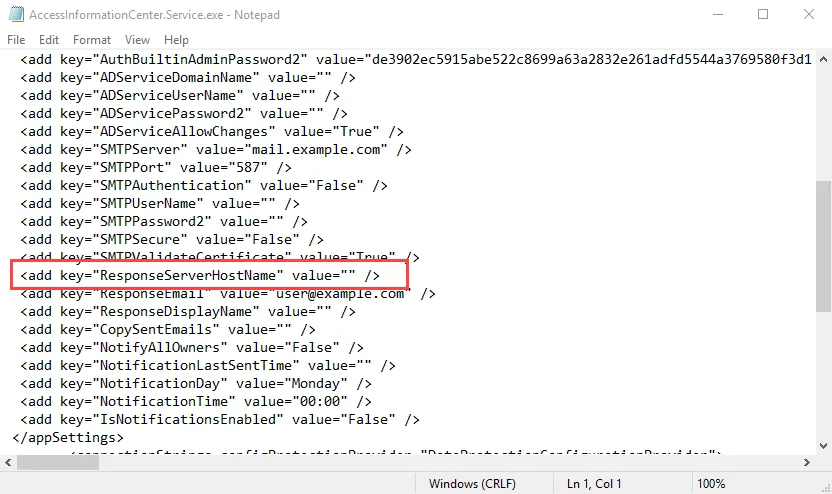
Step 2 – Locate the ResponseServerHostName parameter. By default, the parameter is blank. If you leave it
blank, Access Information Center uses the default URL in notifications. Edit this parameter value by adding an alias server
host name between the double quote marks. For example, the parameter would look like this if the
desired alias server host name is AccessInformation.NWXTech.com:
<add key="ResponseServerHostName" value="AccessInformation.NWXTech.com" />
Step 3 – Save and close the AccessInformationCenter.Service.exe.config file.
Notification hyperlinks now use the supplied alias server host name.