Timeout Parameter
A user session ends when the timeout parameter for inactivity is reached, and the system logs out the user. By default this is 15 minutes.
When accessing the Access Information Center through the Web Console, its timeout parameter value takes precedence over the Access Information Center timeout parameter value. See the Timeout Parameter for the Web Console topic of the Netwrix Access Analyzer Documentation for instructions on modifying its timeout parameter value.
Configure the timeout parameter within the AccessInformationCenter.Service.exe.config file in
the Access Information Center installation directory:
…\STEALTHbits\Access Information Center
To modify the timeout parameter:
Step 1 – Open the AccessInformationCenter.Service.exe.config file with a text editor, for
example Notepad.
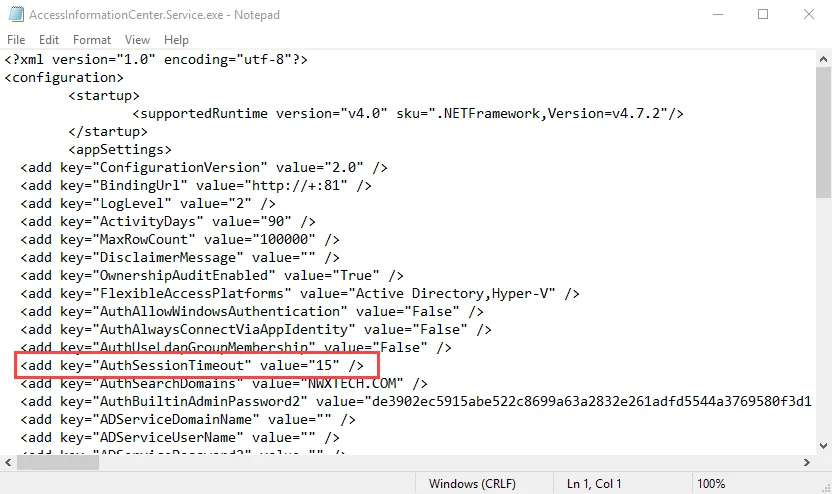
Step 2 – Change the value for the AuthSessionTimeout parameter to the number of
minutes you want. For example:
<add key="AuthSessionTimeout" value="20"/>
Step 3 – Save and close the file.
A user session times out after the number of minutes specified for inactivity, for example after 20 minutes.