Active Directory Page
Connect the Access Information Center to Active Directory for user authentication and to assign resource ownership in the Resource Owners interface. Configure the Active Directory service account on the Active Directory page of the Configuration interface. You need read access to Active Directory for this purpose.
During installation, the system configures the Active Directory service account based on the account used for connecting to the database. If your Database service account uses:
- SQL Server authentication credentials — The system configures the Active Directory service account to use the Local System, or computer account, which typically has Read rights to the domain
- Windows authentication credentials — The system uses the same domain credentials for the Active Directory service account
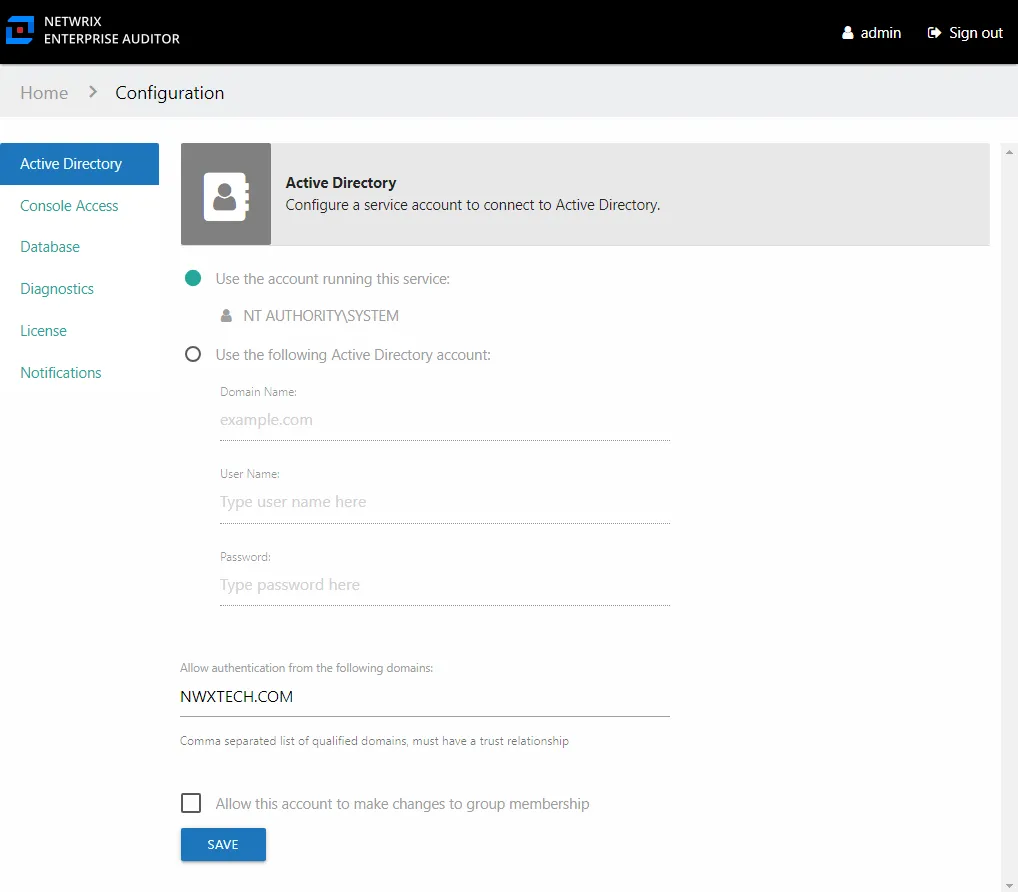
There are two options for the type of Active Directory service account:
-
Use the account running this service — Local System, or computer account (NT AUTHORITY\SYSTEM)
- You can configure a group Managed Service Account (gMSA) to run the Netwrix Access Information Center service. See the Group Managed Service Account (gMSA) Configuration topic for additional information.
-
Use the following Active Directory account – Uses a domain account with the required permissions to Active Directory. The supplied User Name [DOMAIN\USERNAME] and Password become the Active Directory service account.
Multiple Domains
By default, only domain users from the domain where the Access Analyzer Console resides can access the Web Console and the Access Information Center. The Allow authentication from the following domains option grants access from other domains. Add any additional required domains to the default domain as a comma separated list.
- For example:
NWXTECH.COM,CORP.EXAMPLE.COM
All domains provided must have a trust relationship with the domain where the Access Information Center resides.
If the Web Console is enabled for access from multiple domains, the Access Information Center should be configured to be accessible by the same domains. See the Enable Multiple Domain Access topic of the Netwrix Access Analyzer Documentation for additional information.
All domains enabled to access the Access Information Center must also have data collected by the .Active Directory Inventory solution of Access Analyzer.
Commit Group Membership changes
The Access Information Center can optionally be configured to commit Active Directory group membership changes via the change modeling feature, by resource owners via ad hoc changes, or as part of the Resource Reviews and Self-Service Access Requests workflows. This option requires more permissions and setup. After the prerequisites are in place, you can enable it on this page.
When checked, the Allow this account to make changes to group membership option uses the Active Directory service account to commit group membership changes. See the Commit Active Directory Changes topic for additional information on provisioning the Active Directory service account and best practices for group and resource management through the Access Information Center
Click Save when any changes are made to this page.
Update the Active Directory Service Account Password
To update the Active Directory service account password, these steps only apply for the Use the following Active Directory account option:
Step 1 – On the Active Directory page, enter the new password in the correct field.

Step 2 – Click Save. Then click OK to confirm. After you save the settings, you must re-authenticate to continue using the Access Information Center.
The Active Directory service account password has been updated.