Access Report
The Access report at the domain object level provides information on the level of access trustees have at the domain object level. This report includes a Permission Source table.
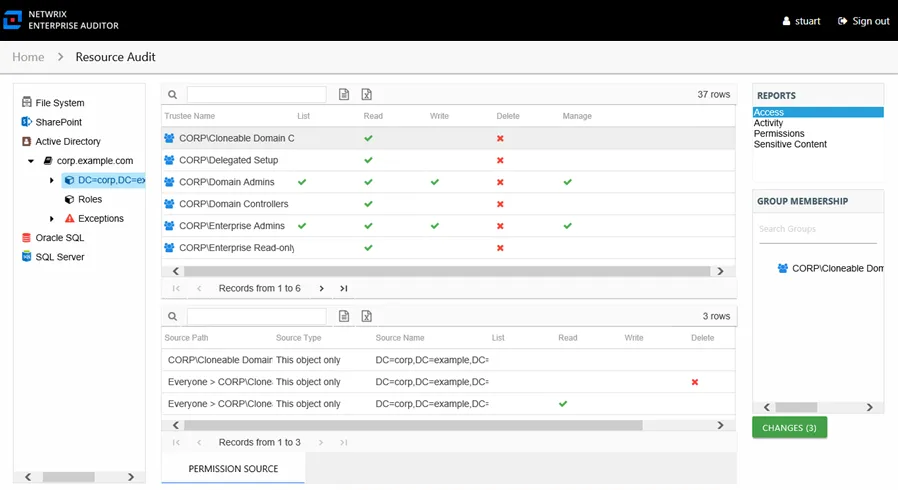
This report contains the following columns:
- Trustee Type – Type of the trustee (for example, Domain User or Domain Group)
- Trustee Name – Owner of the trustee account
- Trustee Account – Active Directory account associated with the trustee
- Department – Department to which the trustee account belongs
- Title – Trustee’s title as read from Active Directory
- Mail – Trustee’s email account as read from Active Directory
- EmployeeId – Corporate ID for the employee as read from Active Directory
- Description – Description of the trustee object as read from Active Directory
- DistinguishedName – Distinguished name for the trustee account
- ObjectSid – Security ID of the object
- Disabled – True or False if trustee account is disabled
- Deleted – True or False if trustee account is deleted
- Stale – True or False if the Access Analyzer data collection and analysis configuration considers the trustee account stale (based on how long the account has been inactive)
- Direct – True or False if the permission is directly assigned
- List – Right to view list of resources
- Read – Right to view/read resources
- Write – Right to add or modify resources
- Delete – Right to delete resources
- Manage – Equivalent to full control over resources
- Changed – True or False if the trustee has changes modeled that would impact access to the selected resource
If the selected trustee in the top section of the report is a group, the Group Membership pane displays the group membership, including nested groups.
There is one table at the bottom displaying Permission Source for the selected trustee. It contains all of the ways the system grants rights to the selected trustee for the selected resource.
-
Source Path – Location where the audited object received rights to the selected resource, which appears in two ways:
- Directly Applied – Rights the audited object received directly
- Access through another trustee, path starts with trustee who has the direct rights and shows all nested groups leading to the audited object
-
Source Type – Source of the permission (for example, Share, Folder, Site Permission, Web Application Policy, and so on)
-
Source Name – Name of the resource with this permission
-
List – Right to view list of resources
-
Read – Right to view/read resources
-
Write – Right to add or modify resources
-
Delete – Right to delete resources
-
Manage – Equivalent to full control over resources
The following columns display the combined direct and inherited rights:
- Allow Mask – Bitmask corresponding to Windows ACE permission bits for combined direct and inherited allow rights
- Deny Mask – Bitmask corresponding to Windows ACE permission bits for combined direct inherited deny rights