NetApp FPolicy Options Tab
The NetApp FPolicy Options tab provides options to configure FPolicy server settings for monitoring a NetApp Data ONTAP Cluster-Mode device.
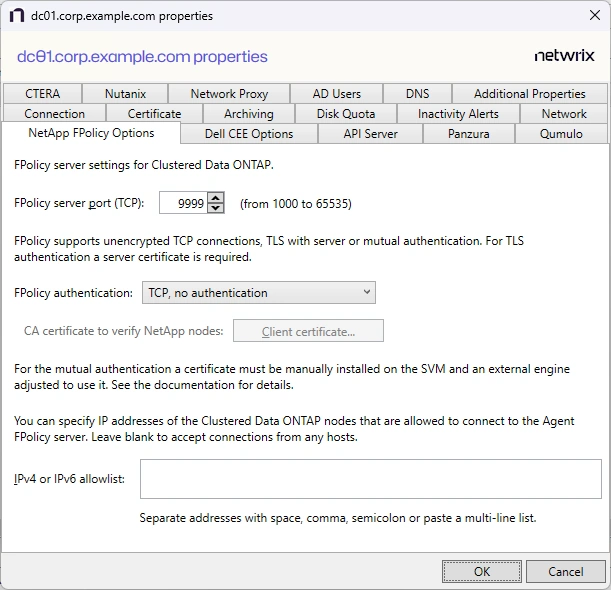
The available options are:
-
FPolicy server port (TCP): [number] (from 1000 to 65535) – Enter the FPolicy server port. The default is 9999.
-
FPolicy authentication – Select from the following options in the dropdown list. For TLS server authentication, a Server certificate is required. For TLS, mutual authentication, a Server certificate and Client certificate are required.
- TCP, no authentication – Default setting, with no server authentication required
- TLS, server authentication – Click Server certificate to open the Server certificate window and import a certificate
- TLS, mutual authentication – Click Server certificate to open the Server certificate window and import a certificate, and Client certificate to open the Trusted client or CA certificate window to import a certificate
-
IPv4 or IPv6 whitelist – Enter IP addresses of the Clustered Data ONTAP nodes allowed to connect to the FPolicy server. Separate addresses with space, comma, semicolon, or a multi-line list. Leave the box blank to accept connections from any hosts.
Click OK to commit the modifications. Click Cancel to discard the modifications. The Agent Properties window closes.