1Secure Integration
Activity Monitor can forward activity from monitored file storage devices to Netwrix 1Secure, a SaaS solution for auditing and reporting. Activity Monitor agents send events to the Netwrix Cloud Agent, which uploads them to 1Secure. Use this integration to investigate and report on file storage activity in 1Secure.
The 1Secure integration supports file storage devices only.
Supported platforms
- Azure Files
- Cohesity SmartFiles
- CTERA
- Dell VNX/Celerra
- Dell Isilon/PowerScale
- Dell Unity
- Dell PowerStore
- Everpure FlashArray (beta)
- Everpure FlashBlade (beta)
- Hitachi NAS
- Nasuni
- NetApp
- Nutanix Files
- Panzura
- Qumulo
Activity Monitor also reports Windows file system activity, although 1Secure has dedicated support for Windows devices, which includes file activity.
Prerequisites
You must deploy Netwrix Cloud Agent and Netwrix Activity Monitor 10.2 in your on-premises environment. Netwrix recommends installing both on the same Windows server, but you can install them on different servers, for example if you already use Activity Monitor.
The Cloud Agent listens for Activity Monitor (NAM) Agent connections on port 4507 by default. The Cloud Agent adds this port to the Windows Firewall exclusions automatically. If NAM Agents run on other servers, ensure they can reach this port.
How it works
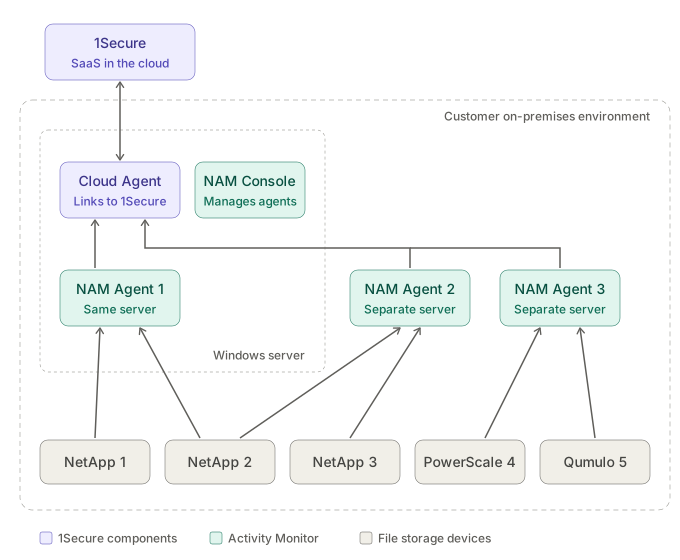
Configuration. Use the Activity Monitor Console to configure activity monitoring of target systems. This differs from other 1Secure data sources: you configure monitoring in the Activity Monitor Console first, not in the 1Secure interface.
Monitoring. NAM Agents do the actual monitoring. A single agent can monitor multiple storage devices. To scale out or add fault tolerance, deploy additional agents.
Data flow. For each monitored storage device, you configure Activity Monitor to forward activity to the Netwrix Cloud Agent. NAM Agents push activity and device status to the Cloud Agent in near real time. The Cloud Agent acts as a hub: it batches the events and uploads them, together with device statuses, to 1Secure.
Secure connection. Before NAM Agents can forward activity to the Cloud Agent, you must establish a secure connection between the two using an enrollment code. The connection uses mutual TLS (mTLS) with pinned certificates.
Configure monitoring in Activity Monitor
Configure monitoring of your storage devices in the Activity Monitor Console before you add them to 1Secure.
If you already deployed Activity Monitor and it monitors your storage devices, skip to Connect Activity Monitor to Cloud Agent.
-
Install Netwrix Activity Monitor on the same server as the Cloud Agent.
-
In the Activity Monitor Console, deploy a NAM Agent. You can install the first agent on the same server as the Console and the Cloud Agent. To scale out or add fault tolerance, deploy additional agents on separate servers.
-
On the Monitored Hosts & Services page, click Add Host/Service and add each storage device you want to monitor.
noteThe required parameters and configuration depend on the device type. See the NAS Device Configuration section for platform-specific instructions.
-
When prompted to select outputs, add a Log File output. You need at least one output, and you add the 1Secure output later, in the next section. The log file also lets you verify that Activity Monitor collects events correctly before you connect Activity Monitor to 1Secure.
After you add the 1Secure output, you can disable the Log File output. Netwrix recommends keeping it enabled with the retention set to 1–2 days, so it doesn't consume much disk space.
Connect Activity Monitor to Cloud Agent
-
Install Netwrix Cloud Agent on the same server as the Activity Monitor.
-
Open the Netwrix Cloud Agent Configuration application.
-
Under Activity Monitor connection status, click Configure.
-
Click Copy Enrollment Code to Clipboard.
noteThe enrollment code is valid for 1 hour, and you can use it more than once. You can use the same code to connect multiple storage devices, regardless of which NAM Agent monitors them.
-
Open the Netwrix Activity Monitor Console.
-
On the Monitored Hosts & Services page, select the storage device you want to forward activity from.
noteYou can select multiple storage devices at the same time.
-
Click Add output, then select Netwrix 1Secure Cloud Agent.
-
In the Enrollment code field, paste the code you copied. The code fills in the server address and port automatically. Change them only if needed.
-
Click Enroll.
-
Verify that the operation succeeds and the Connected successfully message appears.
Add the Network Attached Storage source group in 1Secure
- Log in to 1Secure.
- Open your organization configuration and go to the Sources section.
- Click Add, then select Network Attached Storage.
- Select the site where you installed the Cloud Agent.
- Enter a name for the source group, for example,
NAS. - For the Network Attached Storage Activity (NAM) connector, select Monitor this connector and collect activity data, then complete the wizard.
Storage devices should appear in the new source group within about 5 minutes. Each device appears as a source and reports the same status that the Activity Monitor Console shows.
Create a separate Network Attached Storage source group for each site. If you later add storage devices to Activity Monitor, they appear in the group automatically.
View activity
To search the collected events:
- Go to Reports > Activity > New Investigation.
- Set the filter:
ConnectorEqualsNetwork Attached Storage Activity (NAM).