Nasuni Tab
After you add a Nasuni host to the monitored hosts/services table, you edit the configuration settings using the tabs in the Properties window of the host.
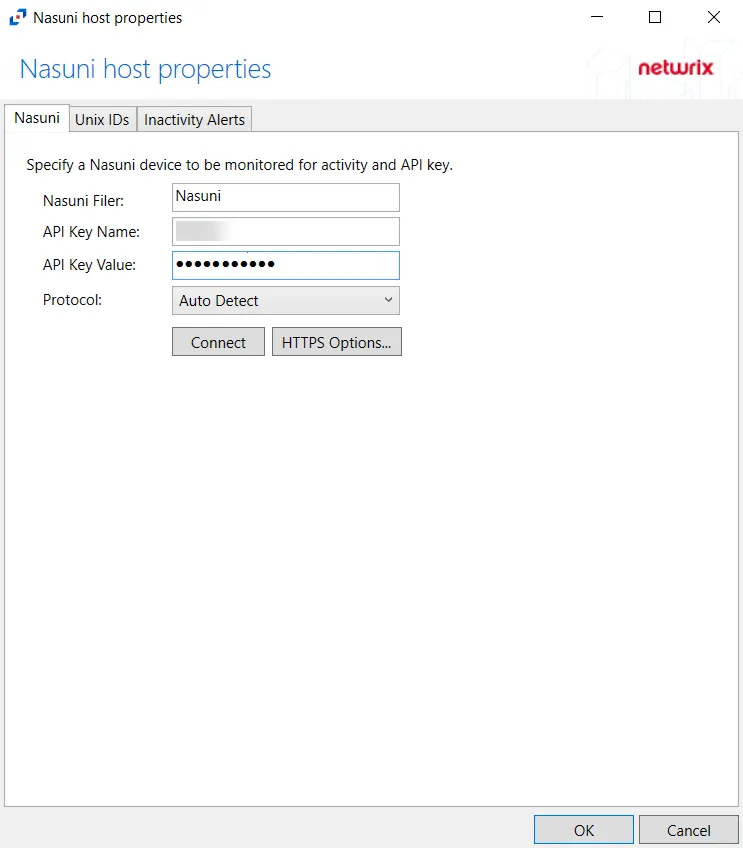
On the Nasuni tab, you can modify settings with the information you entered when the Nasuni host was added.
The configurable options are:
-
Nasuni Filer – Enter the name of the filer
-
Username – Enter the user name for the Nasuni account
-
Password – Enter the password for the user name
-
Protocol – Select from the following options in the dropdown list:
- Auto Detect
- HTTPS
- HTTPS, ignore certificate errors
-
Connect – Click to connect using the selected protocol and validate the connection with Nasuni
 -
HTTPS Options – Opens the Trusted server certificate window to customize the certificate
verification during a TLS session
-
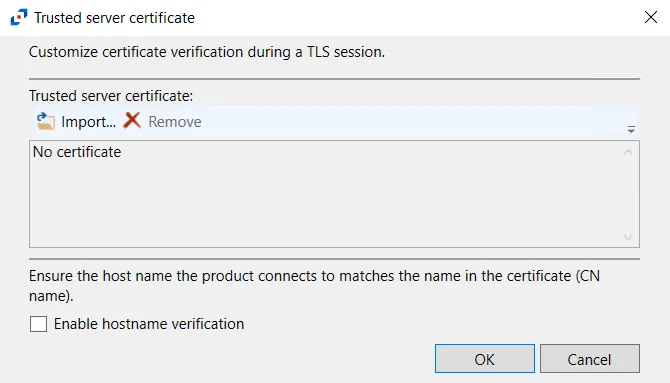
HTTPS Options – Opens the Trusted server certificate window to customize the certificate
verification during a TLS session
- Import – Click to browse for a trusted server certificate
- Remove – Click to remove the selected trusted server certificate
- Enable hostname verification – Select this checkbox to ensure that the host name the product connects and matches the name in the certificate (CN name)
- Click OK to close the window and save the modifications.