Unity Initial Setup with Unisphere
Step 1 – Edit the NAS Server > Protection and Events > Events Publishing > Select Pool settings:
- Add CEPA (CEE Plugin Architecture) server – This is the server where you install CEE (Common Event Enabler). Recommend that this server also hosts the Activity Monitor activity agent.
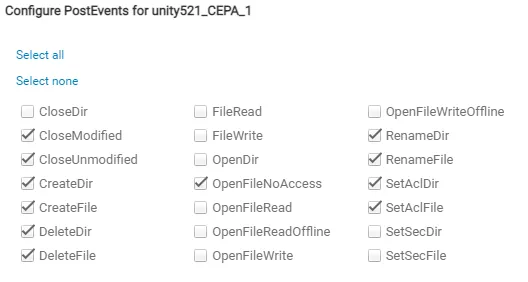
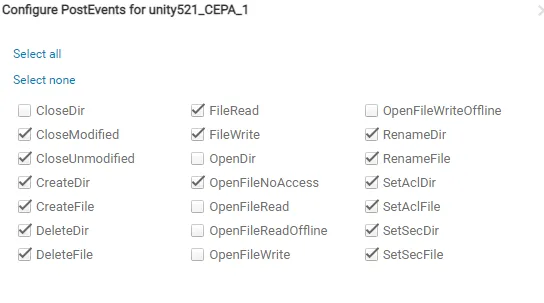
- Enable the following events for Post Events.
Required Unity events needed for CIFS Activity:
Required Unity events needed for NFS Activity:
Step 2 – Enable Events Publishing:
-
Edit the FileSystem > Advanced settings:
- NFS Events Publishing – Enabled (required for NFS protocol monitoring)
- SMB Events publishing – Enabled (required for SMB / CIFS protocol monitoring)
Once Unity setup is complete, it is time to configure and enable monitoring with the Activity Monitor.