SQL Server-Level Roles
This report shows the server-level fixed and custom roles for the selected SQL Server instance, grouped by role name. The details for each role include its name, type, and a list of the effective role members and member types. Use this report to control role membership and permissions.
To read more about SQL server-level roles, refer to this Microsoft article.
To instruct Netwrix Auditor to collect data needed for this report, make sure that Collect data for state-in-time reports option is selected in the monitoring plan properties. See Settings for Data Collection.
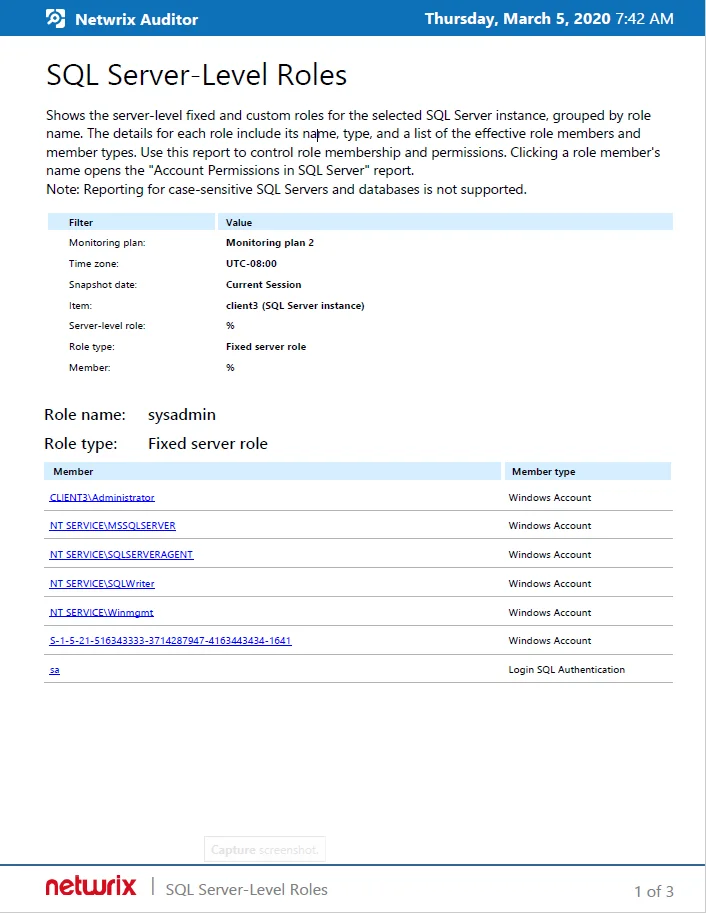
Reported data
The report has a summary section with general information on the selected SQL Server object, and the details section presented in the table format.
The summary section shows:
- Role name
- Role type — Fixed server role or Custom role
The detailed information under summary includes the list of effective members for this role, where:
- Member — role member name.
- Member type —possible values:
- Windows Account
- Login SQL Authentication
- DB SQL User with password
Filters
This report has the following filters:
- Monitoring plan — name of the monitoring plan set to collect data from the SQL Server you need.
- Time zone — time zone where Netwrix Auditor server is located, for example, UTC-08:00. This value is filled in automatically. time zone where Netwrix Auditor server is located, for example, UTC-08:00.
- Snapshot date —select the date of state-in-time snapshot you want to report on. By default, the report includes data obtained during the latest data collection session (Current Session). To report on other snapshots, make sure they are available through import. For details, see Manage historical snapshots option description in SQL Server.
- Item— name of the SQL Server instance monitored with selected monitoring plan.
- Server-level role —select the role that you want to explore.
- Role type — Fixed server role or Custom role.
- Member— role member name.
Considerations and limitations
- Reporting for case-sensitive SQL Servers and databases is not supported.
Related reports
- Clicking a role member (account) link opens the Account Permissions in SQL Server report.
Usage example
Database administrators in the Corp organization need to discover what fixed server roles a certain user has on the SQLSrv01\SQLServer2016 instance. This instance is included in the monitoring plan named SQL Servers Monitoring.
To examine the relevant data, they generated the SQL Server-Level Roles report with the filters set as follows:
- Monitoring plan:_SQL Servers Monitoring_
- Snapshot date:_Current Session_
- Item:_SQLSrv01\SQLServer2016_
- Server-level role: %
- Role type: Fixed server role
- Member:_Corp\Jim.White_