Select Data Sources
Remember, the Access Reviews must already be installed on the Auditor server.
You can configure Netwrix Auditor Access Reviews in two ways:
- Select Data Sources in the General Settings
- Select Data Sources in the Monitoring Plan
Select Data Sources in the General Settings
If you plan to use Access Reviews for multiple data sources, configure the settings to work with the data sources that you select.
To configure Access Reviews in Netwrix Auditor:
Step 1 – Go to Settings > General > Access Reviews.

Step 2 – Click Manage.
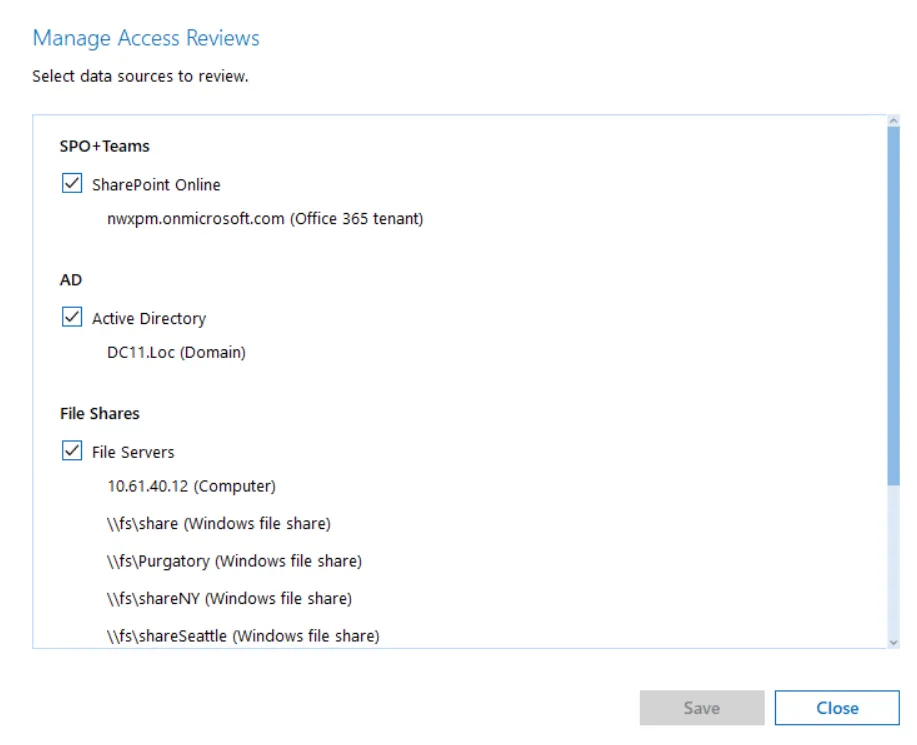
Step 3 – Select the data sources you want to review.
Step 4 – Click Save.
Netwrix Auditor Access Reviews is configured and ready to use in the Netwrix Auditor.
Select Data Sources in the Monitoring Plan
If you plan to use Access Reviews for a specific monitoring plan, configure Access Reviews in that monitoring plan.
To configure Access Reviews in Netwrix Auditor:
Step 1 – Go to Configuration > Monitoring plans.
Step 2 – Double-click the monitoring plan you want.
Step 3 – Click the Edit data source button on the left.

Step 4 – Navigate to the Send data for Access Reviews and select the checkbox.
Step 5 – Click Save or Save & Close.
Netwrix Auditor Access Reviews is configured and ready to use in the Netwrix Auditor.