Configuring subsite and list processing
The Entity Configuration tab displays configuration for the site collection. You can navigate to the subsites/lists to configure their settings.
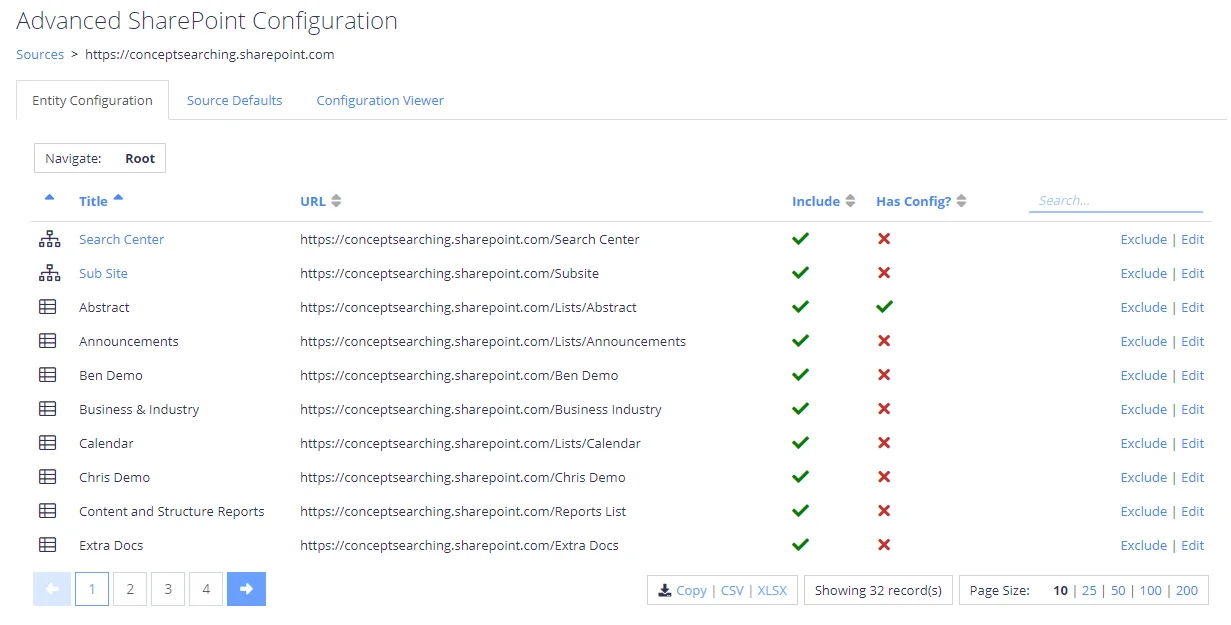
- The Include column for each entity contains an indicator (tick or cross) showing whether the container is configured for crawling.
- The Has Config? column contains an indicator showing whether custom metadata mappings have been defined for the entity.
- The Exclude link in the last column lets you exclude the selected list or subsite from crawling. For excluded entities, this column contains the Include link.
NOTE: Excluding the entity will not automatically remove content from the index. If content has already been crawled, then it should be manually deleted via the QS; alternatively, you can re-collect content source data.
When new content is defined for crawling (i.e. included), a re-index operation should be performed.
- The Edit link lets you modify settings for the selected list or subsite. See the following sections for details.
List Configuration
- To modify list/library settings, select it and click Edit.
- In the properties window, configure Content Fields and Special Field mapping as needed. You can use the dropdown lists/selectors to search for and assign SharePoint fields to the appropriate mappings.
Consider the following:
- In the absence of a list level configuration the collector will automatically use the subsite level mapping (on a field by field basis).
- In the absence of a list level configuration the appropriate source defaults will automatically be used.
Subsite Configuration
- To modify subsite settings, select the subsite and click Edit.
- In the properties window, configure Content Fields and Special Field mapping as needed. You can use the dropdown lists/selectors to search for and assign SharePoint fields to the appropriate mappings.
Consider the following:
- In the absence of a subsite level configuration the collector will automatically use the source level mappings (on a field by field basis).
- Content fields can't be configured at the subsite level.