Features and Benefits
Netwrix Data Classification is a platform that identifies data that’s important for your organization, helping you reduce risk and unleash the true value of this data.
Powered by unique compound term processing technology, it enriches your enterprise content with accurate and consistent metadata empowering you to work with data more confidently. By seeing which data is valuable, you can organize it in a way that promotes productivity and collaboration. By knowing where sensitive or regulated data is, you can reduce the risk of breaches and satisfy security and privacy requirements with less effort and expense. And by locating and getting rid of redundant and obsolete data, you can reduce storage and management costs.
Netwrix Data Classification includes applications for Windows File Servers, Nutanix Files, Dell EMC, NetApp, SharePoint, Office 365, Exchange, SQL Server, Oracle Database, Box, Dropbox, Google Drive, and MySQL. The platform provides a single panoramic view of your enterprise content, whether it’s located in structured or unstructured data stores, on premises or in the cloud.
Major benefits:
- Identify sensitive information and reduce its exposure
- Improve employee productivity and decision making
- Reduce costs and risks by getting rid of unneeded data
- Meet privacy and compliance requirements for information governance
- Respond to legal requests without putting your business on hold
How It Works
Netwrix Data Classification identifies and classifies sensitive and business-critical content across your organization, mitigating the risk of data breaches. The program also helps you meet compliance requirements with less effort and expense.
The following figure shows the app architecture and components.
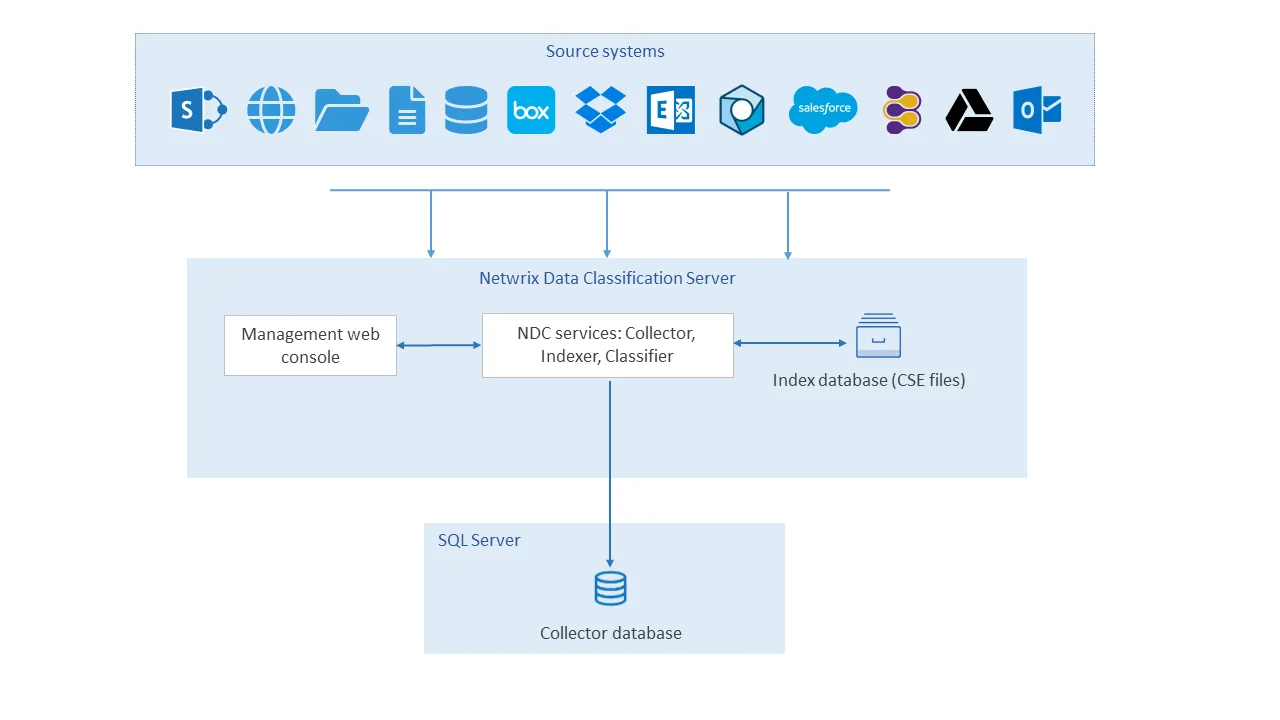
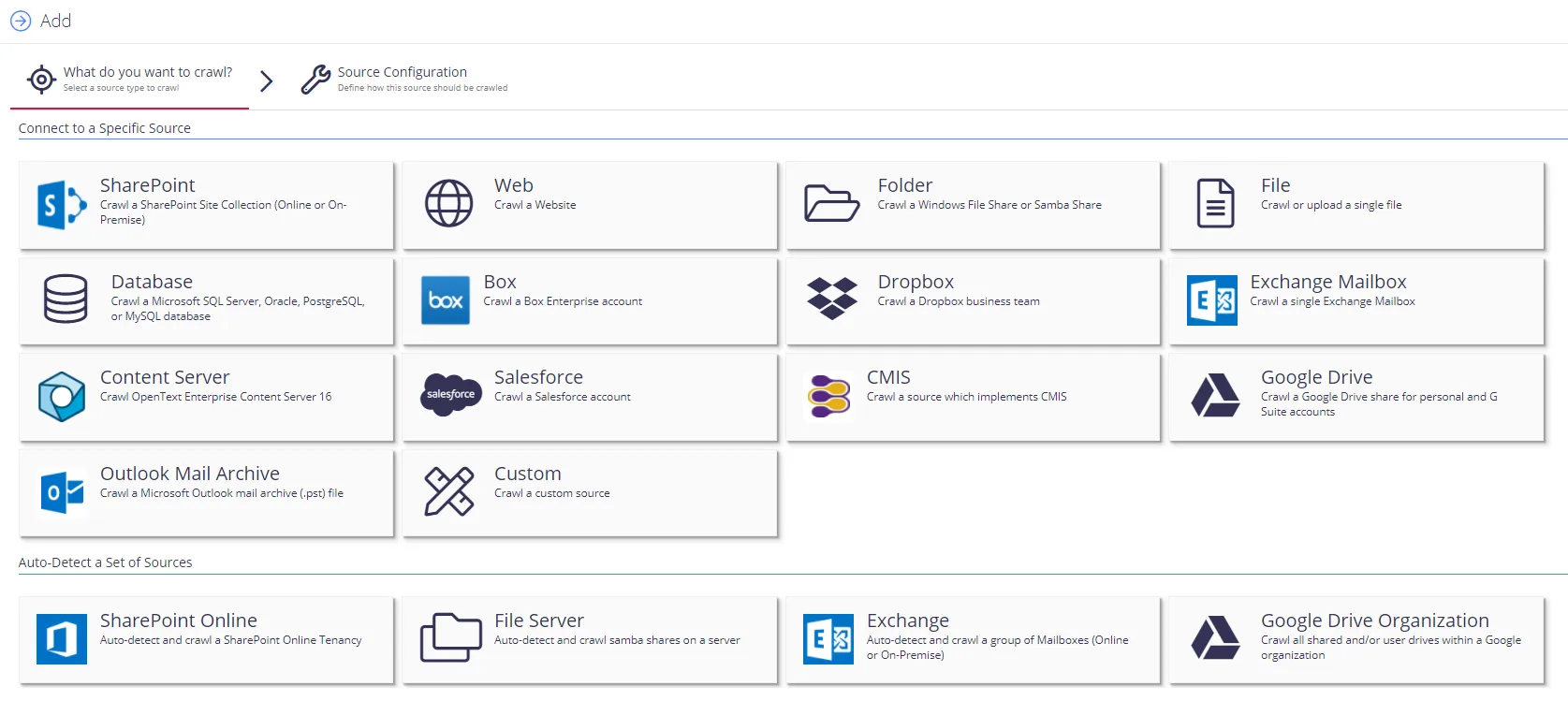
- The user adds data sources using the NDC Management web console (Netwrix Data Classification program).
- The configured data sources are saved to the NDC SQL database.
- The NDC Collector service crawls the data files in each data source, converting documents into plain text and populating file metadata in the NDC SQL database.
- The NDC Indexer service builds and maintains a full-text search index (NDC Index) based on the content and metadata of the collected files.
- The NDC Classifier service performs data classification by matching collected files against pre-built taxonomies (the Netwrix compliance taxonomies) and customer-created taxonomies.
- If Classification Writing is enabled, the assigned classification labels are written to the custom metadata columns for supported document types.
- If Workflows have been defined and are enabled, they are run on documents that meet the workflow conditions.
QueryServer
All interaction between the application and Netwrix Data Classification is via the QueryServer and consists of high-level XML transactions over a Web Services interface.
The primary purpose of the QueryServer is to satisfy retrieval requests from the proprietary probabilistic index (aka NDC Index Database). However, the QueryServer also handles all indexing requests and stores these in the SQL Database for processing by the conceptCollector and Indexer.
NDC Collector
The NDC Collector is responsible for importing new documents into the system.
In addition to collecting documents the NDC Collector also performs the following:
- conversion of documents to text format
- automatic language detection
The NDC Collector manages the queue of documents to be indexed, and outputs its results, via the SQL database.
The NDC Collector is implemented as a Microsoft Windows Service.
Indexer
The Indexer takes each new document the NDC Collector collected and indexes terms from the extracted text within the NDC Index.
The index can be read from concurrently with the indexing process. However, significant indexing activity can lead to a corresponding drop in index performance. In this case, run the Indexer during quiet periods (e.g. overnight) or perform indexing separately with a batch process updating the live index periodically.
If you want the Indexer to update the live index as a background task, run it on the same server where you store the NDC Index Database.
The Indexer is implemented as a Microsoft Windows Service.
For file system and SharePoint/OneDrive sources, event handlers/file watchers dynamically schedule documents for crawling when they are created/modified. You only need to set up reindexing for those sources to catch documents that the event handlers miss.
For File Share scans, the source watchers will queue up new and updated documents for crawling automatically. This function even operates when a source is paused. If you want to stop adding any content from specific file shares, add the path for those files shares to the Source Watcher Exclusions.
NDC SQL Database
The NDC SQL Database is used to manage the queue of documents being indexed. It may also be used by the application to store any application-specific information independently from Netwrix Data Classification.
The QueryServer will also retrieve selected information for the current hitlist from the SQL Database such as: the document title, body text, etc. However, this information is always requested using a primary key and so is very efficient. The hitlist itself is always constructed and ranked using information contained in the proprietary conceptDatabase.
The current release of Netwrix Data Classification supports SQL Server 2008 R2 or later.
NDC Index
The NDC Index contains a probabilistic index for all documents that have been indexed by the system. The index files use the extension “.cse”, but temporary files (extension “.tmp”) are used when merging changes into the index.
The NDC Index files should be located on the same server as the Netwrix Data Classification server because the query and indexing processes can be highly disk-intensive.
"text.cse" isn't supplied since it will be created automatically when the first documents are collected.
Classifier
The Classifier classifies collected documents against NDC taxonomies. It can make use of the built-in taxonomies and any custom taxonomies created by the user, and can be linked to SharePoint termsets to classify against them as well. It also runs user-configured workflows against any documents that meet the conditions of the workflow, and is used to perform Data Subject Access Requests.
The Classifier is implemented as a Microsoft Windows Service.