Dropbox
Use the Dropbox source configuration screen to enable the crawling and classification of content stored in Dropbox cloud storage.
IMPORTANT: Ensure you created and configured a Dropbox app before adding the source. See Configure Dropbox for Crawling for app requirements.
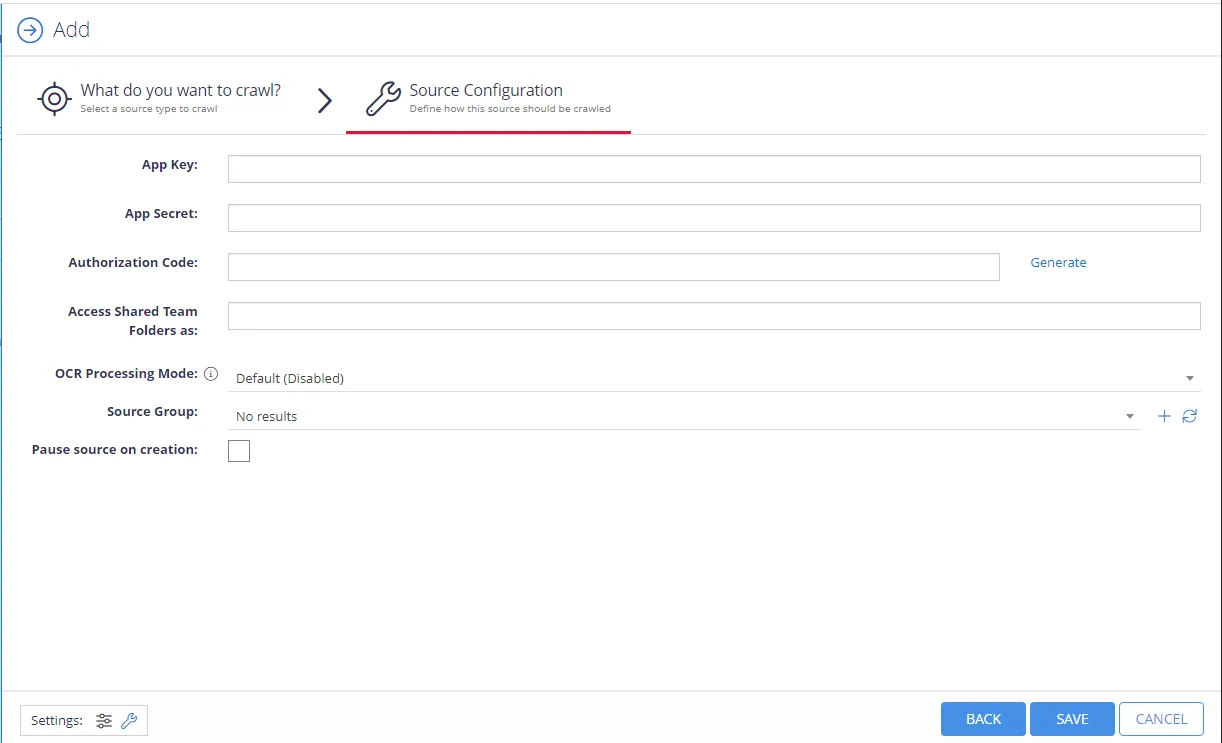
Complete the following fields:
| Option | Description |
|---|---|
| App key | Generated automatically as you create your Dropbox app. |
| App secret | Generated automatically as you create your Dropbox app. Click Show in the Dropbox app to view the value. |
| Authorization code | Select Generate and copy the code from your app. |
| Access Shared Team Folder as | If you have team folders in your Dropbox namespace and you want to crawl one or more of these folders with Netwrix Data Classification, provide the email address of an account that has access to the team folders you want to crawl. For personal folders, this option isn't required. See the Dropbox Namespace guide for details on namespace types and access requirements. |
| OCR Processing mode | Select document images processing mode:
|
| Source Group | Netwrix recommends creating a dedicated source group for Dropbox. If there are no existing Dropbox source groups, a source group named Dropbox Sources will be created automatically. |
| Pause source on creation | Select if you want to make other configuration changes before collection of the source occurs. |