SharePoint Online
If you're an Office 365 customer, you can configure the collector service to automatically detect and queue your employees' SharePoint Online sites hosted in Office 365. You must supply an account with Tenant administration rights and set how often the service detects new SharePoint Online sites. You can also provide a filter expression to include certain SharePoint Online paths and exclude others as required.
Optionally, you can set up the resources needed to enable and configure Netwrix Data Classification on the detected SharePoint Online sites. Templating allows an administrator to preconfigure classification settings for site collections. For more information, review the associated templating guide.
To crawl the data within SharePoint Online, you need to enable Multi-Factor Authentication:
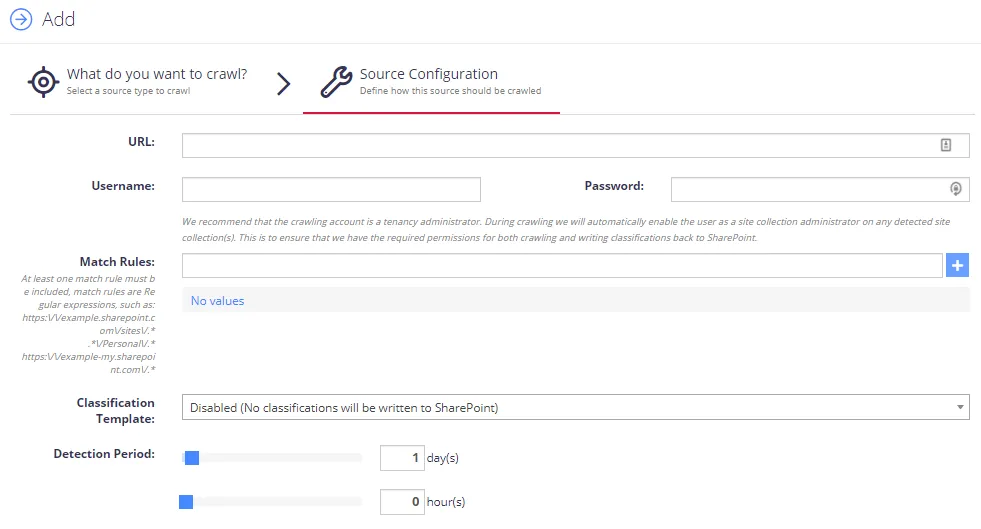
Complete the following fields:
| Option | Description |
|---|---|
| SharePoint URL | The root of the site collections to add. Click the “(Multiple Urls)” link to add multiple SharePoint Online Site Collections that use the same credentials for crawling. |
| Cloud Environment | Select the Azure instance that hosts your SharePoint Online tenant. |
| Username | Enter username in the following formats: DOMAIN\USERNAME and USERNAME@DOMAIN. |
| Password | Enter your password for SharePoint Online. |
| Match Rules | Enter the site collections' path for crawling the documents. You must include at least one match rule. Match rules are regular expressions, for example, https://example.sharepoint.com/sites/. |
| Classification template | Specify the required Classification template for writing classifications. See the Enable Write Classifications and Working with SharePoint templates topics for more information. |
| Detection Period | Specify how often to detect new site collections. Default period is 1 day. |
After configuring the settings, click the Save button.