Upgrade to the Latest Version
Netwrix recommends that you upgrade from the older versions of Netwrix Data Classification to the latest version available to take advantage of new features and fixes.
Upgrade Prerequisites
Before you start the upgrade, Netwrix strongly recommends taking the following steps:
Step 1 – Ensure you have .NET Framework 4.7.2 installed on the computer where Netwrix Data Classification resides. If not, download it from Microsoft website: Download .NET Framework 4.7.2.
Step 2 – Back up NDC SQL database. Netwrix recommends the following:
- Start Microsoft SQL Server Management Studio and connect to SQL Server instance hosting this database.
- In the Object Explorer, right-click the database and select Tasks > Back Up.
- Wait for the process to complete.
Step 3 – Stop all NDC services. Netwrix recommends the following:
- On the computer where Netwrix Data Classification resides, start the Netwrix Data Classification Service Viewer tool. Select Stop next to each service.
- If you upgrade a Distributed Query Server (DQS) environment, stop all services on all instances before upgrading any instance.
If any services are running while the upgrade occurs, database schema updates may fail to apply correctly. If this occurs, Netwrix recommends contacting Netwrix Support for help.
Step 4 – Back up the Index files. Locate the folder containing the index files (the default location is C:\Program Files\Netwrix\Data Classification\Index) and back it up.
For versions of 5.7 before 5.7.10, all NDC services and the NDC IIS Application Pool had to run as the same service account. For 5.7.10 onwards this is no longer necessary, but if you upgrade from an earlier version of 5.7, complete the upgrade to 5.7.10 before changing the service account to avoid upgrade issues.
Upgrade Process
You can upgrade directly to Netwrix Data Classification 5.7 only from versions 5.5 and newer.
After taking the preceding preparatory steps, run the product setup and follow the wizard steps. When the upgrade finishes, all solution components are running.
To upgrade from an earlier version, perform a staged upgrade: first upgrade to version 5.5, then upgrade to version 5.7.
Upgrading a DQS Environment
When upgrading to 5.7.10 or later in an NDC environment that uses the Distributed Query Server (DQS) functionality, upgrade the primary server before the secondary instances. Secondary instances attempt to resynchronize with the primary instance during the upgrade process, and this resynchronization fails if you haven't upgraded the primary instance.
When upgrading to 5.7.10 or later from an earlier version of 5.7, you should run the installer as the NDC service account if possible so that the installer can synchronize the DQS instances automatically. If you don't, you must resynchronize DQS when upgrading each secondary DQS instance. For further details on this process, see the Configuring NDC Servers Cluster and Load Balancing with DQS Mode page.
After the Upgrade
During the upgrade from previous versions, Netwrix Data Classification preserves its configuration, so you can classify your data right after finishing the upgrade. However, you may need to take several steps after upgrading.
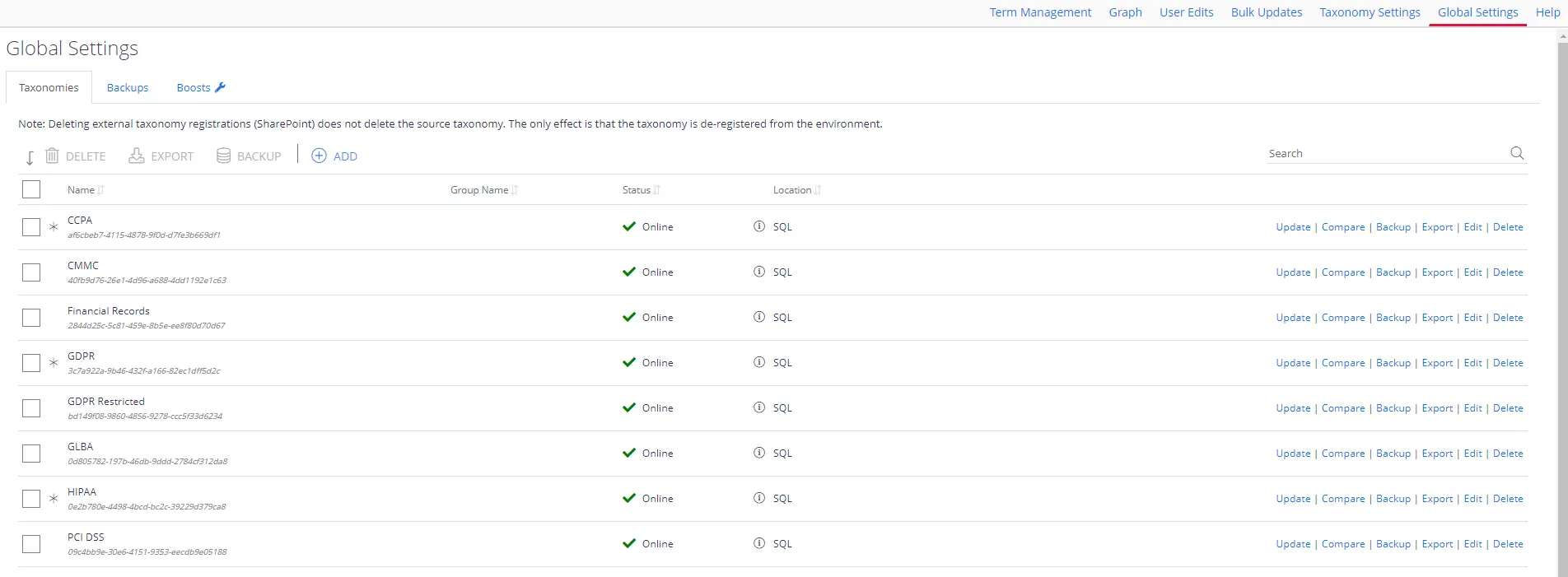
To update taxonomies manually:
Step 1 – In administrative web console, navigate to Taxonomies > Global Settings.
Step 2 – Click Update in the right corner next to each taxonomy.
The upgrade is now complete.