Collector
This configuration tab contains the classification engine settings. Each option has an associated information popup (the “i” symbol next to the option name) which describes what the setting does and how it works.
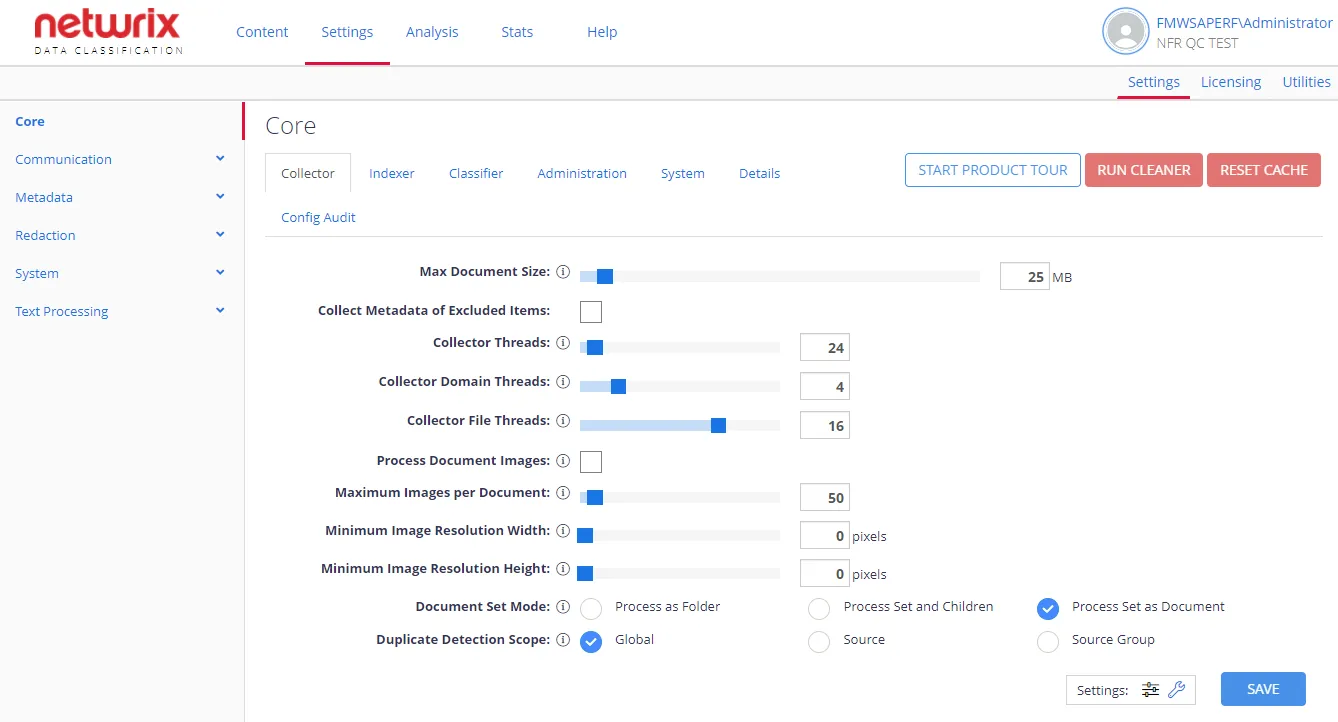
| Option | Description | Comment |
|---|---|---|
| General settings | ||
| Max Document Size | Sets the maximum size of the document to be processed. | Documents exceeding this size will typically be excluded from processing. |
| Collect Metadata of Excluded Items | When enabled, the Netwrix Data Classification services include the document, but from a metadata standpoint only (no text is extracted from the file). | Used in combination with the "Max Document Size" value. Inactive by default. |
| Collector Threads | The number of overall background threads to be used by the Collector to access content from the source system. | Each thread can be considered a "user" when considering load on the source system. See the Knowledge Base article on thread tuning. |
| Collector Domain Threads | The number of threads the Collector uses to access content from each HTTP domain. (Examples: netwrix.com, google.com, microsoft.com, etc.) The "Collector Threads" value automatically caps this number. | Applies to HTTP source types only. Each thread can be considered a "user" when considering load on the source system. See the Knowledge Base article on thread tuning. |
| Collector File Threads | The number of threads used to crawl file system content. | See the Knowledge Base article on thread tuning for details on adjusting file thread counts. |
| Process Document Images | If enabled, the system extracts images from supported documents (Office XML files and PDFs). These images are then collected, and any text found is included (with the document text) for classification. | For this setting to work, OCR must also be enabled at a content type level — to ensure that the extracted images go through the OCR engine. This setting is inactive by default. |
| Maximum Images per Document | Maximum amount of images to process through OCR on a per document basis. | |
| Minimum Image Resolution Width | Minimum resolution (in pixels) of images to process through OCR. | |
| Minimum Image Resolution Height | Minimum resolution (in pixels) of images to process through OCR. | |
| Document Set Mode | Specifies how SharePoint document sets will be treated. Possible options:
| Applies to SharePoint documents. |
| Duplicate Detection Scope | Instructs to exclude detected duplicates from processing within the specified scope: Global, Source, Source Group | Applies to File and web sources. |
| Advanced settings | ||
| Collector User Agent | Is used by Collector service as part of each web request made when crawling HTTP sources — to identify itself to the crawled systems. | |
| Encrypt Text (text.cse) | Encrypts all data stored in text.cse (raw document extracts). | Inactive by default. If data already exists in the index, then to enable encryption on that existing data, you should perform re-collection. For that, click Run Cleaner button on the right. |
| Optimize Text Storage | Reduces storage requirements for stored text. | Enabled by default. At each re-crawl or re-index the program tries to detect whether the document text has changed. |
| Re-use Text Offsets | Reduces storage requirements for stored text by sharing and reusing the stored text. | May slightly increase the demand on the NDC database while processing each de-duplication command. |
| Collector Delay | The sleep time (in milliseconds) between intensive operations, such as storing crawled text. Default is 1 ms. | |
| Collector Polling | The sleep time (in seconds) between Collector batches. | Only used when the Collector queue is empty. |
| iFilter Processing Mode | Specify where the iFilter processing will run. Possible options: Process as Sub Process — run in a separate process Process Internally — run within Collector process | |
| Collector Reader Process Pool Size | The number of external processes that the system uses for iFilter conversion. | Each additional process increases the load on the Netwrix Data Classification server. Netwrix recommends leaving this setting on its default value. See the Knowledge Base article on thread tuning for further details. |