System
This configuration tab contains the settings related to system health, operation, and logging. Each option has an associated information popup (the “i” symbol next to the option name) which describes what the setting does and how it works.
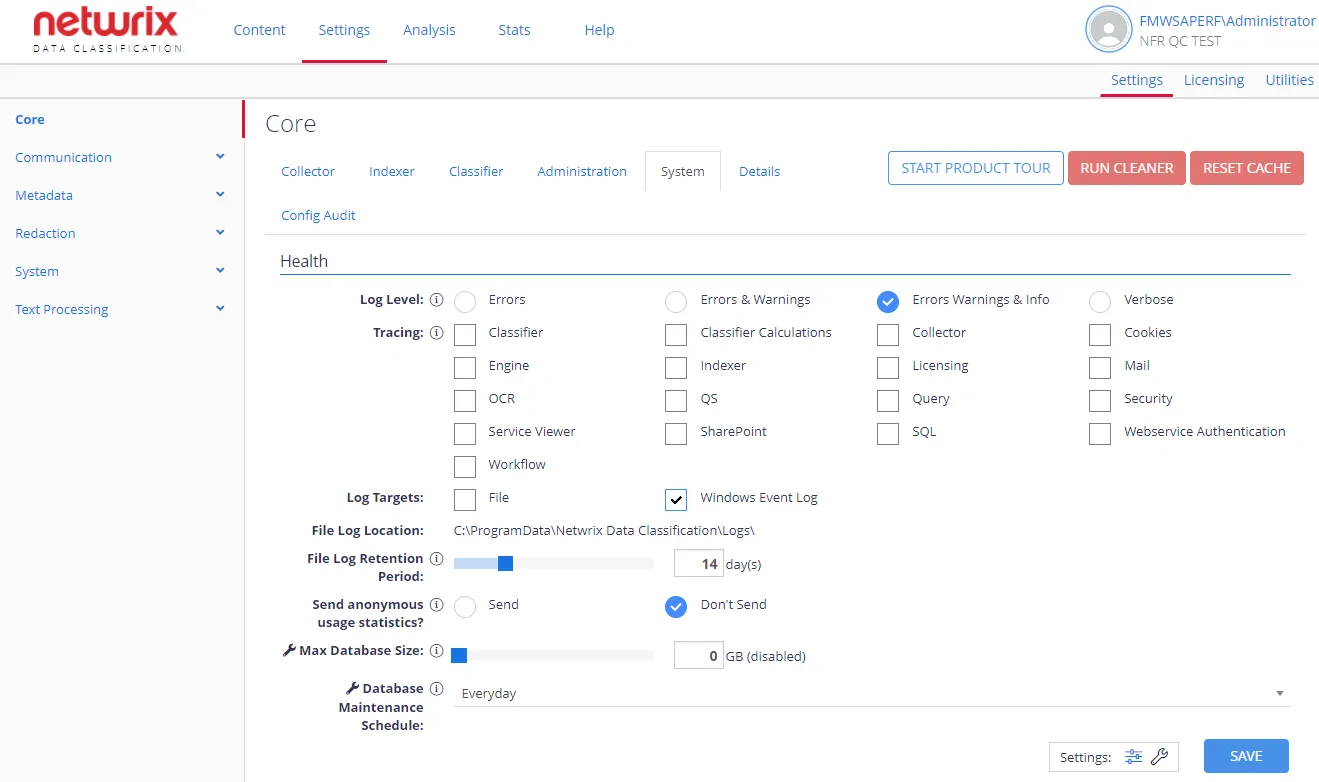
Health
| Option | Description | Comment |
|---|---|---|
| General settings | ||
| Log Level | Defines logging level that should be persisted to the log targets. Supported levels:
| |
| Tracing | Used to control which components of the system persist logs to the log targets. | Applies to selected components (none by default) |
| Log Targets | Select where the log should be written: to a CSV file, to Windows Event Log, or both. | |
| File Log Location | This location shows the default file log location. This value can't be modified. | The default location is C:\ProgramData\Netwrix Data Classification\Logs |
| File Log Retention Period | Number of days a file log is kept after its last write before being deleted. | To keep all logs (without automatic deletion), specify 0 . |
| Send anonymous usage statistics? | Disabled by default. When enabled, the program will send a small amount of information about how the product is being used — to improve the functionality of the product and future offerings. | Personal information/ company data will not be sent. |
| Advanced settings | ||
| Max Database Size | Specifies the max size (in GB) the SQL database will grow to. | When this value is reached, the Collector and Indexer components will be suspended. Default is 0 (no limit). |
| Database Maintenance Schedule | Specify the schedule for running database maintenance (including the rebuilding of SQL Server indexes) | Default is Everyday. |
Configuration Export
You may need to export the current configuration —to send to the support team for debugging purposes. Go to System Configuration > Config > Settings > Core > System and in the Configuration Export section click Export button.