Adding a Clue
To add a new clue, go to the topmost row in the list and specify these clue properties:
- Type
- Clue (rule body)
- Score
- Is Mandatory
When ready, click Insert on the right.
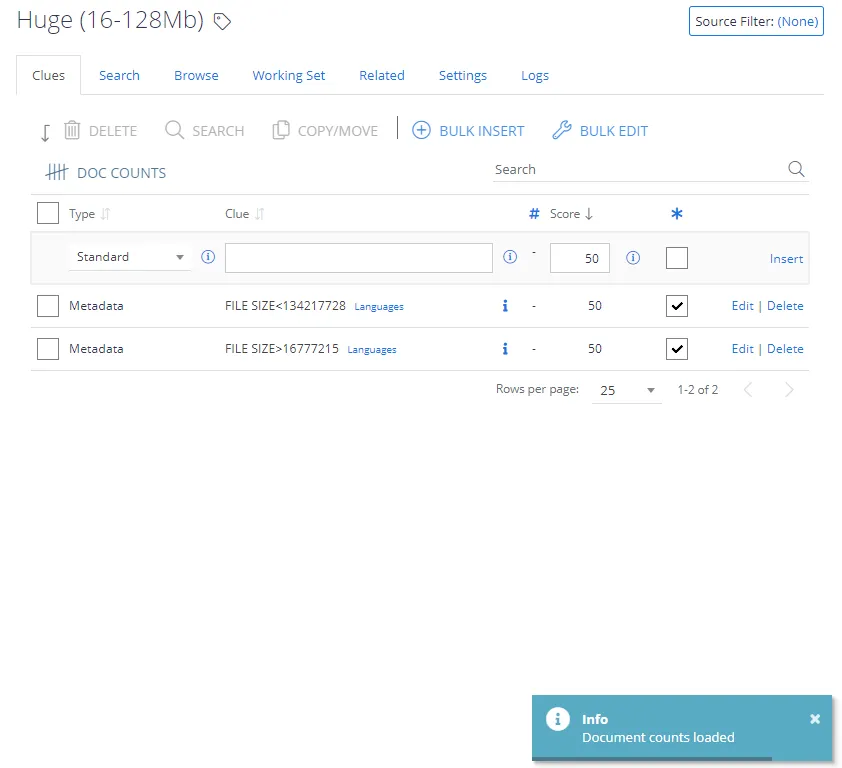
Clue Body
When specifying the clue body, consider exact matching and stemming explained in the following sections.
Exact Matching
There may be any number of words up to a maximum of 200 characters per clue. However, most clues will consist of one, two, or three words.
Use double quotes around phrases to invoke exact phrase matching.
Stemming
Word stemming simplifies classification rules by automatically matching inflected word forms using a single keyword clue. This can be useful to identify how the classification engine implements a clue. The product supports stemming for the following languages:
- Dutch
- English
- French
- German
- Hungarian
- Spanish
- Portuguese
Hovering over a standard clue shows the stemmed version of the word / compound term.
Example: A class called Global Warming may have the following clues:
- Global Warming
- Greenhouse Gases
- CO2 Emissions
- Pollution

To disable stemming, use double quotes around single words.
Score
Scores are percentages of the threshold. For example, if the threshold is 50 then:
- 50 = guarantees that this term alone suffices to classify the document
- 25 = this term will get half way to the target
- 10 = this term is of low importance but its presence should boost a document score
- 0 = zero weight – use to disable a clue
- -10 = this term is a small negative indicator
- -50 = this term is a strong negative indicator
- -1000 = the presence of this term prevents classification of the document
Higher scores indicate a stronger association with the topic.
- Example 1: Global Warming with a score of 50 causes the product to match a document with this concept.
- Example 2: Pollution with a score of 20 (on its own) isn't sufficient to classify the document as being about global warming.
Consider that you can also assign a negative value to clues, which prevents incorrect associations.
- Example 3: Noise pollution shouldn't be associated with Global Warming. So add Noise pollution with a negative value.
Mandatory Clues
You can use the Mandatory checkbox to indicate that a clue is required, i.e. the product can't classify a document against a category unless it matches all of the mandatory clues.
The * icon denotes the mandatory clue selector:

Using the Local Option
In some cases, a further option is available per clue: “Is Local?”. This option lets you restrict a clue to the current Term Set only.
This option is only available for reused terms (SharePoint Term Sets).

- When this option is selected, you can't amend the clue from any other Term Set that contains the re-used Term.
- If you want to share the Term across all Term Sets again, clear the option from the Term Set in which you originally enabled it.
Using Synonyms (SQL taxonomies only)
The Synonyms link is only available for the clues in SQL taxonomies.
Use the Synonyms link to enter synonym definitions.
In general, Netwrix doesn't recommend using this facility. Instead, enter each synonym as separate clues, which generally results in more accurate scoring and therefore better classification results.