Report Subscriptions
Subscriptions for report templates let you schedule email delivery of a variety of reports or set of specific search criteria. Subscriptions are helpful if you use Netwrix Data Classification infrequently and you only need statistics based on individual criteria. For example, an IT manager can provide auditors with weekly reports to prove compliance with regulations.
To view existing subscriptions for reports, navigate to the Report Templates page on the left and click View Subscriptions next to an existing template to view and edit subscriptions.
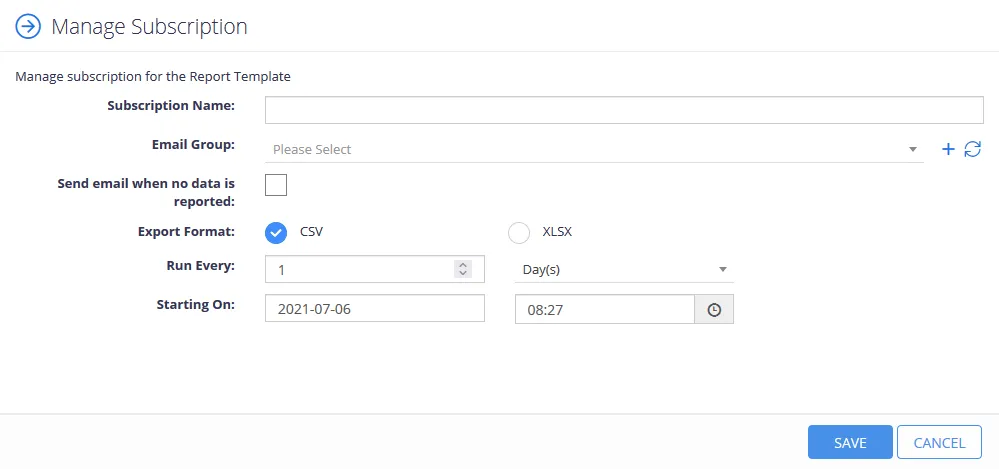
Checking the Create a Subscription box when saving a new report configuration lets users create a new subscription. Configure the following options on the Manage Subscriptions page:
| Option | Description |
|---|---|
| Subscription Name | Create a name for the report subscription |
| Email Group | Enter the email groups to receive the reports. If no email groups exist, click the **(+)**icon to create new email groups. |
| Send email when no data is reported | Check this box to send an email with the report even when there is no data. Leave this box unchecked to disable this option. |
| Export Format | Select whether to export the report as a CSV or XLSX. |
| Run Every: | Set how often the system sends out email reports. Users can choose to send reports in a period of days, weeks, or months. |
| Starting On: | Set the date when the system starts sending out reports. |
Click Save to complete configuration.