Documents Are Crawled Successfully with No Text Ex
Question
Why is Netwrix Data Classification (NDC) crawling your documents successfully, but no text has been extracted?
Answer
Issues with text extraction can have a range of causes. You can find a summary of text extraction errors in the Stats dashboard. Click Details to view a breakdown by type of error.
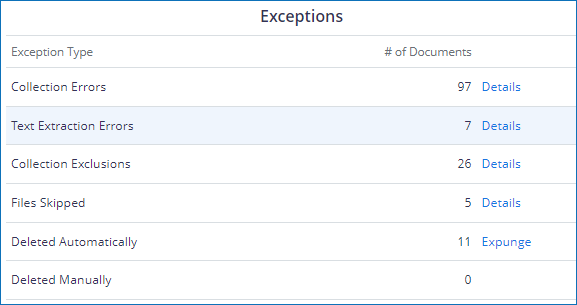
Steps to Diagnose Text Extraction Failure
- Enable Collector and OCR tracing and ensure that the log level is set to
Errors, Warnings & Info. - Find a document that has failed text extraction and re-index it.
- Wait for the Collect Date Time to be updated. This can be viewed from the Page Info screen.
- Review the event logs for a detailed error message about the document's collection.
Intermittent Issues and Backup Extraction Method
If you experience intermittent issues extracting a particular document type, you can enable a backup extraction method through the Content Type Extraction Methods screen in Settings > Text Processing. For example, enabling iFilter as a backup extraction method for Office OLE files may assist with extracting text from problematic documents.
Common Issues
- Missing iFilter: If the content type is configured to use iFilters, make sure that the correct iFilter pack is installed on all servers that NDC is installed on.
- Password Protected Documents: Opening password-protected documents is not currently supported.
- Corrupt Files: Try opening the file manually to verify it. Microsoft Office documents can sometimes be recovered by opening and resaving the file.