Portal login troubleshooting
If you're experiencing difficulties logging in to either the Netwrix Endpoint Policy Manager (formerly PolicyPak) Portal or Cloud Portal, try the log in using the browsers incognito method. If the issue was caused by browser cookies then incognito will usually work.
- Try Incognito in your browser
- Try a different browser
- In the browser where you encounter the issue..
- Clear the browser cache
- Clear the browser cookies
If you prefer to not clear ALL your browser cookies, see below for how to clear those specific to Endpoint Policy Manager for different browsers - leaving other site cookies intact - and how to clear the browser cache.
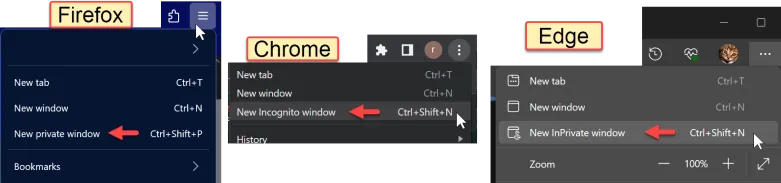
Incognito/Private Window
Here's how to go incognito for different browsers.
Cookies
Here's how to access cookie settings in different browsers.
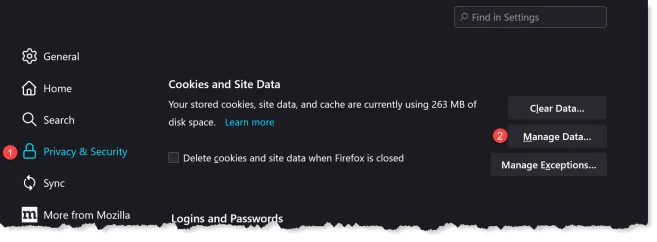
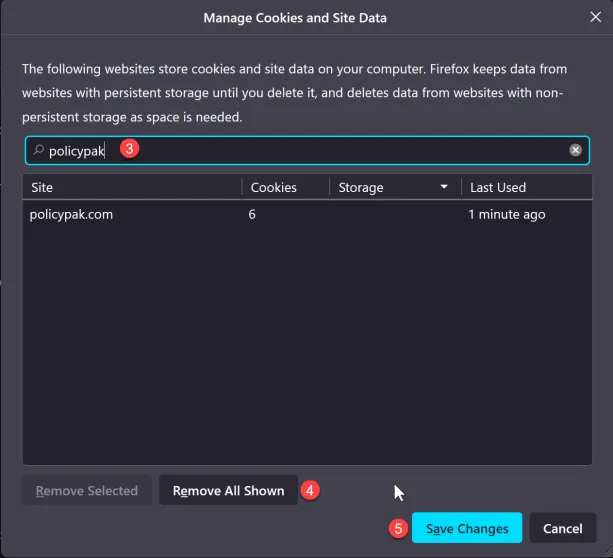
Firefox
In Firefox you have to make your way into Browser Settings and locate Privacy & Security.

Chrome
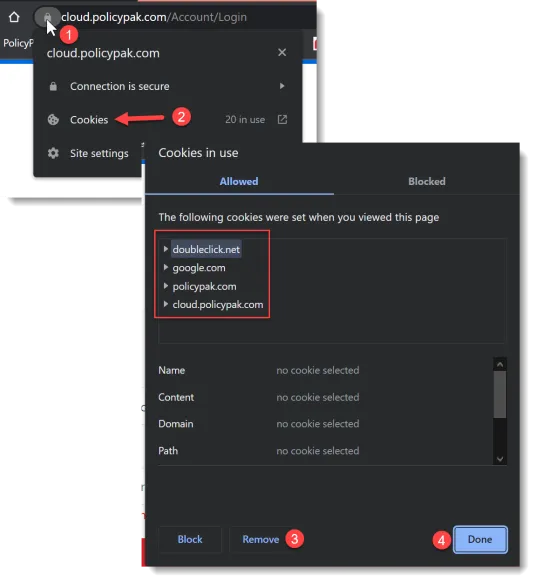
Chrome makes is a little easier to identify and clear cookies for a specific site. Just navigate to the login page and follow the sequence below. In the example below we click Remove 4 times since there are 4 cookies in use for this specific site.
Edge
Edge makes it even easier, similar to Chrome but only 3 steps.


Browser Cache
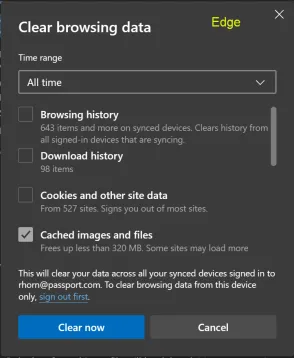
In certain occasions you might want to clear the browser cache which clears cached data for ALL sites you have visited. For Chrome and Edge, remember to scroll the list and ensure only Cached images and files is checked.
All 3 browsers have the Ctrl-Shift-Del shortcut that provides quick access to this setting.