How are BYOD "Workplace Joined" (aka Intune Registered) counted toward licensing?
The Licensing Tool (LT) we supply will count your computers within Intune. There are three types of computers that would need to be addressed. You can see these as items 1, 2 and 3 below.
- Case Item 1 — Azure Active Directory registered, but MDM = NONE
- Case Item 2 — Azure Active Directory Joined, and MDM = Intune
- Case Item 3 — Azure Active Directory Registered and MDM = Intune
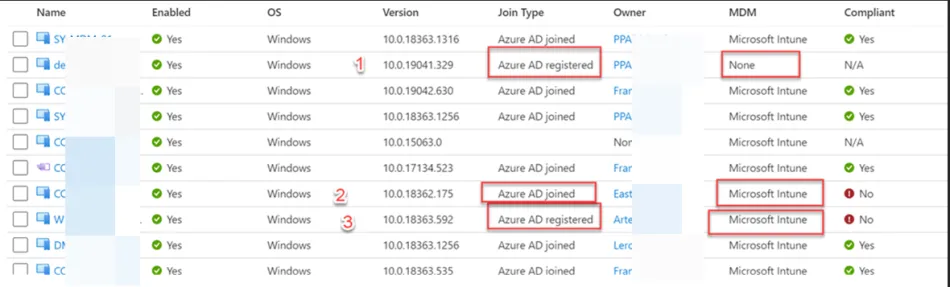
In all these cases, the computers are counted toward Intune licensing. This is because:
- Case Item 3 —This machine is fully managed (registered) by Intune. It can receive Netwrix Endpoint Policy Manager (formerly PolicyPak) directives via MSI (supported) or .Intunewin files (not recommended.) or Intune's PowerShell commands (not recommended.)
- Case Item 2 —This machine is BYOD/Workplace Joined by Intune. From a Endpoint Policy Manager perspective, this machine has exactly the same management capabilities as a fully managed machine. A BYOD/Workplace Joined machine can also get Endpoint Policy Manager directives via MSI, .IntuneWin or Intune's PowerShell commands.
- Case Item 1 —This machine is in Azure, but available at any time to be either fully managed (registered) or essentially fully managed (joined). Therefore we have to count this as a potential license.
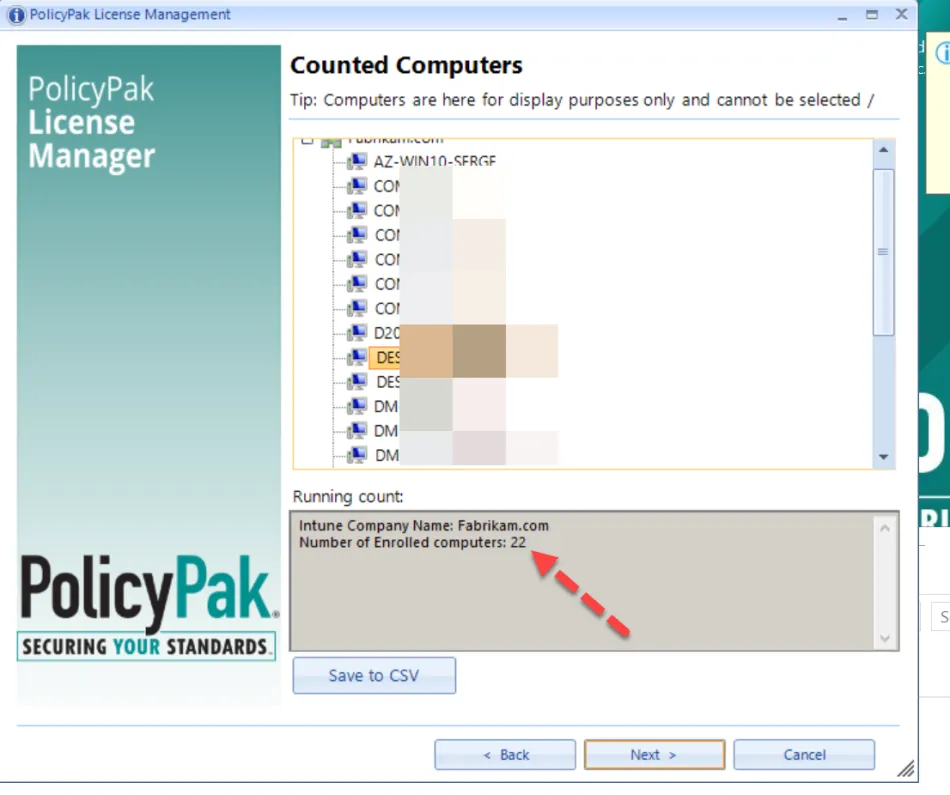
Using LT, you can see all computers noted above would be counted within LT for licensing purposes, as seen here.