SCIM 2.0 API Configuration
Overview
The SCIM API Connector enables Endpoint Protector to integrate with enterprise Identity Providers (IdPs) such as Microsoft Entra ID (Azure AD), Okta, or similar platforms to automate user and group provisioning.
Using SCIM (System for Cross-domain Identity Management), organizations can ensure that user accounts and group memberships in Endpoint Protector are automatically created, updated, and deactivated based on changes in their Identity Provider.
This integration:
- Reduces manual user management
- Enforces the Identity Provider as the source of truth
- Improves security through automated deprovisioning
- Supports enterprise compliance and access governance
Understanding SCIM
SCIM (System for Cross-domain Identity Management) is an industry-standard protocol designed to simplify identity lifecycle management between systems.
SCIM allows an Identity Provider to:
- Create users automatically when they are assigned to an application
- Update user attributes and group memberships
- Deactivate users when access is revoked in the Identity Provider
Important:
SCIM manages user and group provisioning only.
Authentication and login are handled separately using SSO technologies such as SAML or OpenID Connect (OIDC).
How SCIM Works in Endpoint Protector
In a typical deployment:
- An administrator configures SCIM in Endpoint Protector and generates a bearer token.
- The same administrator configures SCIM provisioning in the Identity Provider using:
- The SCIM Base URL
- The generated bearer token
- The Identity Provider sends SCIM requests to Endpoint Protector whenever:
- A user is assigned or removed
- User attributes change
- Group memberships are updated
Endpoint Protector processes these requests and updates its internal user and group records accordingly.
Configuring the SCIM API Connector
The SCIM API Connector is configured from:
Directory Services → SCIM API Configuration
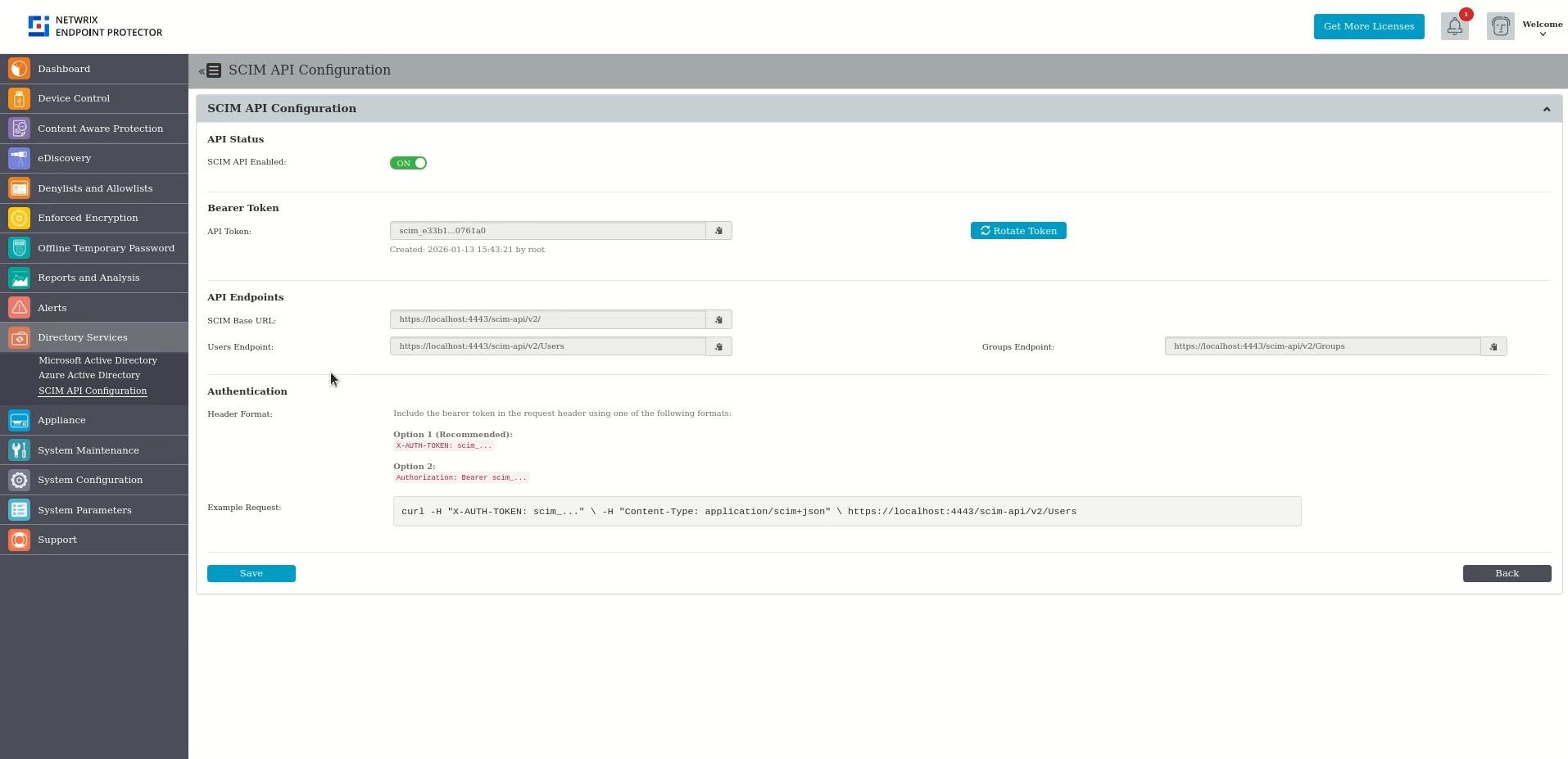
API Status
- SCIM API Enabled
Enables or disables the SCIM API endpoints.- When enabled, Endpoint Protector accepts SCIM provisioning requests.
- When disabled, all SCIM requests are rejected.
Bearer Token
- API Token
A tenant-specific bearer token used to authenticate SCIM requests coming from the Identity Provider. - Generate Token
Generates a new bearer token.
After generation, the token must be copied and configured in the Identity Provider.
Note:
Rotating the token requires updating the token value in the Identity Provider.
The old token becomes invalid immediately.
API Endpoints
The following endpoints are provided for SCIM provisioning:
- SCIM Base URL
Base endpoint for all SCIM operations. - Users Endpoint
Used by the Identity Provider to create, update, and deactivate users. - Groups Endpoint
Used to provision groups and manage group memberships.
These URLs are required when configuring SCIM provisioning in the Identity Provider.
Authentication Header Format
SCIM requests must include the bearer token in the HTTP request header using one of the supported formats:
- Recommended:
X-AUTH-TOKEN: <token> - Alternative:
Authorization: Bearer <token>
An example request is displayed in the UI for reference.
Supported SCIM Operations
Endpoint Protector supports standard SCIM 2.0 operations, including:
- User provisioning and updates
- Group provisioning and membership updates
- Bulk operations
- Filtering and pagination
For detailed endpoint definitions, schemas, and examples, refer to the SCIM API Technical Reference below.
Important Notes and Limitations
- SCIM provisioning applies to users and groups only
- Administrative roles must be assigned manually
- Deprovisioning is performed by deactivating users, not deleting them
- Provisioning timing depends on the Identity Provider
- Attribute mapping and group behavior are controlled by the Identity Provider
Summary
The SCIM API Connector automates user and group management in Endpoint Protector. Combined with SSO, it provides complete enterprise identity integration that improves security and reduces operational overhead.
SCIM API Technical Reference
This section provides the complete technical specification of the SCIM API, including:
- Supported endpoints
- Request and response formats
- Schemas
- Filtering and pagination
- Bulk operation support
Base URL: https://[server]/scim/v2
Authentication
All endpoints except Discovery require Bearer token authentication.
| Header | Format | Note |
|---|---|---|
X-AUTH-TOKEN | scim_xxxx... | Recommended |
Authorization | Bearer scim_xxxx... | Standard OAuth2 |
Provisioning Entities
| Entity | Device Control (DC) | Admin Console |
|---|---|---|
| Users | Supported | Not Supported |
| Groups | Supported | Not Supported |
| Computers | Supported (Custom) | Not Supported |
Endpoints
Discovery (Public - No Auth Required)
| Method | Endpoint | Description |
|---|---|---|
| GET | /ServiceProviderConfig | Service capabilities |
| GET | /Schemas | All supported schemas |
| GET | /Schemas/\{schemaId\} | Specific schema by URN |
| GET | /ResourceTypes | Resource type definitions |
Users
| Method | Endpoint | Description |
|---|---|---|
| GET | /Users | List users (with filtering/pagination) |
| GET | /Users/\{id\} | Get user by ID |
| POST | /Users | Create user |
| PUT | /Users/\{id\} | Full update (replace) |
| PATCH | /Users/\{id\} | Partial update |
| DELETE | /Users/\{id\} | Delete user |
Groups
| Method | Endpoint | Description |
|---|---|---|
| GET | /Groups | List groups (with filtering/pagination) |
| GET | /Groups/\{id\} | Get group by ID |
| POST | /Groups | Create group |
| PUT | /Groups/\{id\} | Full update (replace) |
| PATCH | /Groups/\{id\} | Partial update / member operations |
| DELETE | /Groups/\{id\} | Delete group |
Computers (Custom Resource)
| Method | Endpoint | Description |
|---|---|---|
| GET | /Computers | List computers (with filtering/pagination) |
| GET | /Computers/\{id\} | Get computer by ID |
| POST | /Computers | Create computer |
| PUT | /Computers/\{id\} | Full update (replace) |
| PATCH | /Computers/\{id\} | Partial update |
| DELETE | /Computers/\{id\} | Delete computer |
Bulk Operations
| Method | Endpoint | Description |
|---|---|---|
| POST | /Bulk | Process multiple operations in single request |
Bulk Constraints:
- Maximum 250 operations per request
- Maximum 2MB payload size
Filtering & Pagination
Query Parameters:
| Parameter | Type | Default | Description |
|---|---|---|---|
startIndex | integer | 1 | 1-based pagination start |
count | integer | 20 | Results per page |
filter | string | - | SCIM filter expression |
Filter Examples:
?filter=userName eq "john"
?filter=displayName co "Admin"
?startIndex=1&count=20
Supported Filter Operators: eq, ne, co, sw, ew, gt, lt, ge, le
Logical Operators: and, or
Schemas
Schema URNs
| Resource | Core Schema | Extension Schema |
|---|---|---|
| User | urn:ietf:params:scim:schemas:core:2.0:User | urn:ietf:params:scim:schemas:extension:enterprise:2.0:User |
| Group | urn:ietf:params:scim:schemas:core:2.0:Group | urn:ietf:params:scim:schemas:extension:custom:2.0:Group |
| Computer | urn:ietf:params:scim:schemas:core:2.0:Computer | - |
Message Schemas
| Type | Schema URN |
|---|---|
| List Response | urn:ietf:params:scim:api:messages:2.0:ListResponse |
| Error | urn:ietf:params:scim:api:messages:2.0:Error |
| Patch Operation | urn:ietf:params:scim:api:messages:2.0:PatchOp |
| Bulk Request | urn:ietf:params:scim:api:messages:2.0:BulkRequest |
| Bulk Response | urn:ietf:params:scim:api:messages:2.0:BulkResponse |
Resource Attributes
User Resource
Database Table: clientuser
Core Schema (urn:ietf:params:scim:schemas:core:2.0:User)
| Attribute | Type | Required | Mutability | Uniqueness | DB Column |
|---|---|---|---|---|---|
id | string | - | readOnly | server | ID |
externalId | string | No | readWrite | none | EXTERNAL_ID |
userName | string | Yes | immutable | server | USERNAME |
displayName | string | No | readWrite | none | computed (FIRSTNAME + LASTNAME) |
name.givenName | string | No | readWrite | none | FIRSTNAME |
name.familyName | string | No | readWrite | none | LASTNAME |
groups | complex[] | No | readOnly | - | via clientgroup join table |
Enterprise Extension (urn:ietf:params:scim:schemas:extension:enterprise:2.0:User)
| Attribute | Type | Required | Mutability | DB Column |
|---|---|---|---|---|
department | integer | Yes | readWrite | DEPARTMENT_ID |
domain | string | No | readWrite | DOMAIN |
email | string | No | readWrite | EMAIL |
phone | string | No | readWrite | PHONE |
employeeNumber | string | No | readWrite | EMPLOYEE_ID |
Group Resource
Database Table: eppgroup
Core Schema (urn:ietf:params:scim:schemas:core:2.0:Group)
| Attribute | Type | Required | Mutability | DB Column |
|---|---|---|---|---|
id | string | - | readOnly | ID |
externalId | string | No | readWrite | EXTERNAL_ID |
displayName | string | Yes | readWrite | NAME |
name | string | Yes | readWrite | NAME |
members | complex[] | No | readWrite | via clientgroup join table |
Custom Extension (urn:ietf:params:scim:schemas:extension:custom:2.0:Group)
| Attribute | Type | Required | Mutability | DB Column |
|---|---|---|---|---|
department | integer | Yes | readWrite | DEPARTMENT_ID |
domain | string | No | readWrite | DOMAIN |
Computer Resource (Custom)
Database Table: clientmachine
Core Schema (urn:ietf:params:scim:schemas:core:2.0:Computer)
| Attribute | Type | Required | Mutability | Uniqueness | DB Column |
|---|---|---|---|---|---|
id | string | - | readOnly | server | ID |
name | string | Yes | readOnly | server | NAME |
department | integer | No | readOnly | none | DEPARTMENT_ID |
domain | string | No | readOnly | none | DOMAIN |
groups | complex[] | No | readOnly | - | via join table |
Note: Computer resource is READ-ONLY. Computers are managed by EPP clients, not through SCIM API.
Junction Table: User-Group Membership
Database Table: clientgroup
| Column | Type | References |
|---|---|---|
CLIENT_ID | int | clientuser.ID |
GROUP_ID | int | eppgroup.ID |
Complex Attribute: members (Group)
| Sub-attribute | Type | Description |
|---|---|---|
value | string | Resource ID (clientuser.ID) |
$ref | reference | Resource URI |
display | string | Display name (clientuser.USERNAME) |
type | string | "User" or "Group" |
Complex Attribute: groups (User/Computer)
| Sub-attribute | Type | Description |
|---|---|---|
value | string | Group ID (eppgroup.ID) |
$ref | reference | Group URI |
display | string | Group name (eppgroup.NAME) |
Attribute Characteristics
| Characteristic | Values | Description |
|---|---|---|
| type | string, integer, boolean, dateTime, complex, reference | Data type |
| required | true, false | Whether attribute is mandatory |
| mutability | readOnly, readWrite, immutable, writeOnly | Modification rules |
| returned | always, never, default, request | When included in response |
| uniqueness | none, server, global | Uniqueness constraint |
| caseExact | true, false | Case sensitivity |
HTTP Status Codes
| Code | Status | Used For |
|---|---|---|
| 200 | OK | Successful GET, PUT, PATCH |
| 201 | Created | Successful POST |
| 204 | No Content | Successful DELETE |
| 400 | Bad Request | Invalid request syntax, missing required fields |
| 401 | Unauthorized | Missing or invalid authentication |
| 404 | Not Found | Resource not found |
| 413 | Payload Too Large | Bulk request exceeds limits |
| 500 | Internal Server Error | Server-side error |
Request & Response Examples
Create User (POST /Users)
Request:
POST /scim/v2/Users HTTP/1.1
Host: server.example.com
Content-Type: application/scim+json
X-AUTH-TOKEN: scim_xxxx...

{
  "schemas": [
    "urn:ietf:params:scim:schemas:core:2.0:User",
    "urn:ietf:params:scim:schemas:extension:enterprise:2.0:User"
  ],
  "userName": "jsmith",
  "displayName": "John Smith",
  "urn:ietf:params:scim:schemas:extension:enterprise:2.0:User": {
    "department": 1,
    "domain": "example.com",
    "email": "jsmith@example.com",
    "phone": "555-1234"
  }
}
Response (201 Created):
{
  "schemas": [
    "urn:ietf:params:scim:schemas:core:2.0:User",
    "urn:ietf:params:scim:schemas:extension:enterprise:2.0:User"
  ],
  "id": "42",
  "userName": "jsmith",
  "displayName": "John Smith",
  "groups": [],
  "urn:ietf:params:scim:schemas:extension:enterprise:2.0:User": {
    "department": 1,
    "domain": "example.com",
    "email": "jsmith@example.com",
    "phone": "555-1234"
  },
  "meta": {
    "resourceType": "User",
    "created": "2025-01-20T10:00:00Z",
    "lastModified": "2025-01-20T10:00:00Z",
    "location": "https://server.example.com/scim/v2/Users/42"
  }
}
Get User (GET /Users/{id})
Request:
GET /scim/v2/Users/42 HTTP/1.1
Host: server.example.com
X-AUTH-TOKEN: scim_xxxx...
Response (200 OK):
{
  "schemas": [
    "urn:ietf:params:scim:schemas:core:2.0:User",
    "urn:ietf:params:scim:schemas:extension:enterprise:2.0:User"
  ],
  "id": "42",
  "userName": "jsmith",
  "displayName": "John Smith",
  "groups": [
    {
      "value": "5",
      "$ref": "https://server.example.com/scim/v2/Groups/5",
      "display": "Engineering"
    }
  ],
  "urn:ietf:params:scim:schemas:extension:enterprise:2.0:User": {
    "department": 1,
    "domain": "example.com",
    "email": "jsmith@example.com",
    "phone": "555-1234"
  },
  "meta": {
    "resourceType": "User",
    "created": "2025-01-20T10:00:00Z",
    "lastModified": "2025-01-20T10:00:00Z",
    "location": "https://server.example.com/scim/v2/Users/42"
  }
}
List Users (GET /Users)
Request:
GET /scim/v2/Users?startIndex=1&count=10&filter=userName co "smith" HTTP/1.1
Host: server.example.com
X-AUTH-TOKEN: scim_xxxx...
Response (200 OK):
{
  "schemas": ["urn:ietf:params:scim:api:messages:2.0:ListResponse"],
  "totalResults": 25,
  "startIndex": 1,
  "itemsPerPage": 10,
  "Resources": [
    {
      "schemas": ["urn:ietf:params:scim:schemas:core:2.0:User", "..."],
      "id": "42",
      "userName": "jsmith",
      "..."
    }
  ]
}
Create Group (POST /Groups)
Request:
POST /scim/v2/Groups HTTP/1.1
Host: server.example.com
Content-Type: application/scim+json
X-AUTH-TOKEN: scim_xxxx...

{
  "schemas": [
    "urn:ietf:params:scim:schemas:core:2.0:Group",
    "urn:ietf:params:scim:schemas:extension:custom:2.0:Group"
  ],
  "displayName": "Engineering",
  "urn:ietf:params:scim:schemas:extension:custom:2.0:Group": {
    "department": 1,
    "domain": "example.com"
  },
  "members": [
    {
      "value": "42",
      "display": "jsmith"
    }
  ]
}
Response (201 Created):
{
  "schemas": [
    "urn:ietf:params:scim:schemas:core:2.0:Group",
    "urn:ietf:params:scim:schemas:extension:custom:2.0:Group"
  ],
  "id": "5",
  "displayName": "Engineering",
  "urn:ietf:params:scim:schemas:extension:custom:2.0:Group": {
    "department": 1,
    "domain": "example.com"
  },
  "members": [
    {
      "value": "42",
      "$ref": "https://server.example.com/scim/v2/Users/42",
      "display": "jsmith"
    }
  ],
  "meta": {
    "resourceType": "Group",
    "created": "2025-01-20T10:00:00Z",
    "lastModified": "2025-01-20T10:00:00Z",
    "location": "https://server.example.com/scim/v2/Groups/5"
  }
}
PATCH User (PATCH /Users/{id})
Request:
PATCH /scim/v2/Users/42 HTTP/1.1
Host: server.example.com
Content-Type: application/scim+json
X-AUTH-TOKEN: scim_xxxx...

{
  "schemas": ["urn:ietf:params:scim:api:messages:2.0:PatchOp"],
  "Operations": [
    {
      "op": "replace",
      "path": "displayName",
      "value": "Jonathan Smith"
    },
    {
      "op": "replace",
      "path": "urn:ietf:params:scim:schemas:extension:enterprise:2.0:User:phone",
      "value": "555-5678"
    }
  ]
}
Response (200 OK): Returns updated user resource.
PATCH Group Members (PATCH /Groups/{id})
Add Members:
{
  "schemas": ["urn:ietf:params:scim:api:messages:2.0:PatchOp"],
  "Operations": [
    {
      "op": "add",
      "path": "members",
      "value": [
        { "value": "43" },
        { "value": "44" }
      ]
    }
  ]
}
Remove Members:
{
  "schemas": ["urn:ietf:params:scim:api:messages:2.0:PatchOp"],
  "Operations": [
    {
      "op": "remove",
      "path": "members[value eq \"43\"]"
    }
  ]
}
Delete User (DELETE /Users/{id})
Request:
DELETE /scim/v2/Users/42 HTTP/1.1
Host: server.example.com
X-AUTH-TOKEN: scim_xxxx...
Response: 204 No Content
Bulk Operation (POST /Bulk)
Request:
POST /scim/v2/Bulk HTTP/1.1
Host: server.example.com
Content-Type: application/scim+json
X-AUTH-TOKEN: scim_xxxx...

{
  "schemas": ["urn:ietf:params:scim:api:messages:2.0:BulkRequest"],
  "failOnErrors": 1,
  "Operations": [
    {
      "method": "POST",
      "path": "/Users",
      "bulkId": "user1",
      "data": {
        "schemas": ["urn:ietf:params:scim:schemas:core:2.0:User"],
        "userName": "newuser"
      }
    },
    {
      "method": "DELETE",
      "path": "/Users/99"
    }
  ]
}
Response (200 OK):
{
  "schemas": ["urn:ietf:params:scim:api:messages:2.0:BulkResponse"],
  "Operations": [
    {
      "method": "POST",
      "bulkId": "user1",
      "location": "https://server.example.com/scim/v2/Users/100",
      "status": "201"
    },
    {
      "method": "DELETE",
      "location": "https://server.example.com/scim/v2/Users/99",
      "status": "204"
    }
  ]
}
Error Response
Response (404 Not Found):
{
  "schemas": ["urn:ietf:params:scim:api:messages:2.0:Error"],
  "status": "404",
  "scimType": "noTarget",
  "detail": "Resource not found"
}
Response (400 Bad Request):
{
  "schemas": ["urn:ietf:params:scim:api:messages:2.0:Error"],
  "status": "400",
  "scimType": "invalidValue",
  "detail": "Missing required attribute: userName"
}
SCIM Error Types
| scimType | Description |
|---|---|
invalidFilter | Invalid filter syntax |
tooMany | Too many results |
uniqueness | Uniqueness constraint violation |
mutability | Can't modify immutable attribute |
invalidSyntax | Malformed request |
invalidPath | Invalid attribute path |
noTarget | Resource not found |
invalidValue | Invalid attribute value |
Response Headers
All responses include:
Content-Type: application/scim+json
Cache-Control: no-cache, no-store, must-revalidate
Unauthorized responses include:
WWW-Authenticate: Bearer