Single Sign On
Single Sign On (SSO) simplifies authentication, enhancing security and user convenience by enabling access to the Endpoint Protector Server with Azure AD and OKTA using existing organizational credentials.
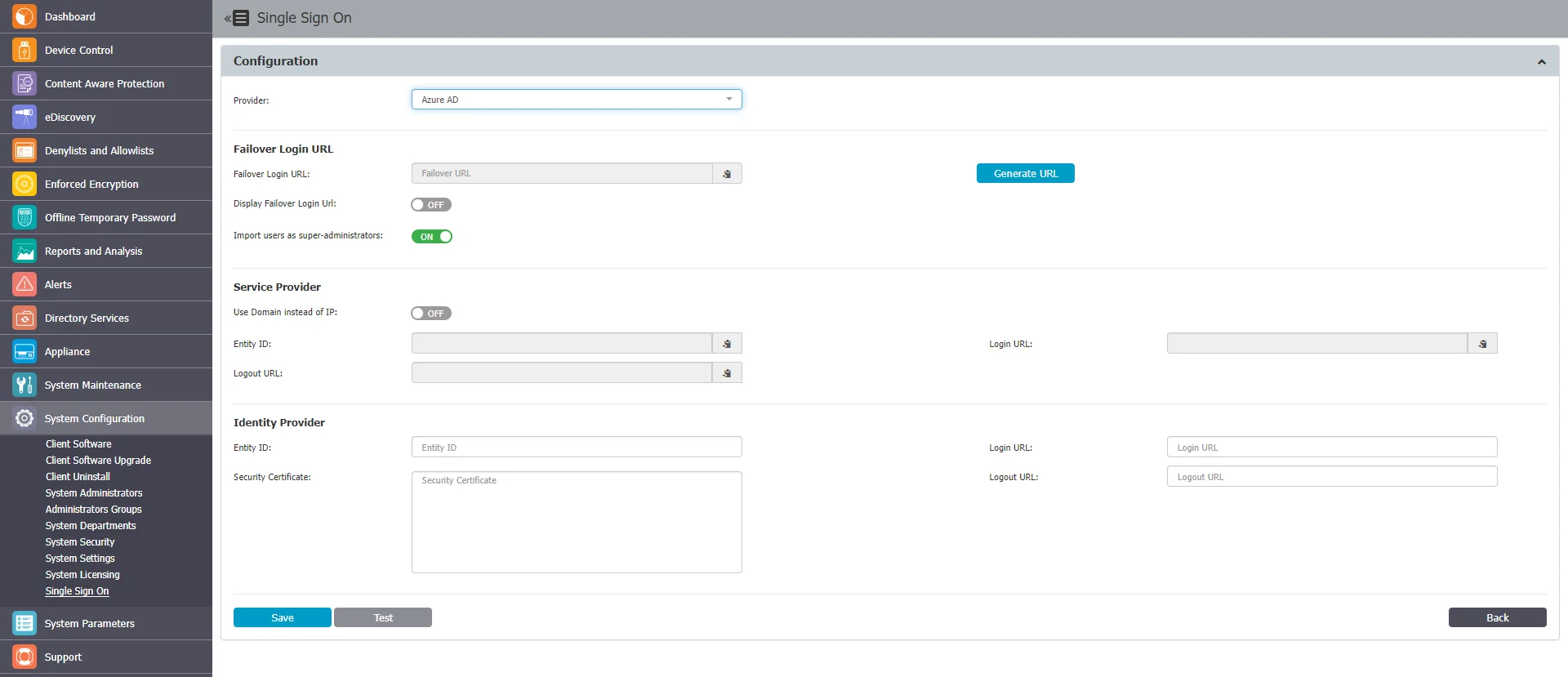
The Single Sign On section includes the following:
- Provider – Select a provider to start the configuration
- Failover Login URL – Enter or generate a link to a page where the Super Administrator can log in locally. This bypasses Azure Single Sign On login if it stops working. To view the URL, enable the Display Failover Login URL setting.
You can provide Super Administrator status to all imported users by enabling the Import users as super administrators setting.
- Service Provider represents the identity of the Endpoint Protector Server. You need this information when you configure the Endpoint Protector application in Azure. Select whether the login uses IP or Domain, provide an Entity ID as well as Login and Logout URL.
- Identity Provider represents Azure side. It includes the fields where you paste the data that Azure generates so you can log in to the Endpoint Protector Server.
Set the Service Provider log in to Domain and use the server's fully qualified domain name (FQDN). Endpoint Protector generates the Entity ID, Login URL, and Logout URL from this setting, and you register them with your identity provider. If you base them on an IP address, SSO logins fail after the server address changes, for example after a migration, until you update the identity provider configuration. See Use an FQDN Instead of an IP Address.