Main components
Netwrix Endpoint Protector is a client-server data loss prevention (DLP) solution that scales from small business environments to large, distributed enterprises. The Endpoint Protector Server enforces security policies across the organization, while the Endpoint Protector Client applies those policies locally on each Windows, macOS, or Linux computer, whether it runs on x86 64-bit or ARM64 hardware. This architecture delivers full Device Control alongside Content Aware Protection, eDiscovery, and Enforced Encryption, all configurable at a granular level, down to individual users, computers, and groups. Administrators can set each policy to log activity without blocking it, block it outright, or block it interactively with user remediation, so a single deployment can address a range of business and compliance use cases. For large enterprises, the System Departments feature splits the endpoint population into separate administrative divisions, each with its own delegated administrators managing only their own devices, computers, and users.
Endpoint Protector's design centers on several physical entities:
- Computers—the Windows, macOS, and Linux workstations that run the Endpoint Protector Client
- Devices—the devices that Endpoint Protector supports (USB devices, digital photo cameras, USB memory cards, and others)
- Users—the users who handle the devices and the computers
The server side of Endpoint Protector has several parts working together:
- Endpoint Protector Hardware or Virtual Appliance—contains the operating system, database, and supporting services
- MySQL Database—stores configuration data, agent provisioning settings, information about users and groups, and policy definitions
- CrateDB—a distributed SQL database, optimized for time-series data, that stores Device Control, File Tracing, Content Aware Protection, and eDiscovery logs, providing faster queries and horizontal scalability for environments with high log volumes
- Web Service—communicates with the Endpoint Protector Clients and stores the information they send
- Endpoint Protector User Interface—manages the existing devices, computers, users, groups, and their behavior in the system
The client side of Endpoint Protector has two components:
- Endpoint Protector Client—enforces the rights and settings the server sends on Windows, macOS, and Linux computers. The client also automatically deploys Enforced Encryption on USB storage devices.
- Enforced Encryption Client—enforces FIPS 140-3 validated encryption on USB storage devices as the server specifies. This is a standalone application compatible with Windows and macOS computers.
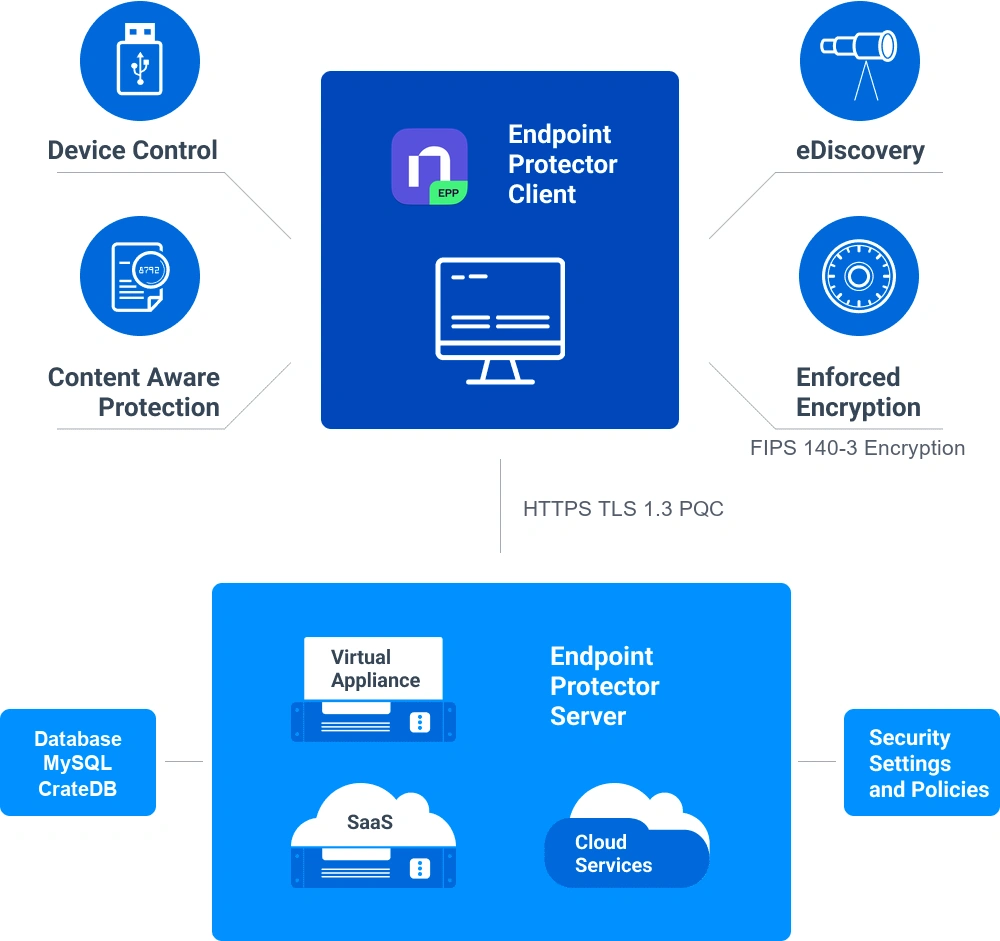
Architecture overview
The following diagram illustrates the network architecture for the Endpoint Protector system. This setup enables comprehensive Data Loss Prevention (DLP) across both local and remote users, securing sensitive information and ensuring compliance with security policies.
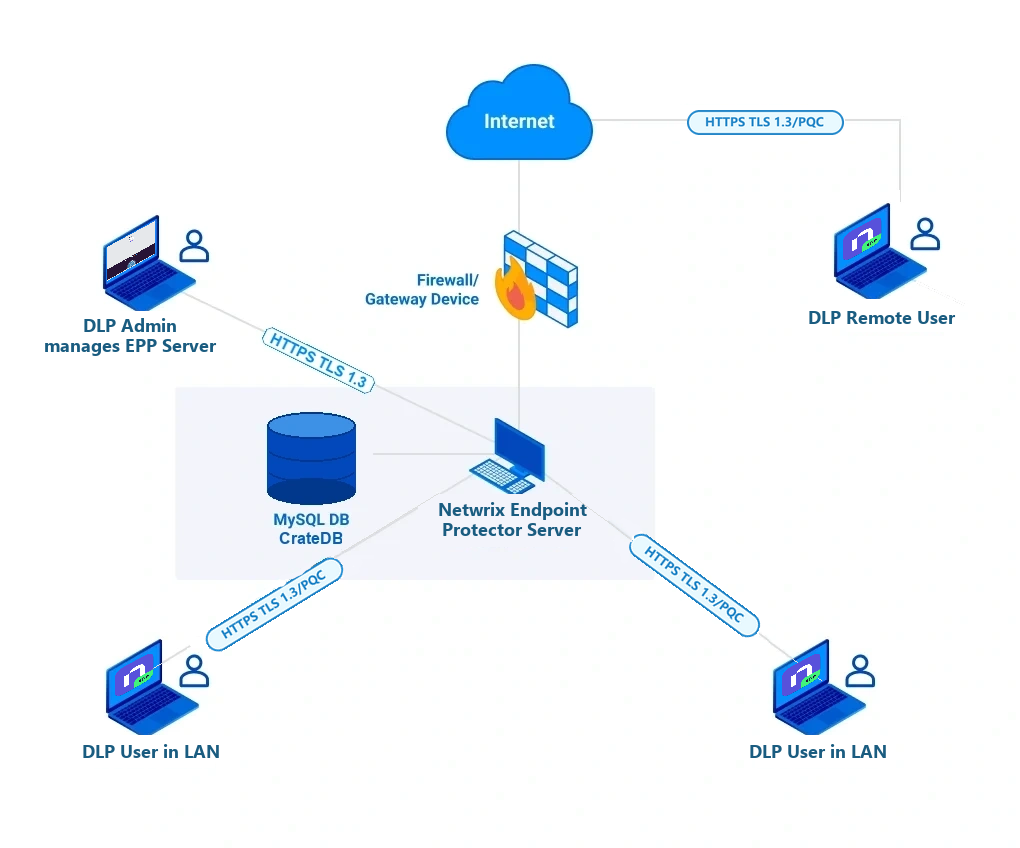
Key components and data flow
Endpoint Protector server
The server is the core of Endpoint Protector, enforcing security policies and monitoring data flows across the organization. It communicates with all endpoints to ensure compliance with data protection rules and logs activity for auditing purposes.
MySQL database
The Endpoint Protector server uses a lastest MySQL LTS database that stores configuration data, agent provisioning settings. MySQL handles agent registration, policy definitions, entity management, and other provisioning data.
Starting with the 2608 release, MySQL no longer stores user activity logs or incident reports — this data now lives in CrateDB instead. SaaS deployments are the exception: Netwrix retains historical data in MySQL to meet compliance requirements, while new logs go to CrateDB.
CrateDB
CrateDB is a distributed SQL database optimized for time-series log data. Endpoint Protector uses CrateDB to store Device Control, File Tracing, Content Aware Protection, and eDiscovery logs.
Firewall/gateway device
The firewall/gateway protects the network from external threats and manages secure connections for remote users. It ensures that only authorized traffic reaches the Endpoint Protector server, safeguarding internal resources.
DLP administrator
The Data Loss Prevention (DLP) administrator manages the Endpoint Protector infrastructure, configures policies, monitors endpoint activity, and addresses potential data breaches. The administrator uses the server's interface to adjust security rules and respond to incidents.
DLP users (LAN and Remote):
- LAN Users—internal users connected to the organization's Local Area Network (LAN), whose devices the Endpoint Protector server monitors to prevent unauthorized data transfers
- Remote Users—remote employees who access the network through secure channels via the firewall/gateway, whose activities Endpoint Protector monitors to ensure consistent policy enforcement
Client to server communication
This section describes how TLS encrypts communication between the Endpoint Protector Server and the Endpoint Protector Client.
- The Endpoint Protector Server enables TLS 1.2 and TLS 1.3 by default. Endpoint Protector always negotiates the highest TLS version available on both the Client and the Server, and selects the strongest cipher suite TLS 1.3 offers.
- Netwrix Support can enable TLS 1.1 upon request for backward compatibility with older agents and appliances.
Endpoint Protector Client TLS
TLS 1.3 Compatibility
Endpoint Protector (EPP)
| OS | Older version | Newer version | Endpoint Protector Client Features |
|---|---|---|---|
| Windows | Not compatible with Windows 7, XP, and versions older than Windows 10 | Compatible with Windows 10, version 1903 and higher, and Windows 11 | Version 2608 and later uses a custom bundled OpenSSL package. Version 2605 and earlier uses Windows' built-in TLS encryption engine (Schannel). |
| macOS | Compatible | Compatible | Uses a custom bundled OpenSSL package shipped with the Endpoint Protector Client. |
| Linux | Not compatible | Compatible | Uses Linux's built-in OpenSSL engine. |
Enforced Encryption (EE)
| OS | Enforced Encryption Client Features |
|---|---|
| Windows | TLS over wolfCrypt SSL, FIPS 140-3 Validated |
| macOS | TLS over wolfCrypt SSL, FIPS 140-3 Validated |
Endpoint Protector PQC encryption
Starting with the 2608 Client and Server release, Endpoint Protector supports Post-Quantum Cryptography (PQC) encryption for Client to Server communication.
You don't need to take any action to enable PQC. Endpoint Protector negotiates it transparently and automatically as the highest available encryption option when both the Client and the Server are on version 2608.x.x.x or later. If either side runs an older version, Endpoint Protector falls back to the highest TLS version both sides support.