ServiceNowResourceTypeMapping
Any resource type mapping must be configured with the same identifier as the related resource type.
Any resource type linked to a ServiceNow connection must be configured with a set of parameters to map the properties in Usercube with those in ServiceNow, for provisioning purposes.
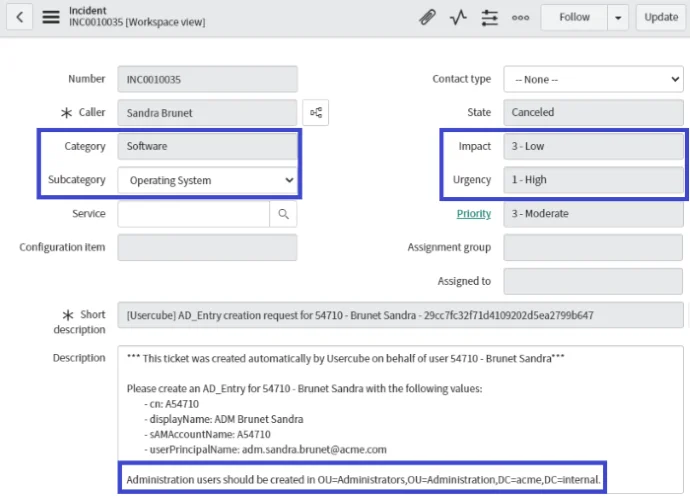
Below is an example of an incident ticket in ServiceNow, where relevant properties (from Usercube's perspective) are emphasized:
Examples
<ServiceNowResourceTypeMapping Identifier="ServiceNow_Entry_NominativeUser" Connection="ServiceNowExportFulfillment" PasswordResetSetting="ToSelf" DefaultObjectClass="sys_user">
  <Property Property="sys_id" IsDNProperty="true" />
</ServiceNowResourceTypeMapping>
Properties
| Property | Details |
|---|---|
| Connection required | Type String Description Identifier of the corresponding connection. |
| DefaultObjectClass optional | Type String Description Default object class used by the provisioner, for example person, organizationalPerson, user, etc. Note: multiple default object classes are separated with <br/>. |
| PasswordResetSetting optional | Type String Description Identifier of the corresponding password reset setting. |
| TicketAdditionalInformation optional | Type String Description Information to add at the end of the description for all tickets created for this resource type. Note: only used with the package for tickets. |
| TicketCallerId optional | Type String Description Attribute that corresponds to the identifier of the "caller" person in ServiceNow. Note: required when using the package for tickets. |
| TicketCategory optional | Type String Description Category in which new tickets will be created in ServiceNow for this resource type. Note: only used with the package for tickets. |
| TicketImpact default value: Low | Type TicketImpact Description Impact of the ticket in ServiceNow: Low; Medium; High. Note: only used with the package for tickets. |
| TicketSubCategory optional | Type String Description Subcategory in which new tickets will be created in ServiceNow for this resource type. Note: only used with the package for tickets. |
| TicketSynchroIsNotAvailable default value: false | Type Boolean Description true to set synchronization as unavailable for this resource type. Once the ticket is closed and the resource is created, updated or deleted, then the assignment's status is directly set to Verified. Note: only used with the package for tickets. |
| TicketUrgency default value: Low | Type TicketUrgency Description Urgency of the ticket in ServiceNow: Low; Medium; High. Note: only used with the package for tickets. |