WorkflowAddRecordEntityForm
Displays a form to add a new record for an existing resource, by duplicating and adjusting an existing record.
Examples
The following example is a form to request a computer.
<WorkflowAddRecordEntityForm Identifier="Workflow_Directory_User_AddPosition" EntityType="Workflow_Directory_User" MainProperty="Workflow_Directory_User:Directory_User" RecordProperty="Directory_User:Records" WorkflowRequestType="Self" Activity="Directory_User_AddPosition:Request" FormTitle_L1="New Position" >    <MainControl OutputType="TransformImport" EmbeddedForm="Workflow_Directory_User_Main"/>    <RecordControl OutputType="TransformImport" EmbeddedForm="Workflow_Directory_User_AddPosition_Base" />    <RecordUniqueItemControl OutputType="TransformImport" EmbeddedForm="Workflow_Directory_User_AddPosition_Unique" />    <MainSummaryControl OutputType="TransformImport" EmbeddedForm="Workflow_Directory_User_Main" />    <RecordSummaryControl OutputType="TransformImport" EmbeddedForm="Workflow_Directory_User_AddPosition_Base" /></WorkflowAddRecordEntityForm>

With the following form for the resource data's content and summary:
<Form Identifier="Workflow_Directory_User_Main" EntityType="Directory_User">    <Control Binding="Identifier" />    <Control Binding="IsDraft" /></Form>

And with the following form for the record data's content and summary:
<Form Identifier="Workflow_Directory_User_AddPosition_Base" EntityType="Directory_UserRecord">    <Control DisplayName_L1="Position Dates" OutputType="LayoutFieldset">        <Control Binding="StartDate" />        <Control Binding="EndDate" InputType="Date" />    </Control>    <Control DisplayName_L1="Position" OutputType="LayoutFieldset">        <Control Binding="Title" />        <Control Binding="Organization" />        <Control Binding="Manager" DefaultValueBinding="Organization.Manager" />        <Control Binding="Site" DefaultValueBinding="Organization.Manager.MainRecord.Site" />    </Control></Form>

And with the following form for the data that groups records together:
<Form Identifier="Workflow_Directory_User_AddPosition_Unique" EntityType="Directory_UserRecord">    <Control Binding="PositionIdentifier" /></Form>
The contents of MainControl and RecordControl are visible during the workflow's execution:
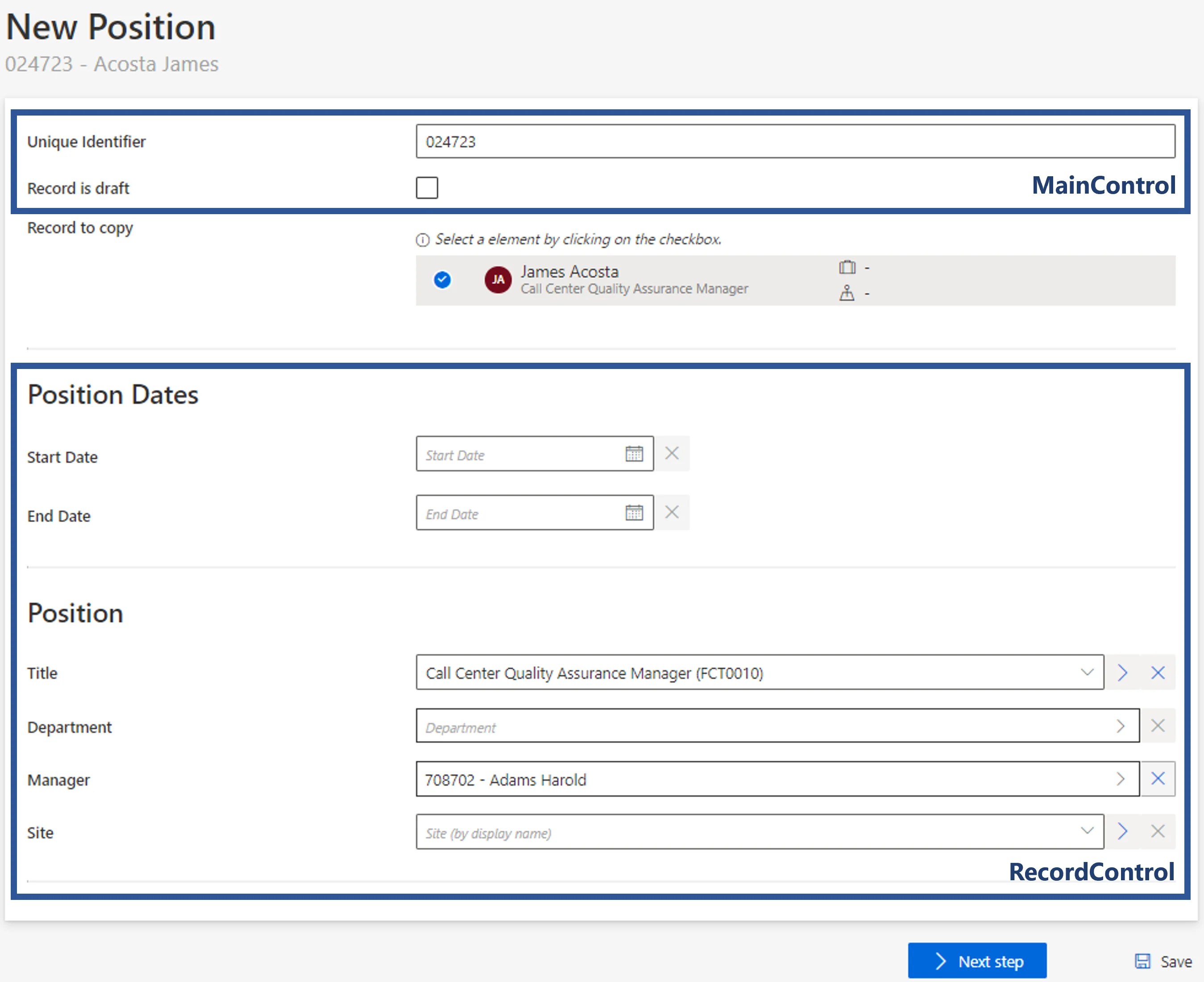
The content of RecordUniqueItemControl is not visible. The user's records that have the same
values for all the properties in RecordUniqueItemControl will be displayed, and potentially
modified, as one.
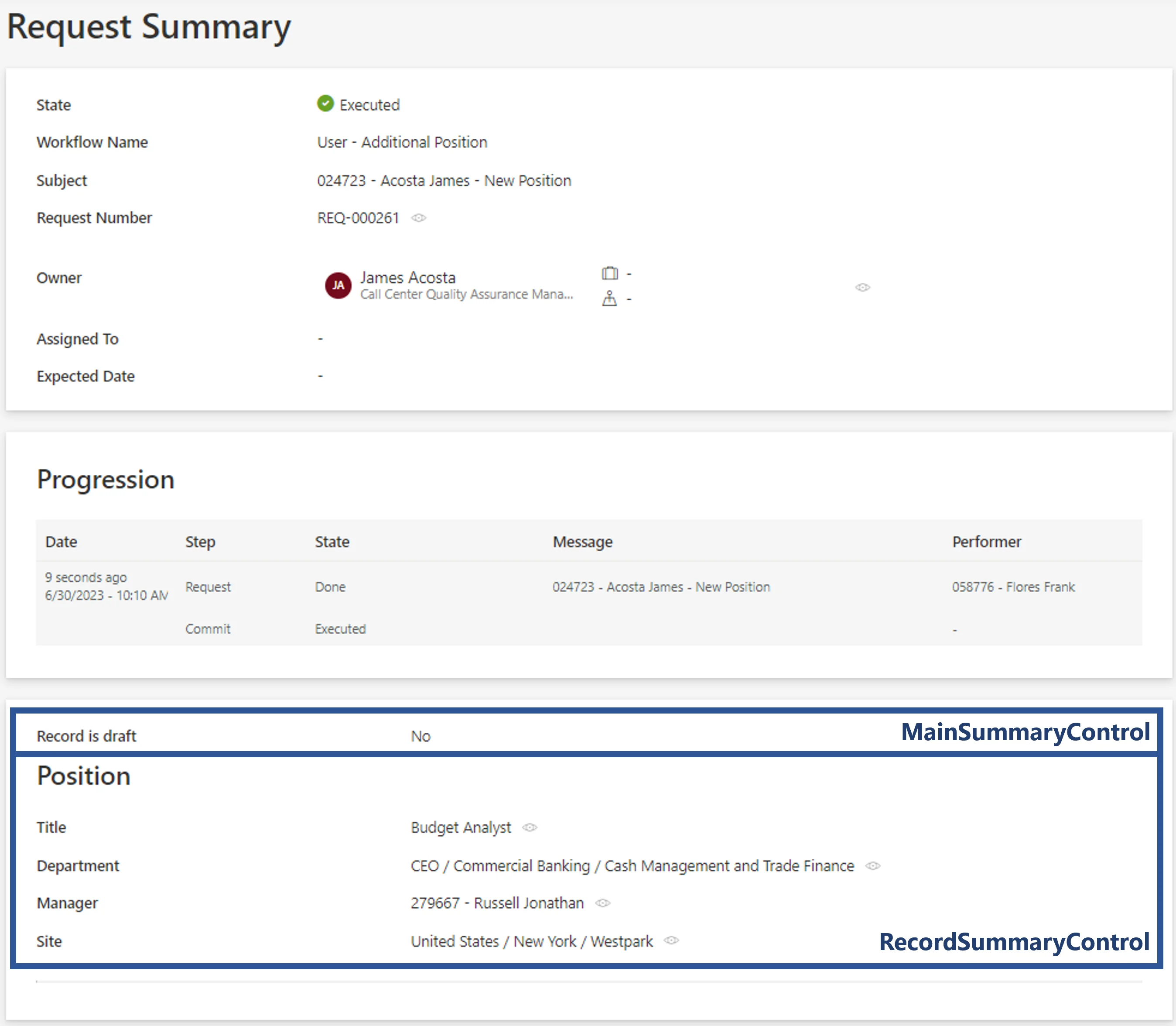
The contents of MainSummaryControl and RecordSummaryControl are visible after the workflow's
execution:
Properties
| Property | Details |
|---|
Child Element: MainControl
Set of fields to collect data about the main resource.
| Property | Details |
|---|
Child Element: RecordControl
Set of fields to collect data about the resource's record.
| Property | Details |
|---|
Child Element: RecordUniqueItemControl
Set of fields that group records together. All records with the same data in
RecordUniqueItemControl are displayed in the workflow as only one record, and they will
potentially be modified together. When not specified, records will be grouped by the data from
RecordControl.
| Property | Details |
|---|
Child Element: MainSummaryControl
Set of fields to sum up the data collected by MainControl after the workflow's execution.
| Property | Details |
|---|
Child Element: RecordSummaryControl
Set of fields to sum up the data collected by RecordControl after the workflow's execution.
| Property | Details |
|---|