WorkflowCreateSeveralRecordsEntityForm
Displays a form to create a new resource with one or several records.
Examples
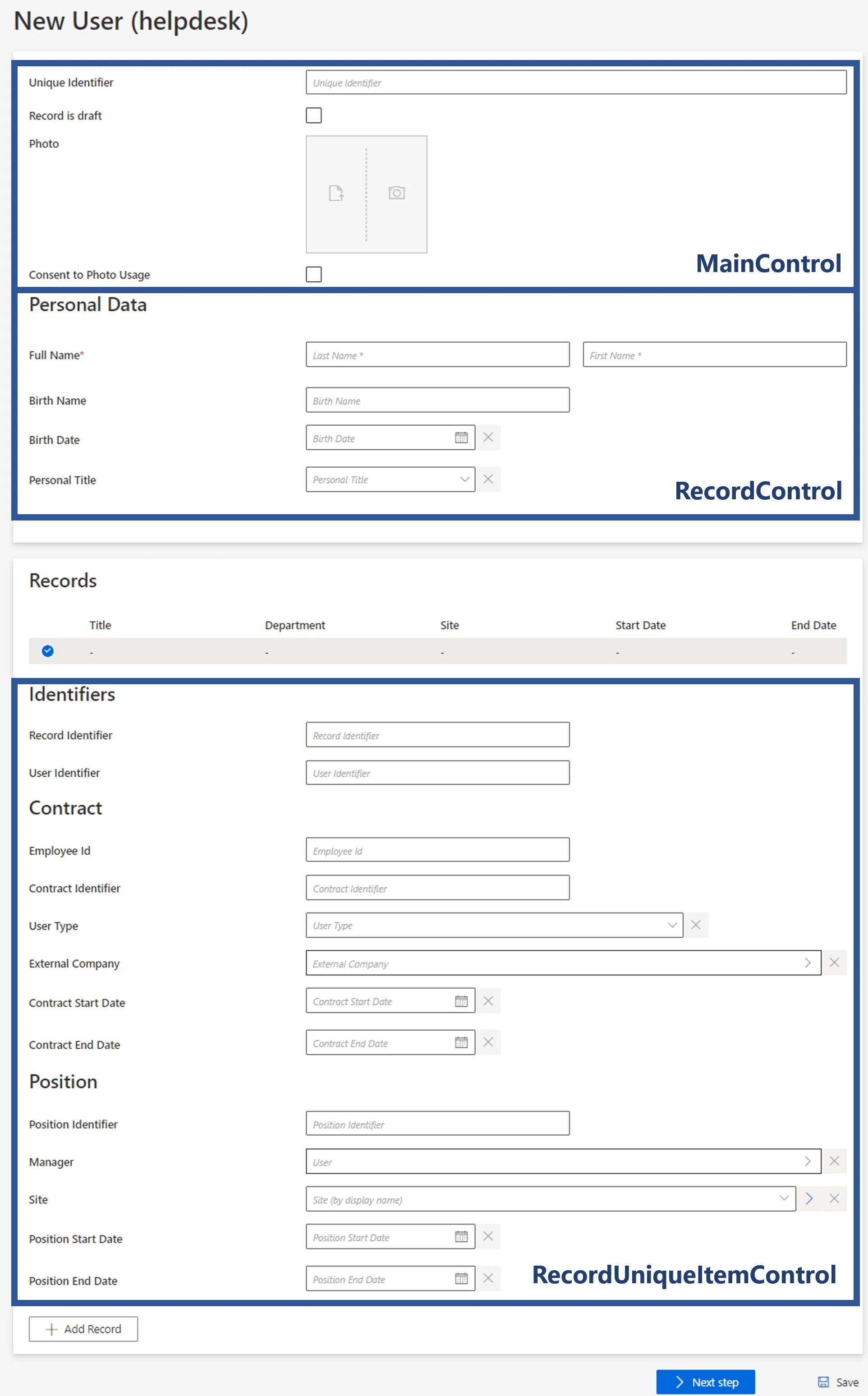
The following example is a form to request a computer.
<WorkflowCreateSeveralRecordsEntityForm Identifier="Workflow_Helpdesk_Directory_User_New" EntityType="Workflow_Directory_User" MainProperty="Workflow_Directory_User:Directory_User" RecordProperty="Directory_User:Records" RecordTable="Directory_UserRecord_Helpdesk" WorkflowRequestType="Helpdesk" Activity="Helpdesk_Directory_User_New:Request" FormTitle_L1="New User (helpdesk)" TableTitle_L1="Records" AddRowLabel_L1="Add Record" RemoveRowLabel_L1="Remove Record">    <MainControl OutputType="TransformImport" EmbeddedForm="Workflow_Helpdesk_Directory_User_Base" />    <RecordControl OutputType="TransformImport" EmbeddedForm="Workflow_Helpdesk_Directory_UserRecord_Shared"/>    <RecordUniqueItemControl OutputType="TransformImport" EmbeddedForm="Workflow_Helpdesk_Directory_UserRecord_Base" /></WorkflowCreateSeveralRecordsEntityForm>

With the following form for the resource's data:
<Form Identifier="Workflow_Helpdesk_Directory_User_Base" EntityType="Directory_User">    <Control Binding="Identifier" />    <Control Binding="IsDraft" />    <Control Binding="Photo" />    <Control Binding="ConsentPhotoUsage" /></Form>

And with the following form for the data shared with all records:
<Form Identifier="Workflow_Helpdesk_Directory_UserRecord_Shared" EntityType="Directory_UserRecord">    <Control DisplayName_L1="Personal Data" OutputType="LayoutFieldset" Name="Personal Data">        <Control DisplayName_L1="Full Name" OutputType="LayoutRowset" Name="Full Name">        <Control Binding="LastName" />        <Control Binding="FirstName" />        </Control>        <Control Binding="BirthName" ColumnSize="4" />        <Control Binding="BirthDate" />        <Control Binding="Gender" ColumnSize="3" />        <Control Binding="PersonalTitle" ColumnSize="3" />    </Control></Form>

And with the following form for the data specific to each record:
<Form Identifier="Workflow_Helpdesk_Directory_UserRecord_Base" EntityType="Directory_UserRecord">    <Control DisplayName_L1="Identifiers" OutputType="LayoutFieldset" Name="Identifiers">        <Control Binding="RecordIdentifier" ColumnSize="4" />        <Control Binding="UserIdentifier" ColumnSize="4" />    </Control>    <Control DisplayName_L1="Contract" OutputType="LayoutFieldset" Name="Contract">        <Control Binding="EmployeeId" ColumnSize="4" />        <Control Binding="ContractIdentifier" ColumnSize="4" />        <Control Binding="UserType" />        <Control Binding="ExternalCompany" />        <Control Binding="ContractStartDate" />        <Control Binding="ContractEndDate" />    </Control>    <Control DisplayName_L1="Position" OutputType="LayoutFieldset" Name="Position">        <Control Binding="PositionIdentifier" ColumnSize="4" />        <Control Binding="JobTitle" />        <Control Binding="Manager" />        <Control Binding="Site" />        <Control Binding="PositionStartDate" />        <Control Binding="PositionEndDate" InputType="Date" />        <Control Binding="IsMainPosition" />    </Control></Form>
The contents of MainControl, RecordControl and RecordUniqueItemControl are visible during the
workflow's execution:
Properties
| Property | Details |
|---|
Child Element: MainControl
Set of fields to collect data about the main resource.
| Property | Details |
|---|
Child Element: RecordControl
Set of fields to collect data shared between all the resource's records.
| Property | Details |
|---|
Child Element: RecordUniqueItemControl
Set of fields to collect data specific to each record.
| Property | Details |
|---|