WorkflowUpdateSeveralRecordsEntityForm
Displays a form to create, update or delete one or several records.
Examples
The following example is a form to create, update and/or delete one or several positions for a given user.
<WorkflowUpdateSeveralRecordsEntityForm Identifier="Workflow_Directory_User_ManagePositions" EntityType="Workflow_Directory_User" MainProperty="Workflow_Directory_User:Directory_User" RecordProperty="Directory_User:Records" RecordTable="Directory_UserRecord_ManagePositions" WorkflowRequestType="Self" Activity="Directory_User_ManagePositions:Request" FormTitle_L1="Manage Positions" TableTitle_L1="Positions" AddRowLabel_L1="Add Position" RemoveRowLabel_L1="Remove Position" RecordStartProperty="Directory_UserRecord:PositionStartDate" RecordEndProperty="Directory_UserRecord:PositionEndDate">    <MainControl OutputType="TransformImport" EmbeddedForm="Workflow_Directory_User_Position_Main" />    <RecordControl OutputType="TransformImport" EmbeddedForm="Workflow_Directory_UserRecord_Position_Base_New" />    <RecordUniqueItemControl OutputType="TransformImport" EmbeddedForm="Workflow_Directory_UserRecord_Position_Unique" />    <RecordSlaveUniqueItemControl OutputType="TransformImport" EmbeddedForm="Workflow_Directory_UserRecord_Position_Contract" />    <RecordSlaveControl OutputType="TransformImport" EmbeddedForm="Workflow_Directory_UserRecord_Position_Base_Existing" /></WorkflowUpdateSeveralRecordsEntityForm>

With the following form for the resource's data:
<Form Identifier="Workflow_Directory_User_Position_Main" EntityType="Directory_User">    <Control Binding="Identifier" />    <Control Binding="IsDraft" /></Form>

And with the following form for the data shared with all records:
<Form Identifier="Workflow_Directory_UserRecord_Position_Contract" EntityType="Directory_UserRecord">    <Control Binding="EmployeeId" ColumnSize="4" />    <Control Binding="ContractIdentifier" ColumnSize="4" />    <Control Binding="UserType" />    <Control Binding="ContractStartDate" />    <Control Binding="ContractEndDate" /></Form>

And with the following form for the data used to update existing records:
<Form Identifier="Workflow_Directory_UserRecord_Position_Base_Existing" EntityType="Directory_UserRecord">    <Control DisplayName_L1="Position" OutputType="LayoutFieldset" Name="Position">        <Control Binding="PositionIdentifier" ColumnSize="4" />        <Control Binding="Manager" />        <Control Binding="IGAManager" />        <Control Binding="Organization" />        <Control Binding="Site" />        <Control Binding="PositionStartDate" />        <Control Binding="PositionEndDate" InputType="Date" />    </Control></Form>

And with the following form for the data used to add new records:
<Form Identifier="Workflow_Directory_UserRecord_Position_Base_New" EntityType="Directory_UserRecord">    <Control DisplayName_L1="Position" OutputType="LayoutFieldset" Name="Position">        <Control Binding="PositionIdentifier" ColumnSize="4" />
        <Control Binding="Title" />
        <Control Binding="Manager" />        <Control Binding="IGAManager" />        <Control Binding="Organization" />        <Control Binding="Site" />        <Control Binding="PositionStartDate" />        <Control Binding="PositionEndDate" InputType="Date" />    </Control></Form>

And with the following form for the data that groups records together:
<Form Identifier="Workflow_Directory_UserRecord_Position_Unique" EntityType="Directory_UserRecord">    <Control Binding="PositionIdentifier" /></Form>
The contents of MainControl, RecordControl, RecordSlaveUniqueItemControl and
RecordSlaveControl are visible during the workflow's execution:
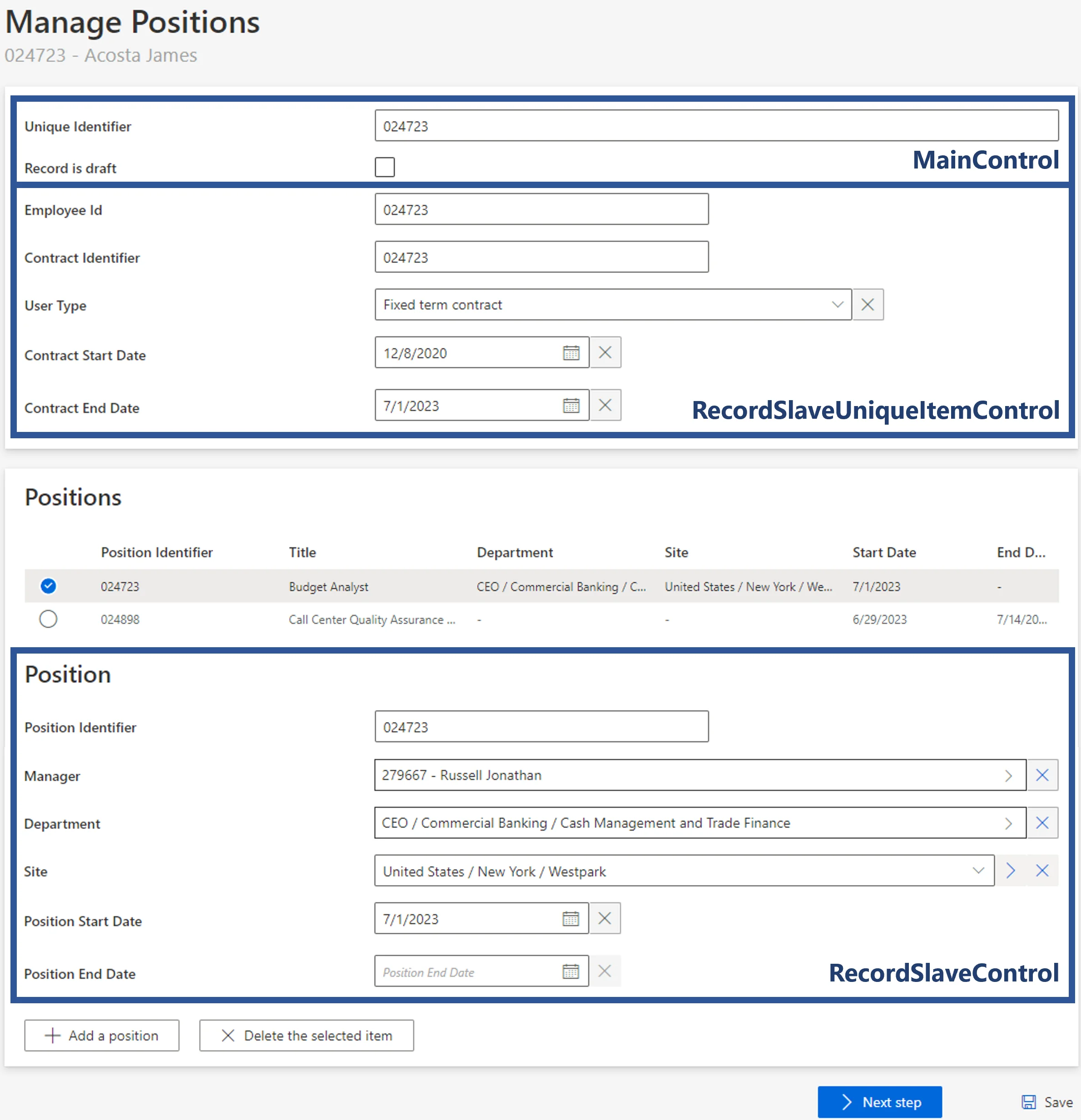
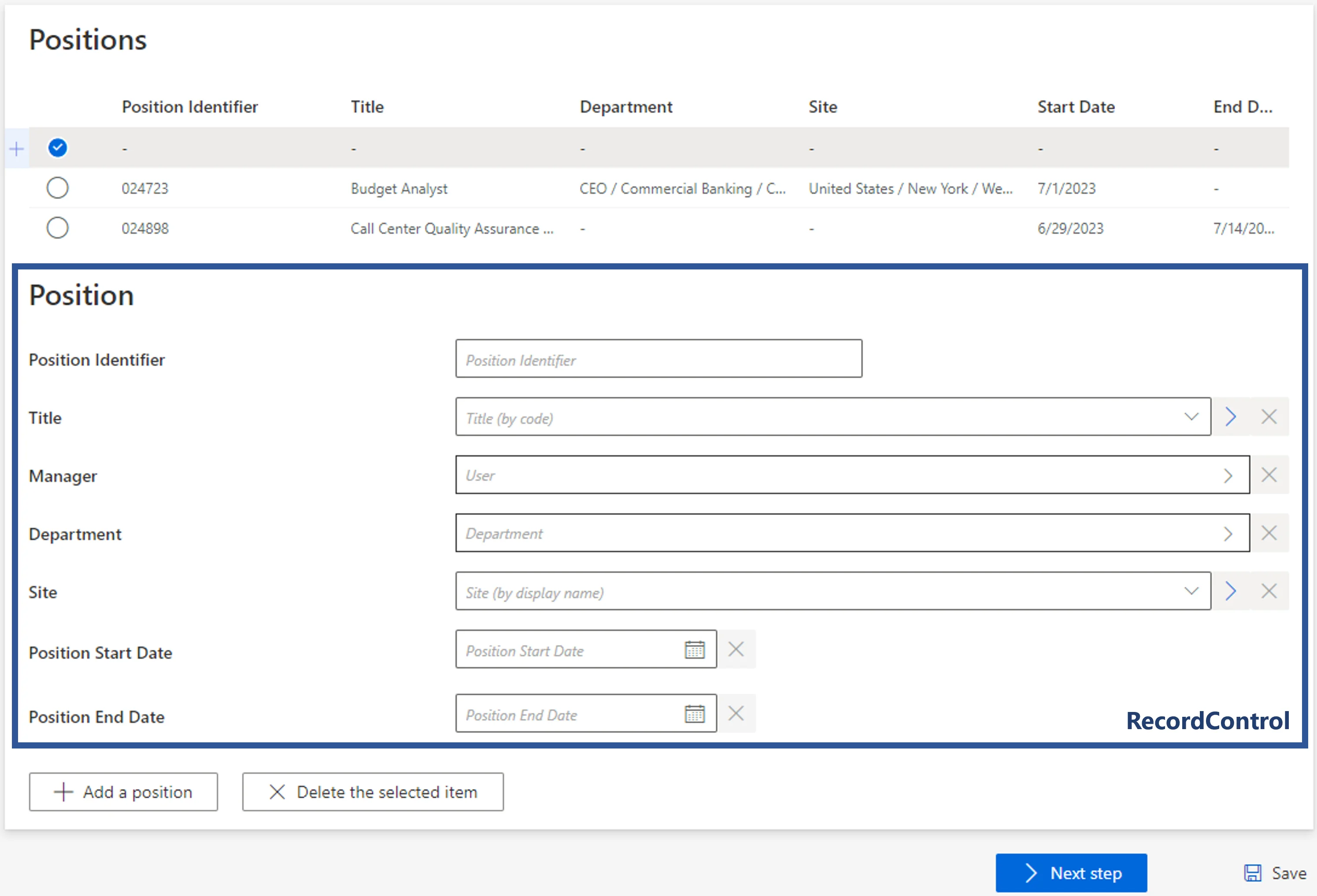
When adding a new position, we decide to make Title available, in addition to the fields used to
update existing records:
The content of RecordUniqueItemControl is not visible. The user's records that have the same
values for all the properties in RecordUniqueItemControl will be displayed, and potentially
modified, as one.
Properties
| Property | Details |
|---|
Child Element: MainControl
Set of fields to collect data about the main resource.
| Property | Details |
|---|
Child Element: RecordControl
Set of fields to collect data when adding new records.
| Property | Details |
|---|
Child Element: RecordUniqueItemControl
Set of fields that group records together. All records with the same data in
RecordUniqueItemControl are displayed in the workflow as only one record, and they will
potentially be modified together. When not specified, records will be grouped by the data from
RecordControl.
| Property | Details |
|---|
Child Element: RecordSlaveUniqueItemControl
Set of fields to collect the data shared with all the resource's records, for example contract information when managing positions.
| Property | Details |
|---|
Child Element: RecordSlaveControl
Set of fields to collect data when updating existing records.
| Property | Details |
|---|