NIM Profile
This connector exports and fulfills profile assignments from/to an Identity Manager instance.
This page is about NIM Profile.

Overview
The NIM (Netwrix Identity Manager) Profile connector enables Identity Manager to manage its own profile assignments. This connector allows you to:
- Automatically assign profiles based on rules
- Include assigned profiles in access certification campaigns
- Apply separation of duties risk rules to Identity Manager profile permissions
- Leverage the full governance lifecycle (approval workflows, audit trails, role mining, etc.)
The connector supports two operational modes:
- Local mode: Manage profile assignments within the same Identity Manager instance (target instance = source instance)
- Remote mode: Manage profile assignments in a different Identity Manager instance (target instance ≠ source instance)
Prerequisites
Implementing this connector requires:
- An Identity Manager instance with properly configured profiles
- For Remote mode: API connectivity between the source and target Identity Manager instances
Permissions
The open id client must have the following permissions:
- Read, Write, Create, Delete permissions on the target instance to export/provision/deprovision profile assignments:
/AccessControl/AssignedProfile/Query/AccessControl/AssignedProfile/Update/AccessControl/AssignedProfile/Create/AccessControl/AssignedProfile/Delete
The user generating the NIM Profile Template must have the permission /Connector/Connection/Update
Configuration Template
The NIM Profile connector uses an automated configuration wizard that generates the necessary connector configuration based on a template.
More specifically, based on the profiles, dimensions and entity types in the target instance, the wizard will generate and deploy:
- Entity types and associations
- Single roles (one per profile)
- Resource types
- Correlation rules
- Query rules
- Navigation and scalar rules
- UI components (views and menu items)
- A dedicated category for the connector
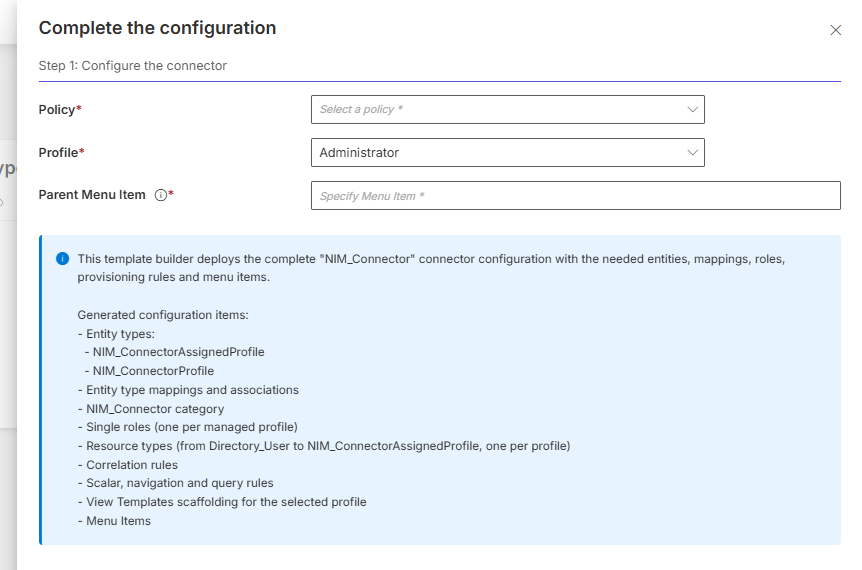 When generating the configuration, as seen above, the following elements need to be specified:
- Policy: Defines where to include the category, single roles, resource types, and rules
- Profile: Defines the profile used to specify the access control rules
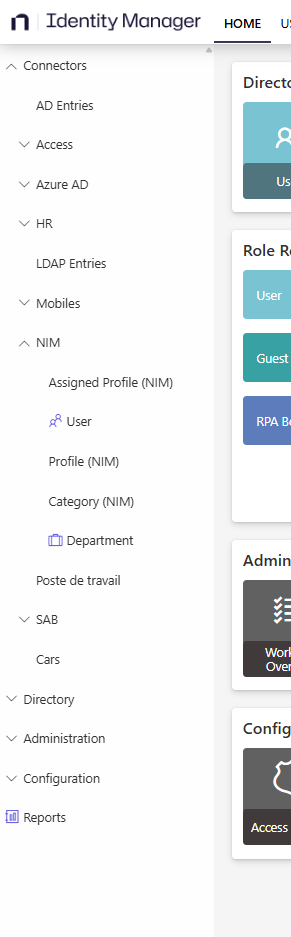
- MenuItem: Determines where to nest the sub-menu items for the NIM connector in the user interface (see screenshot below showing menu item locations). For example, in the demo configuration,
Nav_Connectorsshould be used. Parent Menu ItemNavcan be used. It will add the items to the root of the navigation left panel on the Home page. For more information, refer to the Menu Item documentation.
In complex scenarios, when the owner entity type is different from the identity entity type (the entity type bound via the ResourceIdentityProperty setting), the wizard generates multiple Resource Types per profile, one for each identity correlation path (e.g., separate Resource Types for nominative and administrative accounts).
The connector supports scenarios where:
- Users have multiple profile assignments
- Profiles are parameterized with multiple dimension values
- Users have both time-limited and permanent profile assignments
The product currently faces limitations concerning evolutions:
- If the target instance's configuration changes (profiles added or removed, dimensions modified, ...), the connector configuration may become outdated. This could lead to uncorrelated resources for newly added profiles. For now, the only option is to re-create a connection and re-run the configuration wizard to regenerate the connector configuration.
- Since the generation of the template also creates hard coded resources, it is not yet possible to export the configuration from one environment and import it in another environment. The template needs to be generated using the wizard in the second environment too.
Local Mode vs Remote Mode
Local Mode (Self-Management)
In Local mode, the source and target instances are the same. This is the simplest configuration: no manual steps are required, all expressions are automatically computed. The generated rules can always be manually adjusted after deployment if needed.
When the owner entity type differs from the identity entity type, binding expressions for query and correlation rules are inferred from the existing correlation rules linking the two entity types. When multiple correlation rules exist for the same Resource Type, only the one with the highest confidence level is used.
Remote Mode
In Remote mode, the source and target instances are different.
The wizard cannot automatically determine how to map identities between the source and the target Identity Manager instances. The following steps must therefore be performed:
-
Locate Placeholder Expressions (for Query and Correlation Rule): Placeholders contain the text "PLACEHOLDER" and include guidance.
-
Update Query Rules: For each Resource Type, replace the placeholder with an expression that returns the target instance user identifier.
For example:
C#:userRecord: return userRecord.User?.Identifier.ToString(); -
Update Correlation Rules: For each Resource Type, with the same logic as for Query Rules, modify to correlate users between instances.
-
Test the Configuration:
- Run an Export job to verify data is exported correctly
- Run a Synchronization job to import the data
- Run a ComputeRoleModel job to test correlation
- Verify that profile assignments are being correlated correctly
- If correlation fails (0 matches found), review and correct the user binding expressions
In Remote mode, if placeholder expressions are not replaced, the connector will appear to work (Export and Synchronization jobs complete successfully), but no correlation will occur.
Export
For a configured NIM Profile connection, this connector exports profile assignments from the target Identity Manager instance.
What is Exported
The connector exports:
- Profile Metadata: Profile definitions (from
UA_Profilestable) - Assignment Context: Profile context values (from
UA_ProfileContextstable) - User Associations: Links between profiles and users (from
UA_AssignedProfilestable) - Dimension Values: Parameter values for parameterized profiles. For assigned profiles, dimensions include the dimensions defined in the configuration but also single roles, composite roles, resource types as well as categories.
Configuration
The connection configuration is created through the UI during connector setup.
For Local mode, no additional connection settings are required beyond selecting "Local" mode.
For Remote mode, the connection settings must be configured through the UI or in the appsettings.agent.json > Connections section:
// appsettings.agent.json
{
  ...
  "Connections": {
    ...
    "<ConnectionIdentifier>": {
      "Mode": "Remote",
      "ServerUrl": "https://target.instance.com",
      "ClientId": "your-client-id",
      "ClientSecret": "your-client-secret"
    }
  }
}
Setting Attributes
| Name | Type | Description |
|---|---|---|
| Mode required | String | Connection mode: Local or Remote. |
| ServerUrl Required for Remote mode | String | The URL of the target Identity Manager instance to manage. Not required for Local mode. |
| ClientId Required for Remote mode | String | OAuth client ID for authenticating with the target instance API. Not required for Local mode. |
| ClientSecret Required for Remote mode | String | OAuth client secret for authenticating with the target instance API. Not required for Local mode. |
Output Details
This connector generates a file named <connectionIdentifier>_AssignedProfile.csv, with columns for:
- Id: Target instance assignment ID
- StartDate: Assignment start date
- EndDate: Assignment end date
- UserId: Reference to the assigned user
- ProfileId: Reference of the assigned profile
- Parameter dimension values: For each profile parameter
- Email: Email for the assignment
As well as a file named <connectionIdentifier>_Profile.csv, with columns for:
- Id: Id of the profile
- Identifier: Reference of the profile
- DisplayName_L1: Name of the profile
Additional CSV files are generated for profile context values (dimensions as well as categories, single roles, composite roles and resource types).
Fulfill
This connector provisions profile assignments to the target Identity Manager instance.
The BlockProvisioning property is set to true and the ApprovalWorkflowType is set to ManualAssignmentNotAllowed on generated Resource Types.
Therefore provisioning must occur through the Role Model engine based on Single Role assignments only. Once the orders are created, they have to be reviewed in the Provisioning Review screen.
Configuration
The fulfillment configuration is automatically generated by the wizard and includes:
- Resource Type Mappings: Type
NimResourceTypeMappinglinked to the NIM Profile connection - Provisioning Rules: Navigation rules for profile and parameter values, Scalar rules for dates
- Correlation Rules: Rules to match existing assignments and avoid duplicates
Output Details
The connector:
- Creates new
UA_AssignedProfilesandUA_ProfileContextsfor granted assignments - Updates existing profile assignments
- Deletes profile assignments for permissions that need to be revoked
- Generates historization in both source and target instances
Best Practices
Before Deployment
- Review target instance schema: Ensure profiles are properly configured with correct parameters
- Plan identity correlation: In Remote mode, document the user mapping strategy before running the wizard
- Test in non-production: Deploy and test the connector in a development environment first
After Deployment
- Validate correlation: Run test exports and synchronization to verify correlation is working correctly
- Monitor provisioning: Review initial provisioning operations to ensure assignments are created correctly
- Document expressions: If using Remote mode, document the user binding expressions for future reference
Troubleshooting
Export completes but no data is synchronized
| Possible cause | Resolution |
|---|---|
| Target instance has no profile assignments | Check target instance UA_AssignedProfiles table |
| Access Control Rule has filters | Verify the open id client has permissions to /AccessControl/AssignedProfile/Query and can access all |
| profile assignments |
No correlation occurs
| Possible cause | Resolution |
|---|---|
| Placeholder expressions not replaced (Remote mode) | Check Query Rules and Correlation Rules for "PLACEHOLDER" text |
| Incorrect user binding expressions | Verify user binding expressions return valid identifiers |
| User data not synchronized to source instance | Synchronize before correlating profile assignments |
Fulfillment operations are not executed
| Possible cause | Resolution |
|---|---|
BlockProvisioning preventing fulfillment | Check Provisioning Review for pending operations |
| No Single Roles assigned to users | Verify the single role rules for the profiles are properly defined and that users have appropriate Single Role assignments |
| Role Model not computed | Run the Compute Role Model job to generate provisioning operations |
Computed profiles display as non-conforming
ProfileRules will continue to be computed. To ensure that computed profiles are properly recognized by the Compute Role Model job and do not display as non-conforming, Profile rules should be written through Single Role rules as for other connectors, rather than using ProfileRules.
Authentication
Password Reset
This connector does not reset passwords.
Credential Protection
For Remote mode connections, data protection can be ensured through:
- RSA Encryption configured in the
appsettings.encrypted.agent.jsonfile - An Azure Key Vault safe
Consider storing API credentials in:
- A CyberArk's AAM Credential Providers able to store the target instance URL and API credentials