AppDisplaySetting
This setting is used to customize the application display.
Examples
Set colors, logos and names
The following example sets:
- "Netwrix Identity Manager" as name of the application visible on the tabs;
- the logo to be displayed in the top left corner;
- the favicon to be displayed on the tabs;
- the banner color, banner gradient color, banner selected tab color, banner text color, primary color and secondary color.
<AppDisplaySetting ApplicationName="Netwrix Identity Manager" LogoFile="logo.webp" FaviconFile="favicon.ico" BannerColor="#512E5F" BannerGradientColor="#76D7C4" BannerSelectedTabColor="#E74C3C" BannerTextColor="#F1C40F" PrimaryColor="#0E6655" SecondaryColor="#85C1E9" />


Disable counters
The following example disables the counters that are usually visible on the dashboard:
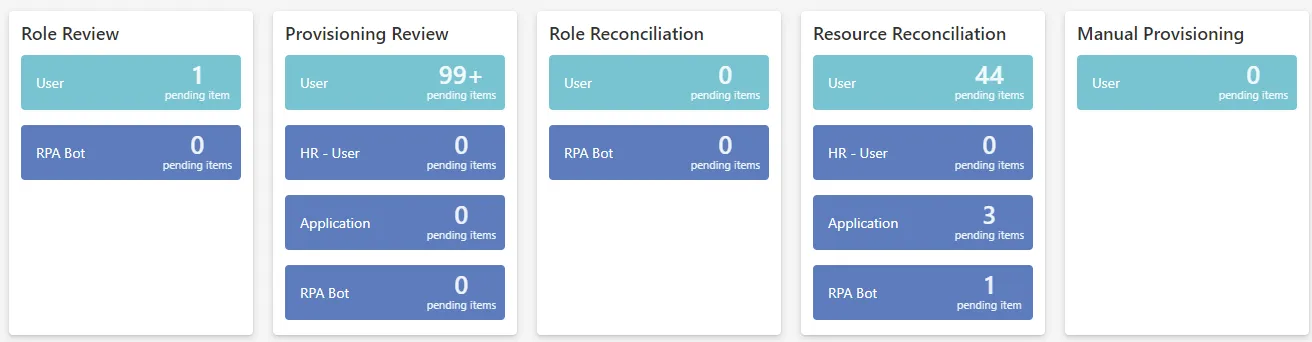
<AppDisplaySetting DisableProvisioningCounters="true" />

Properties
| Property | Details |
|---|---|
| ApplicationName optional | Type: String Description: Name of the application, visible on the application's tabs. |
| BannerColor optional | Type: String Description: HEX code of the color for the banner, i.e. the header displaying logo and navigation bar. |
| BannerGradientColor optional | Type: String Description: HEX code of the color for the banner's gradient to be visible at the middle of the banner. |
| BannerSelectedTabColor optional | Type: String Description: HEX code of the color for the line that emphasizes the selected tab. |
| BannerTextColor optional | Type: String Description: HEX code of the color for the banner's text. |
| DisableProvisioningCounters default value: false | Type: String Description: true to disable the counters related to the administration screens: Role Review, Provisioning Review, Role Reconciliation, Resource Reconciliation and Manual Provisioning. |
| FaviconFile optional | Type: String Description: Path of the favicon to be displayed in the application's tabs. |
| FaviconMimeType optional | Type: String Description: Mime type of the favicon. |
| FullNameSeparator default value: ¤ | Type: String Description: Separator of the full name. |
| Identifier default value: AppDisplay | Type: String Description: Unique identifier of the setting. |
| LogoFile optional | Type: String Description: Path of the logo to be displayed in the top left corner. |
| LogoMimeType optional | Type: String Description: Mime type of the logo. |
| Preview optional | Type: String Description: Documentation unavailable. |
| PrimaryColor optional | Type: String Description: HEX code of the color for the highlighted buttons. |
| SecondaryColor optional | Type: String Description: HEX code of the color for the background of the authentication screen. |