ResourceType
In Identity Manager, a resource type is a conceptual model used to categorize resources. It groups together, with a meaningful name, resources sharing the same intent and the same authorization system. Resource types are assigned directly to a resource rather than mapped to a role. A resource type can be assigned manually, or configured to be assigned automatically via a resource type rule.
Examples
The following example declares a new resource type to provision the LDAP service accounts:
<ResourceType Identifier="LDAP_Entry_ServiceEntry" DisplayName_L1="LDAP Entry (service)" Policy="Default" TargetEntityType="LDAP_Entry" Category="LDAP" SourceEntityType="Directory_Application" />
ArgumentsExpression
The ArgumentsExpression allows you to compute provisioning arguments dynamically based on the provisioning order and resource properties.
For detailed examples, see Compute a Resource Type's Provisioning Arguments.
DependsOn
This option is used to configure another resource type as prerequisite for this resource type.
For example, a Microsoft Exchange account requires the email address of a related Active Directory account.
In this case, we want to configure the Exchange Account resource type so that a user cannot own an Exchange account when they do not own an AD account.
The following example is meant to perform an automatic check to prevent the execution of any provisioning order for the creation of an Exchange account when the user does not own an AD nominative account.
<ResourceType Identifier="Exchange" DisplayName_L1="Exchange Account" Policy="Default" TargetEntityType="Exchange" Category="Accounts" SourceEntityType="Directory_User" ApprovalWorkflowType="ManualAssignmentNotAllowed" DependsOn="AD_Entry_NominativeUser">
DependsOnOwnerProperty
This option is used to configure a property as prerequisite for the resource type.
Consider an Active Directory administrator account which should be able to perform manual provisioning to ServiceNow. Then it requires the random identifier computed by ServiceNow.
In this case, we want to configure the AD_Entry_AdministrationUser resource type so that a user cannot own an AD administrator account when they do not have an identifier in ServiceNow.
The following example is meant to perform an automatic check to prevent the execution of any provisioning order for the creation of an AD administrator account when the user does not have an identifier in ServiceNow.
<ResourceType Identifier="AD_Entry_AdministrationUser" DisplayName_L1="AD User (Administration)" Policy="Default" TargetEntityType="AD_Entry" Category="Accounts" SourceEntityType="Directory_User" ApprovalWorkflowType="ManualAssignmentNotAllowed" DependsOnOwnerProperty="ServiceNow:identifier">
DiscardManualAssignments
This option is used to set Identity Manager as authoritative following a manual change in a managed system.
Suppose a resource type managing the provisioning of Active Directory nominative accounts based on users data in Identity Manager (Directory_User). Suppose a scalar rule that provisions the AD's sn property based on users' last names.
The following scenario is about a user named Cedric Blanc, whose AD's sn property is set by the scalar rule to Blanc.

Let's see what happens when the user's name is changed manually directly in the AD.
Suppose that we change in the AD the last name to White. As the scalar rule computes the sn value based on the user's data which still states the last name Blanc, such a change induces a difference between the value calculated by the rule and the actual value in the AD. This difference is spotted by the next synchronization, triggering a non-conforming assignment on the Resource Reconciliation page.


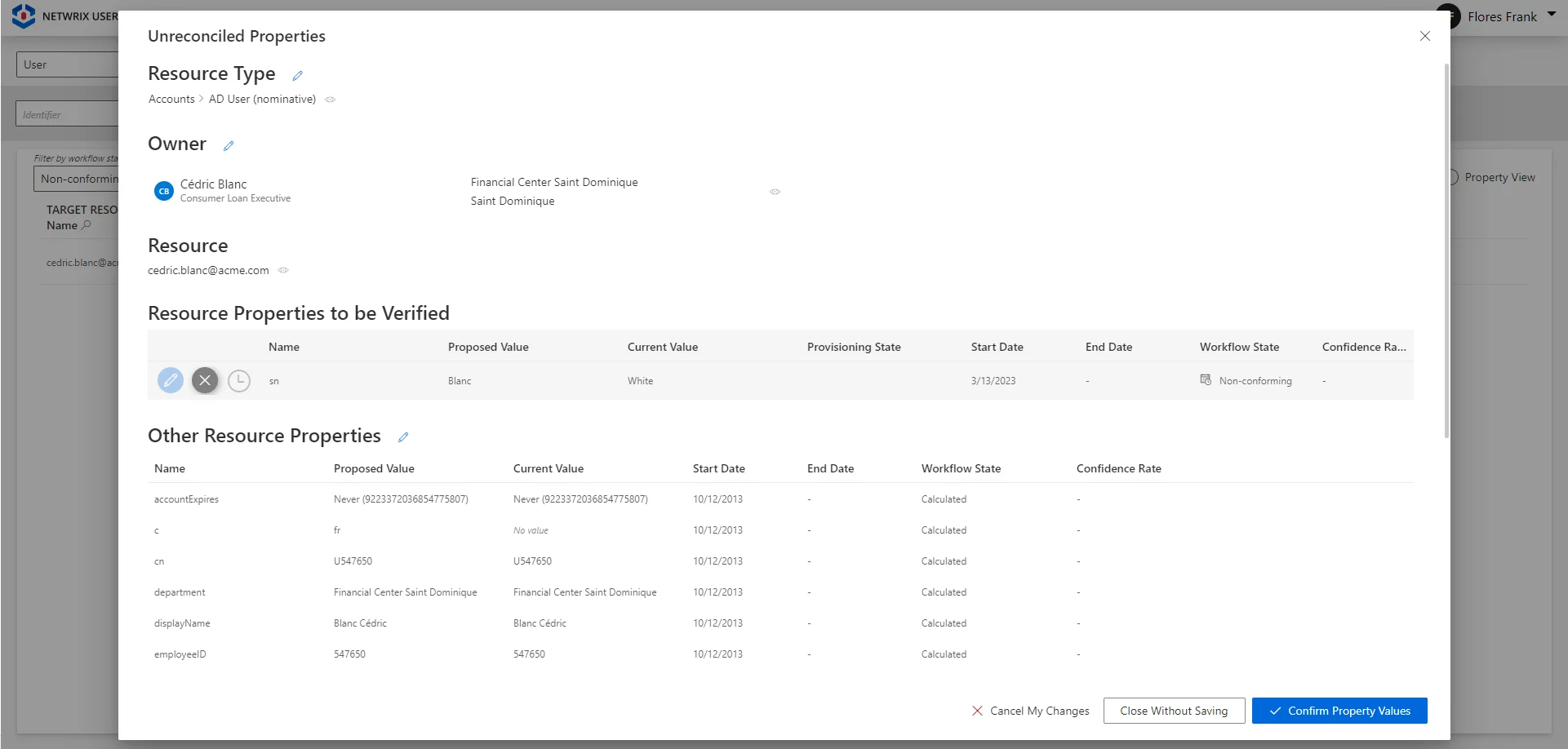
Once this manual new value is confirmed, the property is stated as Approved.

Now suppose that the user's last name is changed to Black via Identity Manager's workflows. As the source data is changed, the scalar rule computes a new value for sn. There are two options:
-
The default configuration (
DiscardManualAssignmentsset tofalse) considers manual assignments, i.e. changes made directly in the managed system, as authoritative. So there will be no provisioning of the newly computed value forsn. The currentsnvalue that was written manually in the AD stays as is, no matter the changes in the source data (here the user's last name). Identity Manager only states the property's value asQuestioned. note
noteNo change in the source data can affect the property's value. However, any manual change made in the managed system will trigger a non-conforming assignment. Then, reconciling the property by choosing to keep Identity Manager's suggested value will make the property's value go back to
Calculatedand thus follow the changes in the source data. -
If
DiscardManualAssignmentsis set totrue, then the state of the property's value does not matter. Identity Manager applies the rules of the role model, and generates a provisioning order to overwrite the manual changeWhitewith the newly computed valueBlack.
In this scenario for Cedric Blanc, these behaviors can be summed up like the following:
Properties
| Property | Details |
|---|---|
| AllowAdd default value: true | Type: Boolean Description: Enables Identity Manager to automatically create new resources in the managed system when their owners are given the right entitlements. Otherwise, resource managers must create resources manually directly in the managed system. |
| AllowRemove default value: true | Type: Boolean Description: Enables Identity Manager to automatically deprovision resources in the managed system when their owners are deprived of the right entitlements. Otherwise, Identity Manager is able to delete resources in the managed system only with a manual approval on the Resource Reconciliation screen. |
| ApprovalWorkflowType default value: 0 | Type: ProvisioningPolicyApprovalWorkflow Description: Indicates the number of validation to give to a role given manually (from None to Three). The value ManualAssignmentNotAllowed is used when a manual assignment cannot be performed. Note: NETWRIX recommends using ManualAssignmentNotAllowed for all resource types. |
| ArgumentsExpression optional | Type: String Description: C# expression used to compute the arguments of provisioning orders, for example a workflow identifier, in a situation where it is not obvious. The aim is to enable an InternalWorkflow connector to fulfill correctly a virtual managed system by launching the right workflows based on a given provisioning order. This expression must return a dictionary of string. Note: ArgumentsExpression is useful only when provisioning via the following packages: [Active Directory](/docs/identitymanager/current/integration-guide/connectors/references-packages/Active Directory); [Apache Directory](/docs/identitymanager/current/integration-guide/connectors/references-packages/Apache Directory); [Generic LDAP](/docs/identitymanager/current/integration-guide/connectors/references-packages/Generic LDAP); [Open LDAP](/docs/identitymanager/current/integration-guide/connectors/references-packages/Open LDAP); [Oracle LDAP](/docs/identitymanager/current/integration-guide/connectors/references-packages/Oracle LDAP); [Red Hat Directory Server](/docs/identitymanager/current/integration-guide/connectors/references-packages/Red Hat Directory Server); Workflow. |
| BlockProvisioning default value: true | Type: Boolean Description: true to block the provisioning policy orders. |
| Category optional | Type: Int64 Description: Resource type category. |
| CorrelateMultipleResources default value: false | Type: Boolean Description: true to extend the QueryRule/CorrelationRule to match as many target resources as possible (no blocking like this is normally the case). |
| DependsOn optional | Type: Int64 Description: Identifier of another resource type that must be provisioned for a given identity before the current resource type can be provisioned for said identity. |
| DependsOnOwnerProperty optional | Type: Int64 Description: Identifier of one of the owner properties that must be filled before the current resource type can be provisioned for said identity. |
| Description_L1 optional | Type: String Description: Describe this resource type in detail. |
| DiscardManualAssignments default value: false | Type: Boolean Description: true to always allow the provisioning of a new property value, i.e. re-computed by a provisioning rule after a change in the source data, no matter the property's current workflow state. Set to false, any manual change of a property's value made directly in the target system will be "protected" (only after the change is approved in Identity Manager in Resource Reconciliation). It means that a future change in the source data will not trigger the provisioning of the new value to the target system. Instead, Identity Manager will keep the value of the manual change, and state the value as Questioned. This option should be set to true when: * using multiple authoritative sources and the latest value should be provisioned; * a source system is not often synchronized to Identity Manager but should stay the authoritative source. |
| DisplayName_L1 required | Type: String Description: Display name of the resource type in language 1 (up to 16). |
| FulfillHoursAheadOfTime default value: 0 | Type: Int32 Description: Anticipate resource fulfill order hours ahead of they start time. It is helpful for manual fulfillment and/or long fulfillment process. It differs from TimeOffset because the start date of the resource to fulfill is not impacted. |
| HideOnSimplifiedView default value: false | Type: Boolean Description: true to hide this resource type in the basket simplified view. This flag is applied only on automatic assignments. |
| Identifier required | Type: String Description: Unique identifier of the resource type. |
| ImplicitApproval default value: 0 | Type: Byte Description: Indicates if the validation steps of the resource type can be skipped. 0 - Inherited: implicit approval value in the associated policy. 1 - Explicit: all the workflow steps must be approved. 2 - Implicit: the workflow steps can be skipped if the requester has enough permissions. |
| ManualAssignmentEndDateLockedToContextMode default value: Inherited | Type: RoleManualAssignmentEndDateLockedToContextMode Description: Inherited (default value): Use the policy's ManualAssignmentEndDateLockedToContextMode value. ExplicitNotContextBoundByDefault: The manual assignments' end date can be specified by the user or can be locked to match the end date specified by context rules. By default, in the UI, it is not automatically locked. ExplicitContextBoundByDefault: The manual assignments' end date can be specified by the user or can be locked to match the end date specified by context rules. By default, in the UI, it is automatically locked. Never: The manual assignments' end date needs to be specified. Always: The manual assignments' end date cannot be modified. They are computed by the policy to match the end date specified by context rules. |
| MaximumDelete default value: 0 | Type: Int32 Description: Deleted lines threshold. Sets the maximum number of resources that can be removed from the resource type when running the provisioning job. |
| MaximumDeletePercent default value: 30 | Type: Int32 Description: Deleted lines threshold in percent. |
| MaximumInsert default value: 0 | Type: Int32 Description: Inserted lines threshold. Sets the maximum number of resources that can be added into the resource type when running the provisioning job. |
| MaximumInsertPercent default value: 30 | Type: Int32 Description: Inserted lines threshold in percent. |
| MaximumUpdate default value: 0 | Type: Int32 Description: Updated lines threshold. Sets the maximum number of resources that can be modified within the resource type when running the provisioning job. |
| MaximumUpdatePercent default value: 30 | Type: Int32 Description: Updated lines threshold in percent. |
| P0 default value: false | Type: Boolean Description: true to indicate that the resource type is parameterized, i.e. there is at least one type rule configured to assign the resource type based on the dimension 0 (up to 3V following the base32hex convention). |
| Policy required | Type: Int64 Description: Identifier of the policy that the resource type is part of. |
| ProlongationWithoutApproval default value: 0 | Type: ProlongationWithoutApproval Description: Indicates whether the resource type can be extended without any validation. 0 - Inherited: gets the value from the policy. 1 - Enabled. 2 - Disabled. |
| R0 default value: false | Type: Boolean Description: true to set the dimension 0 (up to 3V following the base32hex convention) as a required parameter when assigning the resource type. |
| RemoveOrphans default value: false | Type: Boolean Description: true to authorize the deprovisioning of this resource when it does not have an owner. Can only be true when AllowRemove property is also true. |
| SourceEntityType required | Type: Int64 Description: Identifier of the source entity type. |
| SuggestAllCorrelations default value: false | Type: Boolean Description: Suggest all correlations, whatever the confidence rate of the correlation rule. |
| TargetEntityType required | Type: Int64 Description: Identifier of the target entity type. |
| TransmittedStateValidityPeriod default value: 0 | Type: Int32 Description: Time period (in minutes) after which fulfillment orders in Transmitted/Executed states are automatically set in Error state. Recommendations: - When provisioning automatically, then set 1, 2 or 3 times the period between two synchronizations. - When provisioning manually and synchronizing regularly, then set around 15 days. - When provisioning manually with few synchronizations, then don't set it. |
Child Element: BinaryRule
A ResourceBinaryRule allows to specify the file that must be set to an assigned resource binary property. It is defined by a child element <BinaryRule> of the <ResourceType> element. The source file should already be synchronized and stored inside and reference as an EntityType property.
Examples
  <ResourceType Identifier="AD_Entry_To_Directory_User" ...>
    ...
    <BinaryRule Property="Photo" Binding="thumbnailPhoto" />
  </ResourceType>
TimeOffset
See more information about time offsets.
Properties
| Property | Details |
|---|---|
| Binding optional | Type: Int64 Description: Defines the binding expression to get the file property. |
| Policy required | Type: Int64 Description: Identifier of the policy that the rule is part of. |
| Property required | Type: Int64 Description: Identifier of the property used to represent the file on the target EntityType. |
| SingleRole optional | Type: Int64 Description: Identifier of the single role. The single role must be assigned to the owner so that the file can be provisioned on the resource. |
| TimeOffsetAfterReference default value: 0 | Type: Int32 Description: Defines the offset after reference (in minutes). |
| TimeOffsetBeforeReference default value: 0 | Type: Int32 Description: Defines the offset before reference (in minutes). |
| TimeOffsetReference default value: 0 | Type: TimeOffsetReference Description: Offset mode defining which dates to use as references, in order to apply the time offset. The time period for which the rule is applied is adjusted accordingly. 0 - Default: the offset inherited from the type rule. 1 - Around: the offset before reference is applied from the start date of the resource, and the offset after reference is applied from the end date. 2 - Before: the offset before and after reference are both applied from the start date of the resource. 3 - After: the offset before and after reference are both applied from the end date of the resource. Note: in a situation with several binary rules, the order of application is: After, then Before, then Around, then Default. Each rule is able to overwrite those previously applied in case they overlap. Warning: two offsets of the same mode should never overlap. Resources' start and end dates can be configured through record sections and/or context rules. |
Child Element: NavigationRule
A navigation rule computes the value of a given navigation property for target resources, based on the properties of their owners (source resources and entitlements). These properties are to be provisioned, i.e. written to the managed system. Contrary to query rules, navigation rules assign resources regardless of the attributes of source resources.
A navigation rule is defined by the child element <NavigationRule> of the <ResourceType> element.
Both navigation and query rules compute navigation properties. The value of one navigation property should be computed by either navigation or query rules, not both.
See more information about navigation rules' configuration guidelines.
Examples
Computation based on other properties
The following example declares a new rule to give the SG_APP_SharePoint_HR_Owner group to all users who had the SharePoint_HR_Owner role.
<NavigationRule Property="memberOf" Resource="SG_APP_SharePoint_HR_Owner" SingleRole="SharePoint_HR_Owner" Policy="Default" />
The following rule will set users' Active Directory nominative account in the CN=SG_APP_DL-INTERNET-Restricted,OU=Applications,DC=acme,DC=internal group for people having the DL-INTERNET-Restricted role.
<ResourceType Identifier="AD_Entry_NominativeUser">
    ...
    <NavigationRule Property="memberOf" Resource="CN=SG_APP_DL-INTERNET-Restricted,OU=Applications,DC=acme,DC=internal" SingleRole="DL-INTERNET-Restricted" />
</ResourceType>
Using ResourceFromDimension
The ResourceFromDimension property creates behavior equivalent to having separate navigation rules for each resource in a dimension. This reduces the number of configuration entries when you need the same rule logic for multiple resources.
<NavigationRule Property="Organization" ResourceFromDimension="Organization0" SingleRole="ManagerOrganization" />
The ResourceFromDimension rule above behaves as if you had created individual rules for each resource in the dimension:
<NavigationRule Property="Organization" Resource="Dept_IT" SingleRole="ManagerOrganization" D0="Dept_IT" />
<NavigationRule Property="Organization" Resource="Dept_HR" SingleRole="ManagerOrganization" D0="Dept_HR" />
<NavigationRule Property="Organization" Resource="Dept_Finance" SingleRole="ManagerOrganization" D0="Dept_Finance" />
<!-- one rule per resource in Organization0 dimension -->
Configuration requirements:
- Either
ResourceorResourceFromDimensionmust be specified, not both SingleRoleis required when usingResourceFromDimension- The dimension's entity type must match the target entity type of the navigation property
- Do not specify dimension criteria (D0, D1, etc.) when using
ResourceFromDimension- they are set automatically
TimeOffset
See more information about time offsets.
Parameterized roles
This configuration supports parameterized roles, which allow dynamic role assignments based on context properties and expressions.
For more details, see Parameterized Roles.
Properties
| Property | Details |
|---|---|
| D0 optional | Type: Int64 Description: Value to match for the dimension D0 (up to D127) to trigger the rule. For example, considering that D0 corresponds to users' countries, then set D0 to France to compute the navigation property for users whose country is France. Note: specifying at least one dimension makes the linked role parameterized. |
| IsDenied default value: false | Type: Boolean Description: true to forbid the resource assignment instead of applying it. |
| L0 default value: false | Type: Boolean Description: true to activate inheritance for D0 (up to 127). |
| Policy required | Type: Int64 Description: Identifier of the policy that the rule is part of. |
| Property required | Type: Int64 Description: Identifier of the navigation property to be computed. |
| Resource optional | Type: Int64 Description: Identifier of the resource to be assigned as a value of the impacted navigation property. Said resource must be part of the entity type that the navigation property points to. |
| ResourceFromDimension optional | Type: Int64 Description: The ResourceFromDimension property is a special configuration option for ResourceNavigationRule that simulates having as many navigation rules as there are resources in the specified dimension, without actually creating multiple rule entries. Purpose When you configure a ResourceNavigationRule with ResourceFromDimension, the system behaves as if you had created a separate navigation rule for each resource that belongs to the specified dimension. This provides a powerful way to avoid repetitive configuration and maintain consistency across related resources. Example Scenario If you have a dimension "Departments" containing 50 department resources, setting ResourceFromDimension="Departments" on a single navigation rule is equivalent to creating 50 individual navigation rules, one for each department resource. Configuration Rules Mutually Exclusive Properties You must choose one approach for defining resources: - Use Resource to specify a single, explicit resource - Use ResourceFromDimension to dynamically reference all resources in a dimension These two properties cannot be used together on the same navigation rule. Valid Configuration Examples xml Required SingleRole Property When using ResourceFromDimension, the SingleRole property is mandatory. Entity Type Compatibility The dimension specified in ResourceFromDimension must have the same entity type as the target entity type of the navigation property. This ensures type safety and consistency. |
| SingleRole optional | Type: Int64 Description: Identifier of a single role, which users must have to trigger the property computation. |
| TimeOffsetAfterReference default value: 0 | Type: Int32 Description: Time period (in minutes) after the reference end date, which shifts the end of the rule's application. A negative value for the time offset means that the time period is before the reference date. |
| TimeOffsetBeforeReference default value: 0 | Type: Int32 Description: Time period (in minutes) after the reference start date, which shifts the start of the rule's application. A negative value for the time offset means that the time period is before the reference date. |
| TimeOffsetReference default value: 0 | Type: TimeOffsetReference Description: Offset mode defining which dates to use as references, in order to apply the time offset. The time period for which the rule is applied is adjusted accordingly. 0 - Default: the offset inherited from the type rule. 1 - Around: the offset before reference is applied from the start date of the resource, and the offset after reference is applied from the end date. 2 - Before: the offset before and after reference are both applied from the start date of the resource. 3 - After: the offset before and after reference are both applied from the end date of the resource. In a situation with several navigation rules, the order of application is descending (After-Before-Around-Default). Thus each time offset is able to overwrite those previously applied in case they overlap, for mono-valued properties. Warning: two offsets of the same mode should never overlap for mono-valued properties. Overlapping rules on a multi-valued property do not conflict with each other, Identity Manager stores all computed values. Resources' start and end dates can be configured through record sections and/or context rules. |
Child Element: QueryRule
A query rule computes the value of a given navigation property for target resources, based on the properties of their owners (source resources and entitlements). These properties are to be provisioned, i.e. written to the managed system. Contrary to navigation rules, query rules assign resources to target resources according to a query via a C# expression with conditions, based on the attributes of the source resources.
A query rule is defined by the child element <QueryRule> of the <ResourceType> element.
Both navigation and query rules compute navigation properties. The value of one navigation property should be computed by either navigation or query rules, not both.
See more information about query rules' configuration guidelines.
Examples
Computation based on other properties
The following example declares a new rule to compute the parent distinguished name for guest users. Here we do not use source properties, but a literal expression for all guest users.
<ResourceType Identifier="AD_Entry_Guest">
...
<QueryRule Property="parentdn" Policy="Default" TargetBinding="AD_Entry:dn" SourceExpression="C#:resource:return "OU=Guests,DC=acme,DC=internal";" TargetMatchedConfidenceLevel="100" />
</ResourceType>
TimeOffset
See more information about time offsets.
Properties
| Property | Details |
|---|---|
| Policy required | Type: Int64 Description: Identifier of the policy that the rule is part of. |
| Property required | Type: Int64 Description: Identifier of the navigation property to be computed. |
| SourceBinding optional | Type: Int64 Description: Binding of the property from the source entity type to be compared with the target binding/expression, in order to find a matching resource to be the value of Property. |
| SourceExpression optional | Type: String Description: C# expression to compare with the target binding/expression in order to compute the value of Property with the matching resource. See more details on C# expressions. |
| TargetBinding optional | Type: Int64 Description: Binding of the property from the entity type pointed by Property, which will be the value of Property if it matches the source binding/expression. |
| TargetExpression optional | Type: String Description: C# expression to compare with the source binding/expression in order to compute the value of Property with the matching resource. See more details on C# expressions. Warning: it must contain at least one target property, it cannot be a literal expression. |
| TargetMatchedConfidenceLevel default value: 0 | Type: Int32 Description: Percentage rate expressing the confidence in the rule according to data quality and sensitivity. Identity Manager considers the rules in descending order of confidence rate, the first matching rule is applied. 0 to 99: imposes that a resource manager reviews the property computation on the Resource Reconciliation page. 100 to 150: computes the property automatically. |
| TimeOffsetAfterReference default value: 0 | Type: Int32 Description: Time period (in minutes) after the reference end date, which shifts the end of the rule's application. A negative value for the time offset means that the time period is before the reference date. |
| TimeOffsetBeforeReference default value: 0 | Type: Int32 Description: Time period (in minutes) after the reference start date, which shifts the start of the rule's application. A negative value for the time offset means that the time period is before the reference date. |
| TimeOffsetReference default value: 0 | Type: TimeOffsetReference Description: Offset mode defining which dates to use as references, in order to apply the time offset. The time period for which the rule is applied is adjusted accordingly. 0 - Default: the offset inherited from the type rule. 1 - Around: the offset before reference is applied from the start date of the resource, and the offset after reference is applied from the end date. 2 - Before: the offset before and after reference are both applied from the start date of the resource. 3 - After: the offset before and after reference are both applied from the end date of the resource. In a situation with several query rules, the order of application is descending (After-Before-Around-Default). Thus each time offset is able to overwrite those previously applied in case they overlap, for mono-valued properties. Warning: two offsets of the same mode should never overlap for mono-valued properties. Overlapping rules on a multi-valued property do not conflict with each other, Identity Manager stores all computed values. Resources' start and end dates can be configured through record sections and/or context rules. |
Child Element: ScalarRule
A scalar rule computes the value of a given scalar property for target resources, based on the properties of their owners (source resources and entitlements). These properties are to be provisioned, i.e. written to the managed system.
A scalar rule is defined by the child element <ScalarRule> of the <ResourceType> element.
See more information about scalar rules' configuration guidelines.
Examples
Computation based on other properties
The following example shows two scalar rules. The first one computes users' emails based on AD values. The other one contains a C# expression to compute accountExpires.
<ResourceType Policy="Default" Identifier="App1_Standard_Account" TargetEntityType="App1_Account" SourceEntityType="Bot">
    ...
    <ScalarRule Property="Mail" Binding="AD_Entry:mail" Policy="Default" />
    <ScalarRule Property="accountExpires" Expression="C#:person:return !person.EndDate.HasValue ? null : person.EndDate.Value.ToSince1601DateString();" />
</ResourceType>
The next example computes the firstName property of a App1_Account from the resource type App1_Standard_Account, indicating that it must be equal to the firstName of the source resource.
<ResourceType Policy="Default" Identifier="App1_Standard_Account" TargetEntityType="App1_Account" SourceEntityType="User">
    ...
    <ScalarRule Property="firstName" Binding="User:FirstName" />
</ResourceType>
Computation via a literal expression
The following example translates to "the userAccountControl property of a App1_Account of resource type App1_Standard_Account must be equal to 66048. It uses a literal expression.
<ResourceType Policy="Default" Identifier="App1_Standard_Account" TargetEntityType="App1_Account" SourceEntityType="Bot">
    ...
    <ScalarRule Property="userAccountControl" Expression="Literal:66048" />
</ResourceType>
Binding
The Binding attribute complies with the binding expression syntax or the calculation expression syntax. So, it can use the C# language to specify a more complex binding.
<ScalarRule Property="email" Binding="C#:user:user.firstName+"."+user.lastName+"@acme.com"" />
IsMapped
Consider a system that we want to connect to Identity Manager (let's call it SYST) using a title property. Consider also that SYST needs to be provisioned with the value of title, but does not allow any other system to retrieve said value.
In this case, we set IsMapped to false so that Identity Manager sends the adequate provisioning order when needed, and then is able to change the provisioning state to Verified without synchronization.
The following example computes users' title in a given managed system, based on Identity Manager's PersonalTitle property without ever retrieving the value:
<ScalarRule Property="title" Binding="PersonalTitle" IsMapped="false" />
TimeOffset
A scalar rule is applied according to reference start and end dates (configured through record sections and context rules), usually users' arrival and departure days. It means that, for a user matching the rule's criteria, a property is to be computed, by default, from the user's arrival day until their departure day.
A time offset adjusts the period for which the rule applies and computes a property's value.

The following example impacts the property for the activation of nominative AD accounts:
- the first rule deactivates the account from its creation, i.e. 1 month before the user's arrival day, until the arrival day;
- the second rule activates the account from the user's arrival day until their departure;
- the third rule deactivates the account from the user's departure day and until its deletion, i.e. 6 months after the departure day.
<ResourceType Identifier="AD_Entry_NominativeUser" Policy="Default" TargetEntityType="AD_Entry" Category="Accounts" SourceEntityType="Directory_User" ApprovalWorkflowType="None">
<ScalarRule Property="accountEnabled" Expression="C#:person:return &quot;false&quot;;" <b>TimeOffsetReference="Before" TimeOffsetBeforeReference="-43200" TimeOffsetAfterReference="0"</b> />
<ScalarRule Property="accountEnabled" Expression="C#:person:return person.Leave.GetValueOrDefault() ? &quot;false&quot; : &quot;true&quot;;" <b>TimeOffsetReference="Around" TimeOffsetBeforeReference="0" TimeOffsetAfterReference="0"</b> />
<ScalarRule Property="accountEnabled" Expression="C#:person:return &quot;false&quot;;" <b>TimeOffsetReference="After" TimeOffsetBeforeReference="0" TimeOffsetAfterReference="259200"</b> />
...
</ResourceType>
If the time period of property computation exceeds the limits of the period of resource type assignment, then the period of resource type assignment is extended accordingly.
Note that the rules are applied in a specific order according to their offset reference: After, Before, Around and Default. Each rule overwrites pre-existing values. Thus in case of overlapping rules, Default-offset rules overwrite the values of Around-offset rules, which overwrite the values of Before-offset rules, which overwrite the values of After-offset rules. We could have the following:

Properties
| Property | Details |
|---|---|
| Binding optional | Type: Int64 Description: Defines the binding expression. |
| ComparisonType default value: 0 | Type: ComparisonType Description: Defines the comparison type for the computed value, when Identity Manager retrieves it from the managed system during synchronization, and compares it to the value stored in Identity Manager's database. 0 - CaseSensitive: compares words exactly as they are. 1 - IgnoreCase: ignores the difference between upper and lower case. 2 - IgnoreDiacritics: considers all letters with diacritics (é, à, ç...) to be equivalent to their base letters (e, a, c...). 3 - Simplified: ignores diacritics, case and characters which are not letters. 4 - Approximate: does the same as Simplified but also ignores some spelling mistakes. Some letters are considered equivalent (Z and S, Y and I, W and V, K and C, SS and C). All H can be missing. A T, D or S can be missing at the very end. Finally, it ignores all duplicate letters (other than SS). 5 - Trim: does the same as CaseSensitive but ignores all leading and trailing white-space characters. There is no comparison for unmapped properties (IsMapped set to false). |
| Expression optional | Type: String Description: Expression used to compute the target property specified in Property. See more details on C# expressions. Note: for C# expressions, Identity Manager provides an implicit variable called "assignment" that contains basic information about the linked assigned resource type, i.e. StartDate, EndDate and ParametersValues. |
| IsMapped default value: true | Type: Boolean Description: true to use the scalar rule's computation to both provision the managed system and synchronize the property back to Identity Manager, thus both create and update. Otherwise, the scalar rule's computation is used only to provision the managed system and the property will be ignored during synchronization, thus create only. This way the property can never be displayed as non-conforming. IsMapped is usually set to false in order to adapt the configuration to the constraints of the managed system, when Identity Manager does not retrieve and/or update the property value. |
| Policy required | Type: Int64 Description: Identifier of the policy that the rule is part of. |
| Property required | Type: Int64 Description: Identifier of the scalar property to be computed. |
| SingleRole optional | Type: Int64 Description: Identifier of a single role that users must have to trigger the property computation. Warning: scalar rules must not be dependent on dimensions or role as far as possible as, according to Identity Manager, a good rights policy must be based on group membership and not on mono-valued properties. |
| TimeOffsetAfterReference default value: 0 | Type: Int32 Description: Time period (in minutes) after the reference end date, which shifts the end of the rule's application. A negative value for the time offset means that the time period is before the reference date. |
| TimeOffsetBeforeReference default value: 0 | Type: Int32 Description: Time period (in minutes) after the reference start date, which shifts the start of the rule's application. A negative value for the time offset means that the time period is before the reference date. |
| TimeOffsetReference default value: 0 | Type: TimeOffsetReference Description: Offset mode defining which dates to use as references, in order to apply the time offset. The time period for which the rule is applied is adjusted accordingly. 0 - Default: the offset inherited from the type rule. 1 - Around: the offset before reference is applied from the start date of the resource, and the offset after reference is applied from the end date. 2 - Before: the offset before and after reference are both applied from the start date of the resource. 3 - After: the offset before and after reference are both applied from the end date of the resource. Note: in a situation with several scalar rules, the order of application is: After, then Before, then Around, then Default. Each rule is able to overwrite those previously applied in case they overlap. Warning: two offsets of the same mode should never overlap. Resources' start and end dates can be configured through record sections and/or context rules. |
Child Element: TypeRule
A resource type rule assigns resources to given users if they match specific criteria. These resources are to be provisioned, i.e. written to the managed system.
A resource type rule is defined by the child element <TypeRule> of the <ResourceType> element.
The specification of several resource type rules for one resource type implies the union of all rules, i.e. the combination of all rules (and all sets of criteria) with an OR operator.
Examples
With a dimension criterion
The following rule will assign an App1_Standard_Account resource (resource of type App1_Account) to any User whose organization dimension (dimension binded to column 0) identifier is Marketing.
<ResourceType Policy="Default" Identifier="App1_Standard_Account" TargetEntityType="App1_Account" SourceEntityType="User">
    <TypeRule D0="Marketing">
    ...
</ResourceType>
With a single role criterion
In addition to dimensions, a single role can be used as a criterion for a rule.
The following rule will assign an App1_Standard_Account resource to all User whose organization dimension identifier is Marketing and having the single role Multimedia_Designer.
<ResourceType Policy="Default" Identifier="App1_Standard_Account" TargetEntityType="App1_Account" SourceEntityType="User">
    <TypeRule D0="Marketing" SingleRole="Multimedia_Designer">
    ...
</ResourceType>
Without any criterion
Di and SingleRole conditions are not mandatory. A type rule with no condition entails the creation of an AssignedResourceType, and hence of a target resource (from the target entity type), for every source resource (from the source entity type).
The following example declares a new rule to give the resource type "AD_Entry_NominativeUser" to all users.
<ResourceType Identifier="AD_Entry_NominativeUser" Policy="Default" TargetEntityType="AD_Entry" Category="Accounts" SourceEntityType="Directory_User" Type="Suggested" ApprovalWorkflowType="None">
    <TypeRule Policy="Default" />
    ...
</ResourceType>
TimeOffset
See more information about time offsets.
Properties
| Property | Details |
|---|---|
| D0 optional | Type: Int64 Description: Value to match for the dimension D0 (up to D127) to trigger the rule. For example, considering that D0 corresponds to users' countries, then set D0 to France to assign the resource type to users whose country is France. Note: specifying at least one dimension makes the linked resource type parameterized. |
| IsDenied default value: false | Type: Boolean Description: true to forbid the assignment instead of applying it. |
| L0 default value: false | Type: Boolean Description: true to activate inheritance for D0 (up to 127). |
| Policy required | Type: Int64 Description: Identifier of the policy that the rule is part of. |
| SingleRole optional | Type: Int64 Description: Identifier of a single role, which users must have to trigger the resource type assignment. |
| TimeOffsetAfterReference default value: 0 | Type: Int32 Description: Time period (in minutes) after the reference end date, which shifts the end of the rule's application. A negative value for the time offset means that the time period is before the reference date. |
| TimeOffsetBeforeReference default value: 0 | Type: Int32 Description: Time period (in minutes) after the reference start date, which shifts the start of the rule's application. A negative value for the time offset means that the time period is before the reference date. |
| TimeOffsetReference default value: 0 | Type: TimeOffsetReference Description: Offset mode defining which dates to use as references, in order to apply the time offset. The time period for which the rule is applied is adjusted accordingly. 0 - Default: no offset. 1 - Around: the offset before reference is applied from the start date of the resource, and the offset after reference is applied from the end date. 2 - Before: the offset before and after reference are both applied from the start date of the resource. 3 - After: the offset before and after reference are both applied from the end date of the resource. In a situation with several resource type rules, the order of application is descending (After-Before-Around-Default). Thus each time offset is able to overwrite those previously applied in case they overlap. Warning: two offsets of the same mode should never overlap. Resources' start and end dates can be configured through record sections and/or context rules. |
| Type default value: 0 | Type: RuleType Description: Represents the type of the rule. 0 - Required: the resource type is automatically assigned to users matching the criteria. 1 - RequestedAutomatically: the resource type is listed in the permission basket of new workers. These assignments can still be modified. For existing workers, the rule's type is Suggested. 2 - Suggested: the resource type is listed among suggested permissions in the permission basket of users matching the criteria during an entitlement request. Suggested assignments must be selected manually to be requested, and will go through the validation process. |