Missing Icons and Graphical Elements in Netwrix Access Analyzer Web Console
Symptom
You may see icons missing in the Netwrix Access Analyzer Web Console.
Causes
- Local browser extensions are conflicting with the Netwrix Access Analyzer Web Console and are blocking the console elements.
- A GPO to block untrusted fonts is enforced.
Resolutions
-
Review the browser extensions blocking web fonts or JavaScript and disable them.
-
Exclude Access Analyzer from the GPO blocking untrusted fonts:
-
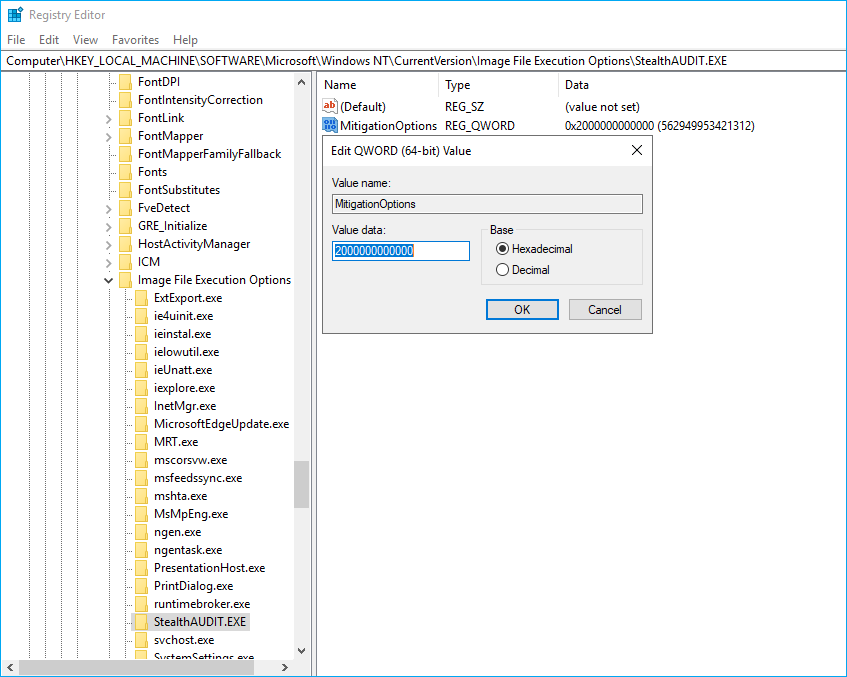
In the Netwrix Access Analyzer server, open Registry Editor, and follow the key provided below:
Computer\HKEY_LOCAL_MACHINE\SOFTWARE\Microsoft\Windows NT\CurrentVersion\Image File Execution Options -
Right-click the Image File Execution Options node and select New > Key. Name the new key
StealthAUDIT.EXE. -
Right-click the
StealthAUDIT.EXEkey and select New > QWORD (64-bit). Name the new valueMitigationOptions. -
Right-click the
MitigationOptionsvalue and select Modify. Verify the Value data field states Hexadecimal2000000000000. Click OK to save changes.
-