Error: Connection Attempt Failed Because Connected Party Did Not Properly Respond
Symptom
The File System Scan completes with the following error message:
Error: A connection attempt failed because the connected party did not properly respond after a period of time, or the established connection failed because connected host
has failed to respond IP:87xx
Cause
A third-party security tool or firewall rule is blocking the needed ports (8767 and 8766) for the File System Scan to function correctly.
Resolution
Netwrix Access Analyzer server needs to communicate with the audited host via ports 8767 and 8766 as shown below. You may refer to the following PowerShell commands, but ensure to replace 2019dc with your needed host name:
- Run these PowerShell commands to test connectivity:
$RPC_host= 'REPLACE-WITH-YOUR-PROXY-HOST'
Test-NetConnection -ComputerName $RPC_host -Port 8766 -InformationLevel Detailed
Test-NetConnection -ComputerName $RPC_host -Port 8767 -InformationLevel Detailed
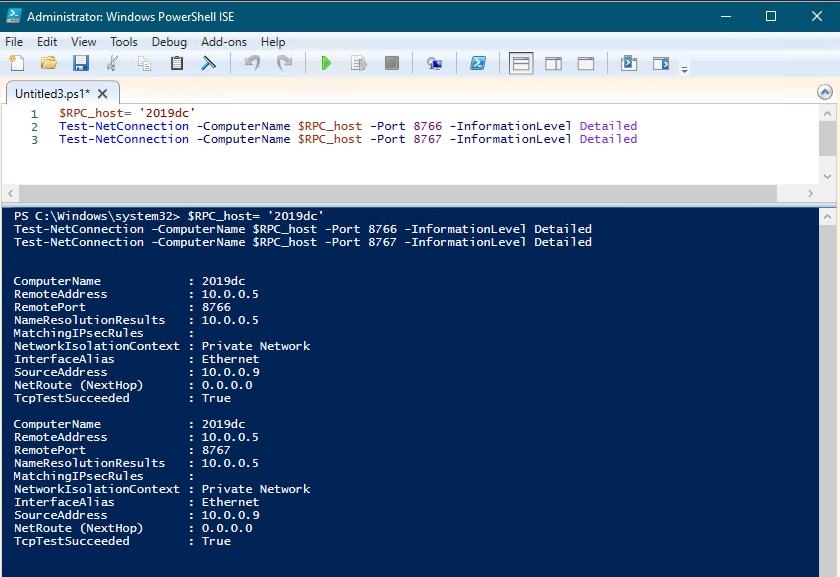
-
If the test connections are successful on both ports, then the error should not appear.
-
If the test connections fail, verify that the proxy is installed and running at that location.
- If the proxy is not installed, then ensure it is installed and running following these steps: Netwrix Access Analyzer v12.0 > File System Proxy Service Installation.
- If the proxy is installed and running, then the environment must either have a firewall or other security software preventing communication on ports
8767and8766.
Related Articles
For more information on port requirements, please see the various guides for each scan mode below:
- Netwrix Access Analyzer v12.0 > File System Proxy Service Installation
- Netwrix Access Analyzer v12.0 > Applet Mode Port Requirements
- Netwrix Access Analyzer v12.0 > Proxy Mode with Applet Port Requirements
- Netwrix Access Analyzer v12.0 > Proxy Mode as a Service Port Requirements
- Netwrix Access Analyzer v12.0 > Local Mode Port Requirements