How to Enable Debug Logging Manually
Question
How can you manually enable the debug logging mode in Netwrix Access Analyzer?
Answer
Refer to the following steps to manually enable the debug mode in Netwrix Access Analyzer:
-
Locate the
GlobalOptionsconfig.xmlfile in the Netwrix Access Analyzer installation folder. Use the following variable to locate the folder:%sainstalldir% -
In the
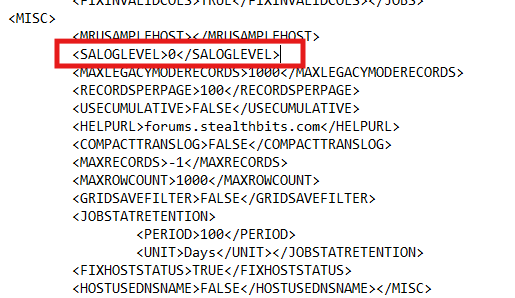
GlobalOptionsconfig.xmlfile, change the<LOGLEVEL>value to0to enable debug logging. Save the changes. -
Open the Netwrix Access Analyzer console to access the application logs.
Refer to the example of the value in the configuration file that must be changed to 0: