Configuring Recursive File Content Monitoring
Overview
The File Integrity Monitoring (FIM) tracker in Netwrix Change Tracker monitors changes to file attributes. You can extend it to also monitor file-content changes, but this FIM/file-content combination is disabled by default on the web console.
This article describes how to enable the FIM/file-content option on the web console, then apply it to a device configuration template.
Instructions
Enable the FIM/File-content Option on the Web Console
-
Connect to the server hosting your Netwrix Change Tracker server via RDP.
-
Browse to
C:\inetpub\wwwroot\Change Tracker Generation 7 (NetCore) Hub\Filtersand edit thedefault.xmlfile. -
Find the line below, then remove the
<!--and-->comment markers so it becomes an active<filetrackerchangesfilter ... />element:<!--filetrackerchangesfilter name="filecontentschangesonly" description="File attributes (including contents) only" priority="low" source="globalLow" watchdirectories="false" watchfiles="true" created="false" length="true" lastaccess="false" lastwrite="true" filename="true" directoryname="true" attributes="true" security="true" datastreams="true" content="true" /--> -
Save and close the file.
-
Log off from the RDP session.
Apply the FIM/File-content Filter to a Configuration Template
- Log in to Netwrix Change Tracker.
- Browse to Settings > Policy Templates.
- Select the appropriate configuration template from the list and select the Edit button next to it.
- Browse to the FIM File Integrity tracker.
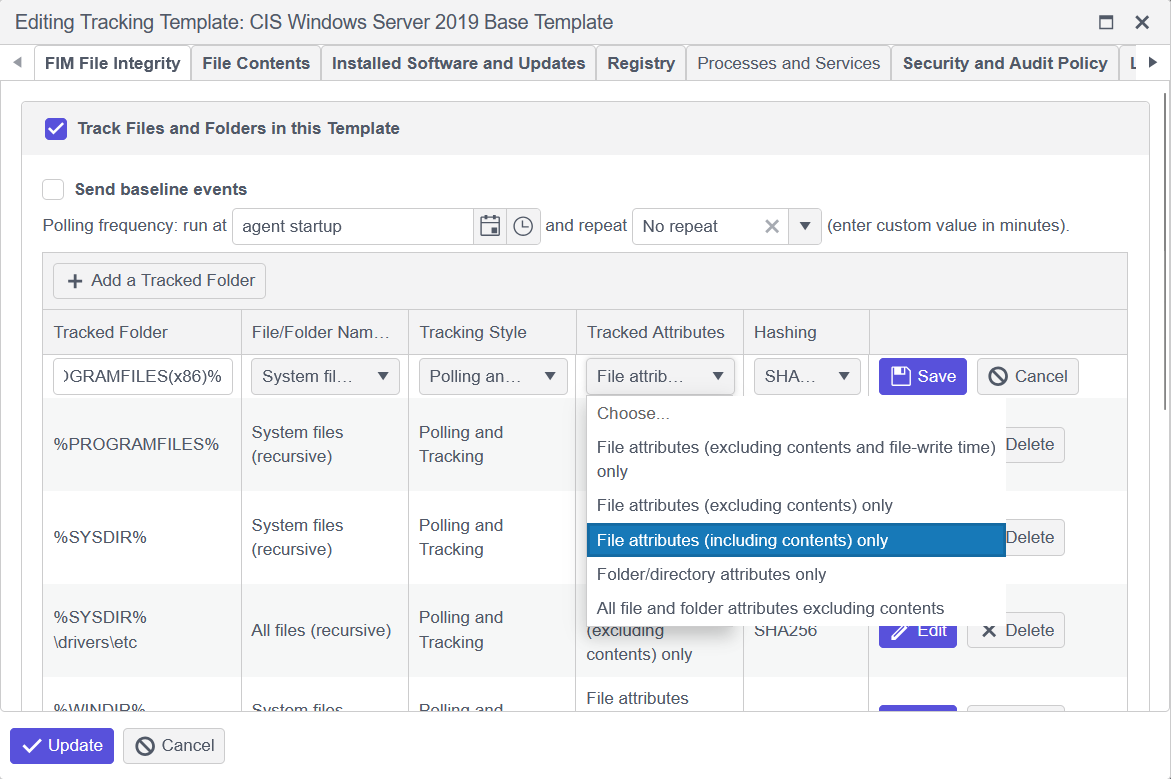
- Select the Tracked Folder entry you want to monitor for file-content changes recursively, then select the Edit button next to it.
- Under the Tracked Attributes column, select the drop-down menu, then select the File attributes (including contents) only option.
- Click Update, then click Save Changes at the top of the screen.
IMPORTANT: After the saved template changes take effect, the agent runs a new baseline scan. Allow the scan to complete before testing file changes in the directory — otherwise the baseline may capture your test changes and not report them as changes.