Add a Future Date in a Description Field
Related Queries
- "Add a future date in a Description field."
- "Is it possible to add the following text and a future date to the Description field: 'User Terminated – Delete On '"
Overview
This article explains how to automatically add a future date to the Description field of a user account in Netwrix Directory Manager (formerly GroupID) Synchronize. This is useful for marking when a terminated employee's account should be deleted, streamlining offboarding and account management processes.
Instructions
-
Open the Synchronize portal and click All Jobs in the left pane.
-
Select the Synchronize job you want to edit and click Edit.
-
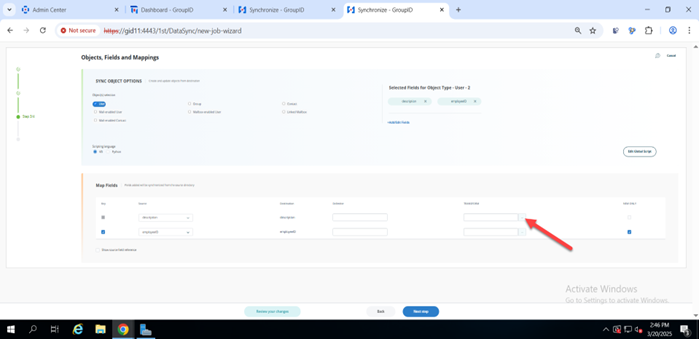
On the Map Fields page, click the Transform button for the Description field.
-
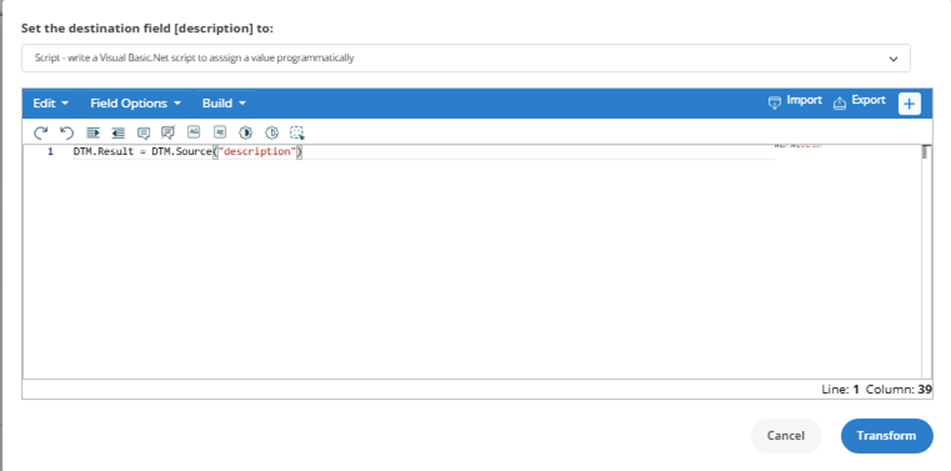
In the Transform dialog box, select Script from the dropdown menu.
-
Copy and paste the following script into the Script Editor:
Dim newDate As DateTime = DateTime.Now.AddDays(30)DTM.Result = "User Terminated – Delete On " & newDate.ToString("yyyy-MM-dd") -
Click the Build button at the top of the Script Editor to test the script. In the dialog box, click Run Script to verify the output.
-
Save your changes to the Synchronize job.
NOTE: You can adjust the number of days by changing the value in
AddDays(30)to any desired period.