Hide Distribution Lists from End Users in Portal
Applies To
Netwrix Directory Manager 10 and above
Overview
In some environments, it may be necessary to prevent end users from viewing distribution lists in the Netwrix Directory Manager self-service portal. This can be accomplished by configuring LDAP filter criteria in the user security role. By excluding specific sAMAccountType values associated with distribution groups, you can ensure that these groups are not displayed to users in the portal.
Instructions
Hide Distribution Lists from End Users
-
In the Netwrix Directory Manager Management Console, open the properties of your identity store.
-
Click the Security Roles tab and edit the User security role.
-
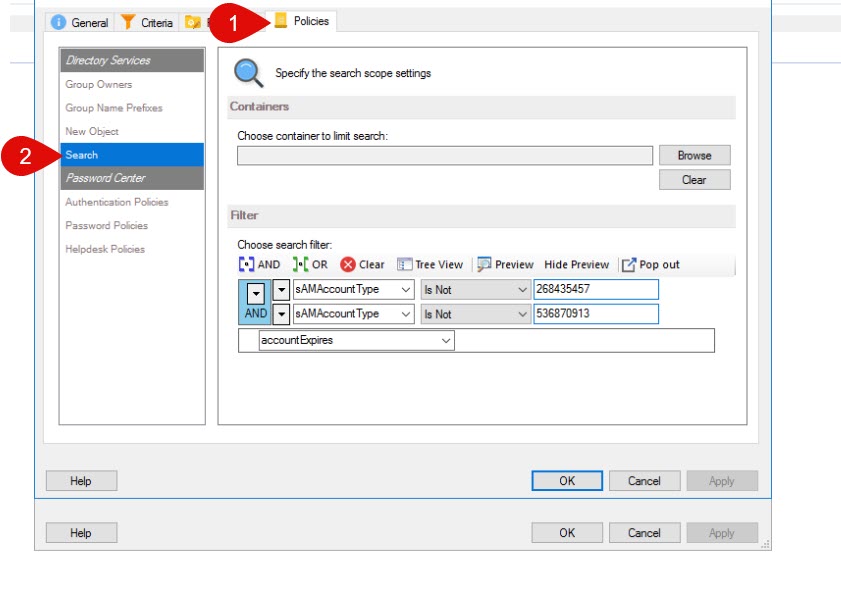
Click the Policies tab then navigate to Search.
-
In the LDAP filter, apply the criteria below to exclude distribution lists. Use the AND operator between these two criteria.
sAMAccountType is Not 536870913sAMAccountType is Not 268435457
-
Save the settings in the security roles.
-
Sign out of the Netwrix Directory Manager portal and sign in again with an account that is part of the user security role to verify the change.
NOTE: For Universal and Global distribution groups, the
sAMAccountTypevalue is 268435457. For Domain local distribution groups, the value is 536870913.