Best Practices for Preventing Accidental Data Leakage
Applies To
Netwrix Directory Manager 10 or above
Overview
This article describes best practices for preventing accidental external and internal data leakage when using Netwrix Directory Manager, including role-based scope limits, group creation controls, membership import methods, and mail-related safeguards.
Instructions
Using Security Roles to Limit Scope of Search
Netwrix Directory Manager uses an RBAC model through which you can define Security Roles and delegate permissions to different users. You can set Netwrix Directory Manager search so that AD objects (for example, Groups, Users, Contacts) can only be searched within a specific OU and filtered based on Active Directory attributes.
For more information on how to set up a limit on the search scope for a particular Security Role, visit the following KB article:
Using Security Roles to Specify Specific Area Where Groups Can Be Created or Have a Fixed and Hidden Path
In Netwrix Directory Manager, you can apply policies to security roles so that role members use Netwrix Directory Manager in keeping with the policy restrictions. Netwrix Directory Manager’s New Object policy enables you to restrict role members to create new groups in a specific OU only.
For more information on how to set up a New Object policy for specific security roles, visit the following KB article:
Importing Membership via Netwrix Directory Manager Bulk Membership Import Feature for Groups
Many times, organizations create groups (Security and Distribution) in advance, i.e., before the actual usage of groups. To avoid leaking critical information, create such groups without populating membership upon creation.
Instead, you can use the bulk import membership feature of Netwrix Directory Manager to update groups with the correct memberships just before their actual usage starts. Bulk import allows for external source files like a CSV or an Excel sheet to import membership when it is needed.
In Netwrix Directory Manager, bulk import of memberships is possible using the Import Wizard available in the Netwrix Directory Manager Portal. The following KB article provides step-by-step instructions to bulk import members into a group:
Creating Smart Group Without Updating Memberships
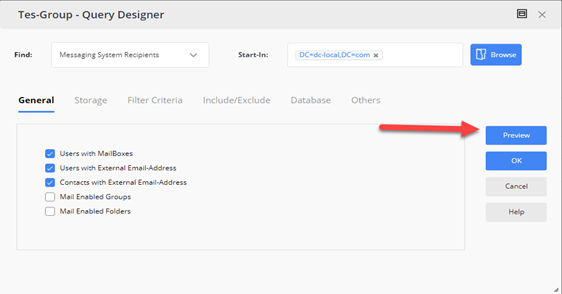
If you create a group in advance, you can preview the query results of a Smart Group without updating its memberships until the group is ready to use.
A query-based dynamic smart group determines its membership from the supplied criteria. You can preview the results without acting on them until needed. Keeping the group out of the update schedule ensures that membership updates occur only when you manually trigger them.
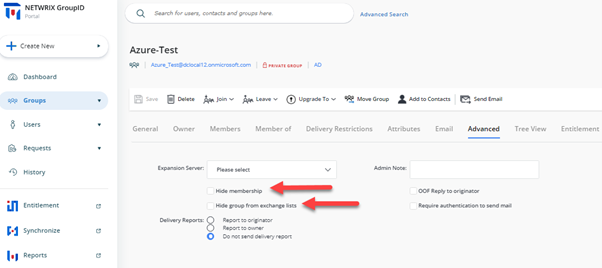
Keep Group Hidden from GAL Until It Is Ready to Be Used
Keeping a group and its membership hidden from discoverability by external tools like Outlook can also help you comply with organizational policies for ensuring secrecy.
Using the Netwrix Directory Manager Portal, if a mail-enabled group is created, you can hide the group and its membership from the Address Book and GAL in the following way:
Selecting Appropriate Security Type for Groups
During the creation of a group via the Netwrix Directory Manager Portal, you can designate the security type as Private, Semi-Private, or Public. This classification, serving as a pseudo attribute within Netwrix Directory Manager, governs the permission levels for joining the group. Choose Private as the Security Type for sensitive groups.
- Private – A closed group where the group owner solely determines group membership.
- Semi-Private – The group owner approves users' requests to join or leave the group.
- Public – An open group that anyone can join or leave.
Setting Up Delivery Restrictions on Mail-Enabled Groups
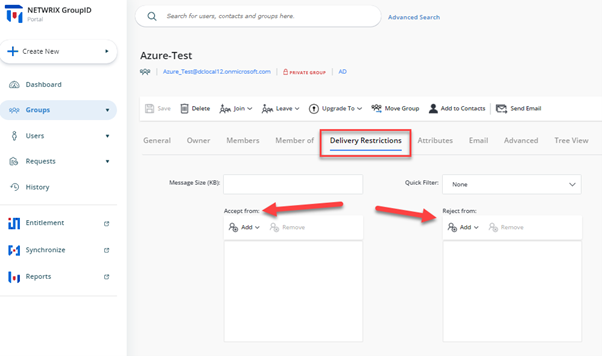
Limit the inflow of email messages received by critical groups in the production environment. Netwrix Directory Manager allows you to set Delivery Restrictions on such groups by leveraging the AuthOrig and UnAuthOrig attributes from Active Directory. Both Self-Service and Automate give Group Owners and Administrators the ability to set rules for accepting/rejecting emails from certain users for a particular group.
To set Delivery Restrictions via the Netwrix Directory Manager portal:
- Search for the group.
- Navigate to the Delivery Restriction tab in Group Properties.
Setting Up Approver Workflows for the Creation of New Groups
One of the most efficient methods to effectively manage the number and quality of groups being created by end users is the implementation of a continuous monitoring process where admins can approve the group being created.
Netwrix Directory Manager allows you to set up customized workflow approval processes with tailored filters to cater to use-case-specific triggering. This process ensures that whenever a group is created, Netwrix Directory Manager sends an approval request to the concerned authorities.
For more information on implementing such workflows, visit the following KB article:
Setting Up Message Moderators for Mail-Enabled Groups
Another way to ensure that no unauthorized message is sent to critical groups is to set up moderator approval processes for Microsoft Exchange. You can customize Netwrix Directory Manager to provide the necessary attributes in Group Properties on the portal, letting you initiate a message approval process and assign moderators for certain critical distribution lists.
For more information on customization to the portal, visit the following KB article:
Other Best Practices to Improve Compliance
In addition to these best practices for keeping the production environment secure and compliant with company policy, visit the following KB article to learn about best practices for controlling changes to group memberships after creation:
Related Articles
- Walkthrough Search Policy - Define Scope and Filter Results
- How To Enforce Users to Create Groups in a Specific OU
- How To Import Members to a Group Using Self-Service Import Wizard
- How to Trigger a Workflow When a User Creates a Group
- How To Add Message Approvers in Group Properties in Netwrix Directory Manager Portal
- Best Practices for Controlling Changes to Group Membership