How To Enforce Users to Create Groups in a Specific OU
Applies To:
Netwrix Directory Manager 11
Business Requirement:
Using the Netwrix Directory Manager portal, users can create groups in any OU in the directory. Is there a way to limit users to create groups in a specific OU?
Solution:
In Netwrix Directory Manager, you can apply policies to security roles, so that role members can use Netwrix Directory Manager in keeping with the policy restrictions.
Netwrix Directory Manager’s New Object policy enables you to restrict role members to create new groups in a specific OU only.
Steps:
-
In the Netwrix Directory Manager Admin Center portal, click the Identity Stores tab.
-
On the Identity Stores tab, click on the Triple Dot button and then click Edit to open its properties.
-
On the Security Roles tab, select the security role you would like to apply the New Object policy to (for example, User).
-
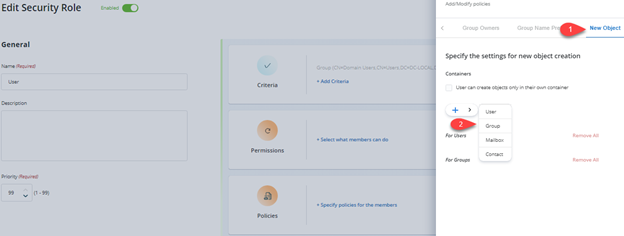
On the Policies tab, click New Object in the left pane.
-
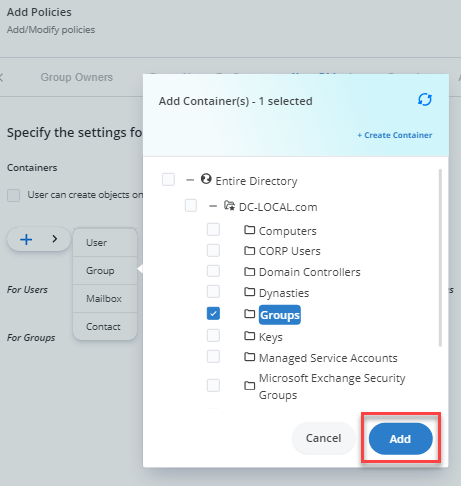
Select Groups and click Add.
-
On the Select Container dialog box, select the container in which role members can create groups (this will be the default OU when creating groups).
The selected OU appears below the Groups option.
-
Click OK.
-
Click Update Security Role and then Save.
Now when members of the security role try to create groups, they will be created in the default OU that you specified in the New Object policy.
Related Articles:
- Walkthrough Search Policy - Define Scope and Filter Results
- How To Import Members to a Group Using Self-Service Import Wizard
- How to Trigger a workflow When a User Сreates a Group
- How To Add Message Approvers in Group Properties in Netwrix Directory Manager Portal
- Best Practices for Controlling Changes to Group Membership
- How To Enforce Users to Create Groups in a Specific OU
- Best Practices for Preventing Accidental Data Leakage