How to Apply Real-time Data Validation
Applies To
Netwrix Directory Manager 11
Overview
Netwrix Directory Manager (formerly GroupID) supports real-time data validation in portal fields. In traditional systems, users only see validation errors after completing all data entry and clicking Save. This process can be frustrating, as users must revisit and correct errors after filling out multiple pages. With Netwrix Directory Manager, the portal validates each field as users enter data, providing immediate feedback and allowing users to correct errors on the spot. This real-time validation improves accuracy and streamlines the data entry process.
Netwrix Directory Manager validates data according to rules for uniqueness and syntax, displaying a message as soon as a user enters invalid data. As an administrator, you can add input fields to a portal and apply the following checks:
- Specify a default value for a field.
- Use a regular expression to validate the data entered in a field.
- Require users to enter a unique value for a field.
Instructions
- In the Netwrix Directory Manager Management Console, select Applications > Netwrix Directory Manager Portals.
- Open the settings for the desired portal.
- Go to the Design settings of your identity store to apply real-time data validation.
- On the Custom Display Types tab, click Add (+) to create a new display type.
- Enter a name for the display type in the Name box.
- From the Type list, select Textbox and click OK.
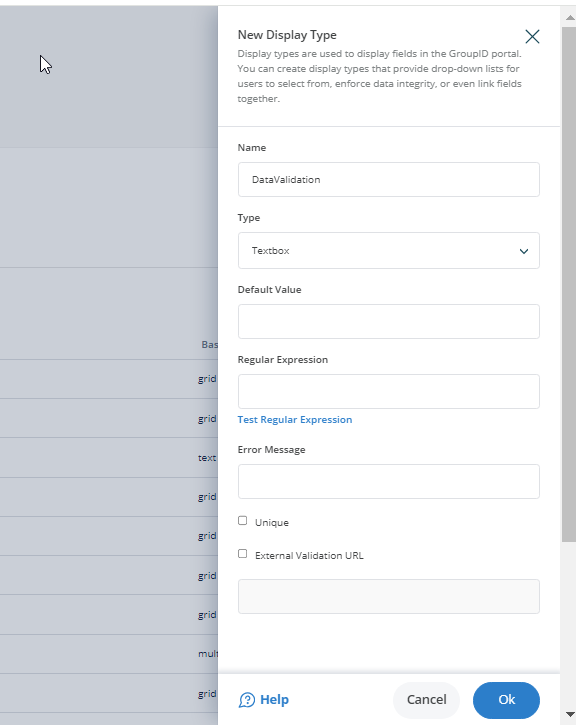
- Enter a value in the Default Value box to set it as the default for the text box. Users can modify this value in the portal.
- In the Regular Expression box, type a regular expression to validate data entered in the text box. Leave this box blank if you do not want to apply a validation rule.
- In the Error Message box, type the text to display when a user enters data that does not conform to the regular expression.
- Click Test to check if the regular expression is valid. In the Regular Expression Example box, type an example that satisfies the regular expression and click Test.
- To require users to enter a unique value for the field, select the Unique check box. Netwrix Directory Manager checks for uniqueness in the directory or an external data source. The portal prevents users from proceeding unless they provide a unique value. You can also use an external data source, such as an Excel file, to validate uniqueness in real time. Select the External Validation URL check box and enter the API URL in the box below.
- Click OK to close the Text Display Type dialog box.
- On the toolbar, click Save.
Applying the Textbox Display Type to a Portal Field
Apply the textbox display type to a field, such as the group name field in the group creation wizard. When a user enters a group name, the portal validates it according to the regular expression and checks for uniqueness in the directory or external data source. The portal displays an error message in real time if the entry does not pass these checks.